
In April 2019 a rocket lifted off from Virginia, in the USA, carrying a box just 10 cm on each side, built by two young Nepali engineers. Two months later the box was pushed out of the International Space Station, and Nepal had its own satellite. In the same years, mobile towers went up on hilltops in Jajarkot, wild elephants were fitted with satellite collars so that wildlife workers could follow them, and Nepal Television began reaching homes in three ways at once: through the air, from a satellite, and over the internet.
This unit is about the technology behind all of that: satellites and their orbits, how radio and TV carry your voice on a wave, how GPS knows where you are, how to use the internet well, and how to stay safe online.
What ICT is
A hundred years ago, sending news from Kathmandu to Jumla took a runner many days. Today a photo reaches Jumla before you have put your phone down. Telephones, mobile phones, fax machines, computers and the internet have joined the whole world together.
Sound, words, pictures and videos can all be stored in a computer, sent across the world through the internet, and used in a faraway place. Information and Communication Technology (ICT) is the use of electronic devices to store large amounts of information, process data, and communicate information. Communication satellites have made ICT faster and its reach wider still.
Which of these is not an example of ICT?
Pick an answer to see why.
Artificial satellite and its application
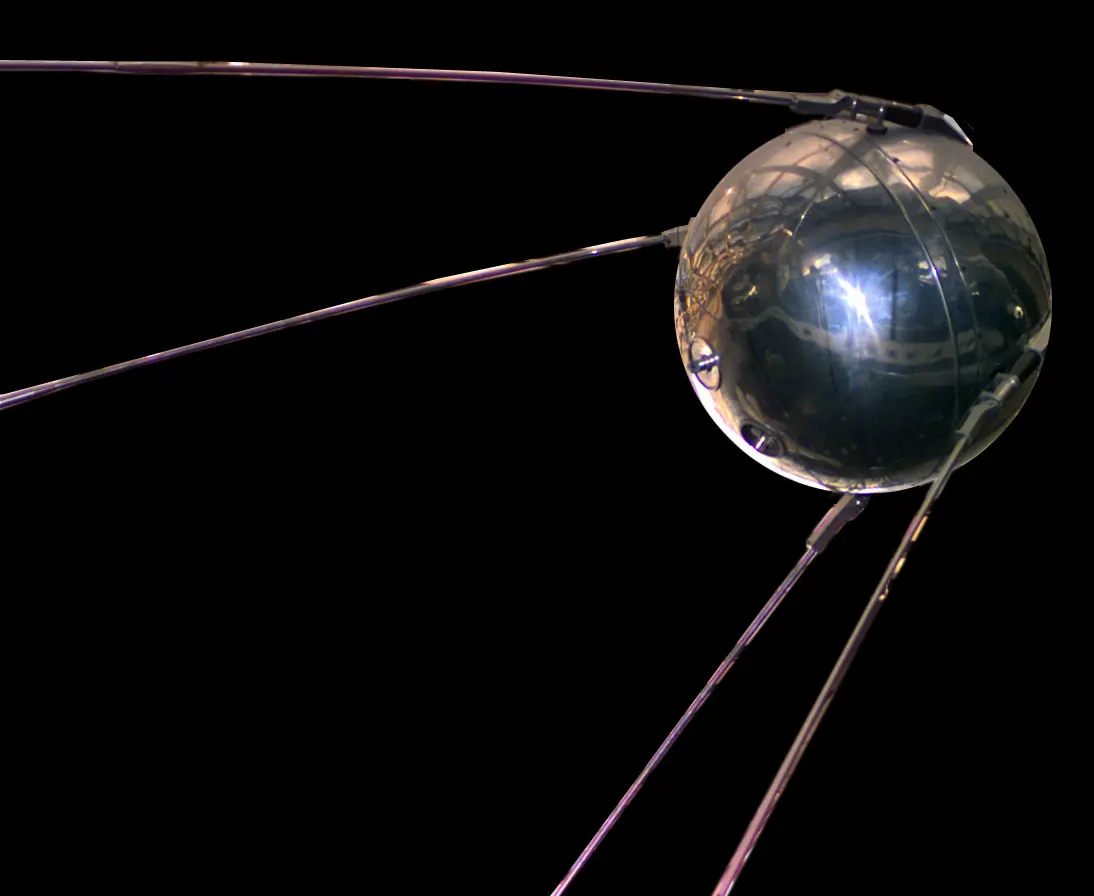
A body that revolves around a planet in a fixed path, or orbit, is a satellite. The Moon is the Earth’s natural satellite. Artificial satellites are objects made by people and sent into orbit around the Earth.
How a satellite stays up
A rocket carries the satellite up to the height it needs, then turns and launches it sideways, at right angles to the pull of gravity, at a very high speed: at 400 km up, about 7.7 km every second, 28 000 km an hour. Then something remarkable happens. Gravity pulls the satellite towards the Earth, so it falls, but it is moving sideways so fast that, as it falls, the curved Earth drops away beneath it just as fast. It keeps falling around the Earth and never reaches the ground. This is an orbit.
Up there the air is almost nothing, so there is almost no friction to slow the satellite down. By Newton’s first law, a moving object keeps its speed unless a force slows it. Gravity doesn’t slow it either: in a circular orbit gravity always pulls at right angles to the satellite’s motion, so it only bends its path into a circle. So once it is in orbit, a satellite needs no fuel to keep going round. Its solar panels make the electricity for the computers, cameras and radios inside it, not for the motion.
Uplink and downlink
Satellites talk to ground stations on Earth using microwaves, radio waves of very high frequency that pass straight through the air and clouds. The signal sent up from a ground station to the satellite is the uplink signal. The satellite’s transponder receives it, amplifies it (makes it stronger), changes it to a different frequency, and sends it back down to Earth: that is the downlink signal. The uplink and downlink use different frequencies so that the strong signal going down doesn’t drown the weak one coming up.
Orbits of artificial satellites
Satellites are put into different orbits, depending on their job. The three main kinds are named by their height above the ground:
| Orbit | Height above the Earth | Time for one orbit |
|---|---|---|
| Low Earth Orbit (LEO) | about 180 km to 2,000 km | about 90 minutes to 2 hours |
| Medium Earth Orbit (MEO) | 2,000 km to 35,786 km | from about 2 hours to nearly a day (GPS: about 12 hours) |
| Geostationary Earth Orbit (GEO) | 35,786 km, above the equator | 23 hours 56 minutes 4 seconds |
The higher the orbit, the weaker the pull of gravity, the slower the satellite moves, and the longer it takes to go round.
Low Earth Orbit
Satellites for observing the Earth, photographing its surface, and scientific research go into Low Earth Orbit. Being close, they take good pictures, and they go round fast, in about an hour and a half. So a LEO satellite stays above any one place for only a short time, but it passes over many places in a day.
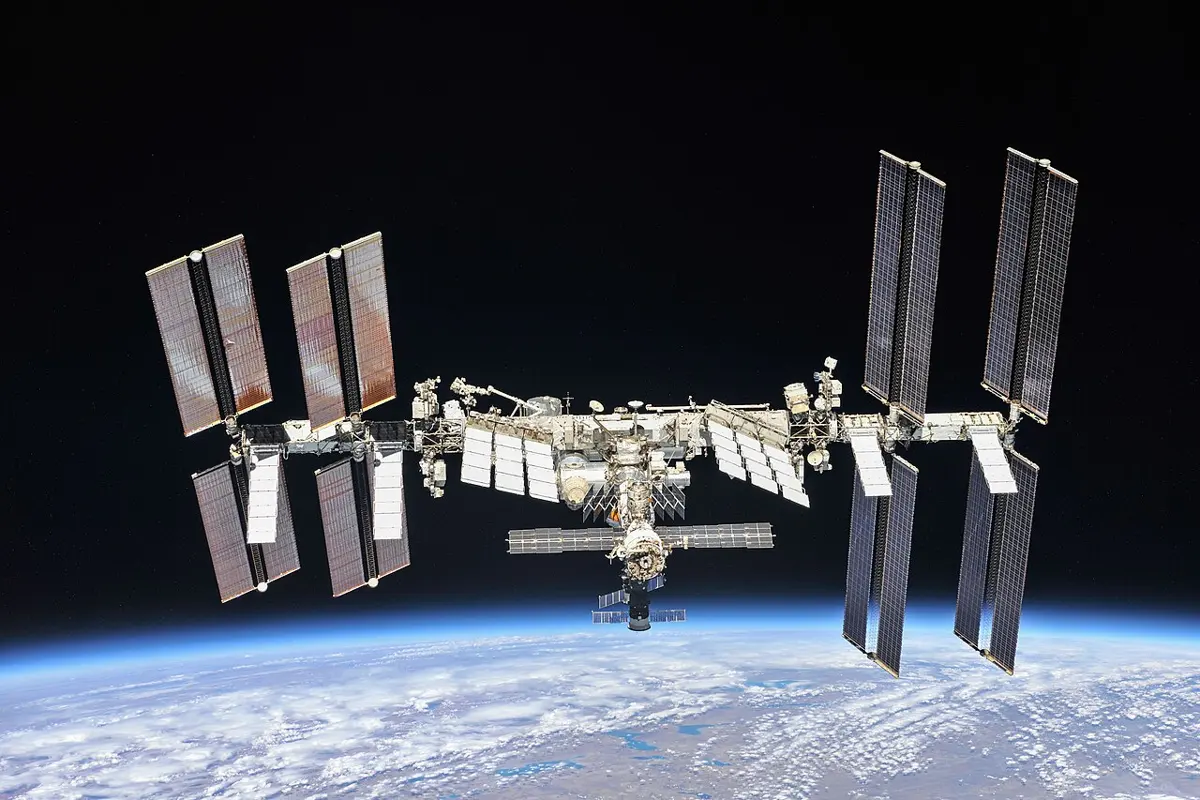
The International Space Station (ISS) circles about 400 km above the ground, once every 90 minutes or so. It is a laboratory in space, where astronauts live for months at a time doing experiments. People have lived on it, without a break, since November 2000.
Medium Earth Orbit
Navigation satellites circle at about 20,200 km, taking about 12 hours for one orbit. There are at least 24 GPS satellites in six different orbits, arranged so that from anywhere on Earth, at any time, several are above the horizon. With their help, the position of anything on Earth can be found. This system is called the Global Positioning System (GPS).
Geostationary Earth Orbit
A satellite at exactly 35,786 km above the equator goes round the Earth once in 23 hours 56 minutes 4 seconds: exactly the time the Earth takes to turn once on its axis (its rotation period). It moves in the same direction as the Earth turns. So it stays above the same point on the equator, and from the ground it seems to stand still in the sky. Such a satellite is geostationary.
Because they never move in the sky, geostationary satellites are perfect for communication: a dish pointed at one once can be left alone for years. They carry television, telephone, mobile and internet signals between continents. Many countries have put communication satellites in geostationary orbit, and LEO and MEO satellites also send their data to the ground through them.
Why do satellite TV dishes on houses never need to turn?
Pick an answer to see why.
Which orbit would you choose for a satellite that must take sharp photos of Nepal’s glaciers?
Pick an answer to see why.
NepaliSat-1
NepaliSat-1 is the first satellite of Nepal. It was built by two Nepali engineers, Abhas Maskey and Hariram Shrestha, while they were studying at the Kyushu Institute of Technology (Kyutech) in Japan, with money from the Nepal Academy of Science and Technology (NAST). It is a nanosatellite (a CubeSat), a cube about 10 cm on each side, with a mass of about 1.33 kg.
- It was launched on 17 April 2019 (18 April in Nepal) from Virginia, USA, on a cargo rocket to the International Space Station.
- On 17 June 2019 it was pushed out from the space station into its own orbit, about 400 km above the Earth.
- It went round the Earth in about 90 minutes. Each time it passed over Nepal, it stayed within range of the ground station for only about 6 to 10 minutes: that was all the time there was to send it commands and download its data.
- Its job was to photograph Nepal’s land, forests, glaciers, mountains and roads, and to measure the Earth’s magnetic field.
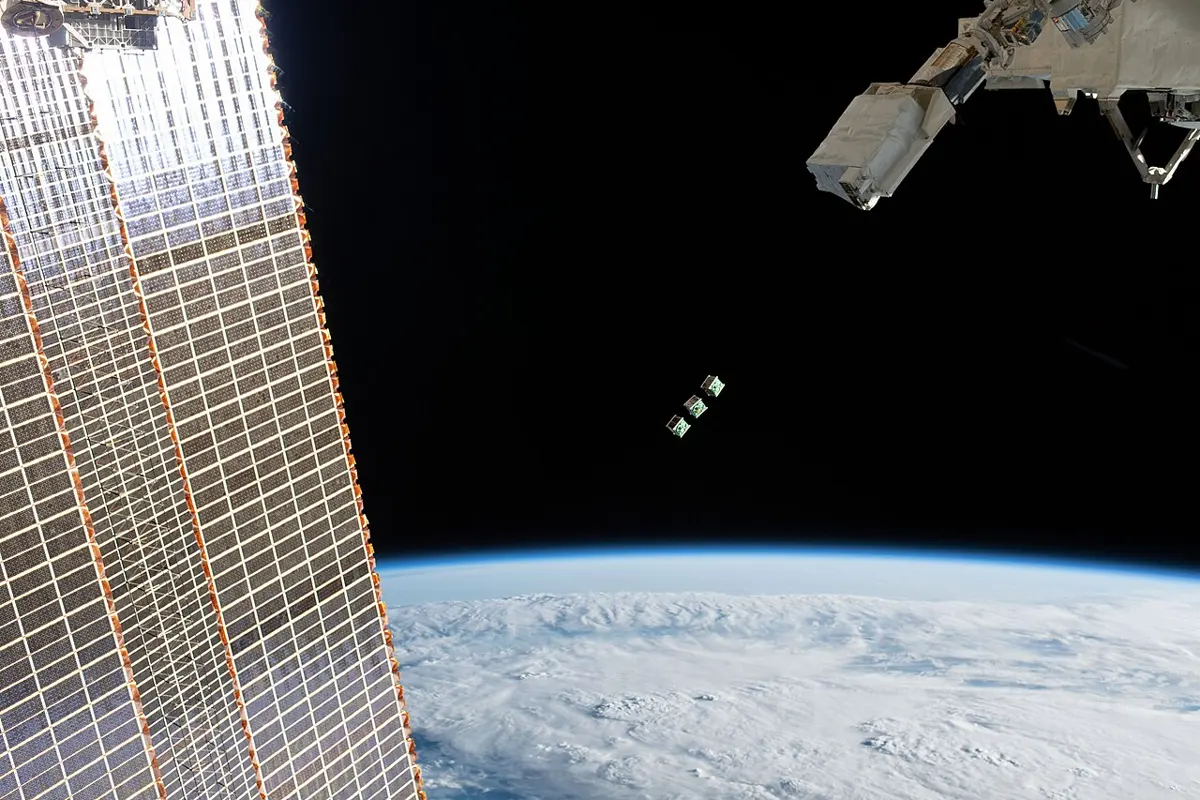
Like all small satellites in such a low orbit, it was slowly dragged down by the faint traces of air up there, and in October 2021, after two and a half years in space, it burned up harmlessly in the atmosphere.
Why could the ground station talk to NepaliSat-1 for only a few minutes at a time?
Pick an answer to see why.
Use of information and communication technology
Magazine, radio and television
Magazines (and newspapers) bring news of our surroundings and of the rest of the world: business, politics, sport, entertainment, articles on science and health. They add to our general knowledge, and we can choose to read what interests us.
Radio reaches more people than magazines. Its programs travel as electromagnetic waves through the air, at the speed of light, so news, notices, educational programs, songs, stories and poems reach listeners instantly, even in villages without electricity, since a small radio runs on cells. The Italian Guglielmo Marconi was the first to show, around 1900, that radio signals can be sent over long distances: in 1901 he sent a signal across the Atlantic Ocean.
Television brings the world into the room: news, weather, education, science, nature programs and entertainment, and live games from around the world. Programs from other countries reach us as radio waves, by way of satellites.
Telephone, fax and mobile phone
A telephone turns your voice into electricity. When you speak, the microphone in the mouthpiece turns the sound into an electrical signal. The signal travels along the wire, and the earpiece of the other telephone turns it back into sound.
A fax machine sends documents, pictures and letters along a telephone line. It scans the page and turns it into an electrical signal; at the other end, the receiving fax machine turns the signal back into a picture of the page and prints it.
A mobile phone does the telephone’s job without a wire: it turns your voice into a radio wave, and turns the radio waves it receives back into sound. That has made talking and sending messages easy from almost anywhere.
Internet, Wi-Fi and email
The internet is the largest computer network in the world: a network of networks, joining billions of computers and phones. We connect to it through an internet service provider, by mobile data, Wi-Fi, a cable, a telephone line or an optical fiber. Through it we can reach information stored on computers anywhere in the world, using tools such as a search engine (Google, Bing, Yahoo). We use the internet to communicate, to find learning materials, for entertainment, and for online services such as paying bills and mobile banking with a QR code.
Wi-Fi is a wireless networking system. Devices connect to each other and to a router by radio waves, so they can share data and the internet without cables. Laptops, smartphones, smart TVs and routers all have Wi-Fi.
Email (electronic mail) is a message sent over the internet from one email address to another. It reaches the other side of the world in seconds, and files (documents, photos) can be attached to it. That makes it a reliable way of communicating in schools, offices and businesses.
Global Positioning System (GPS)
A device with GPS receives signals from navigation satellites. Each signal carries the exact time it left the satellite. The device sees how long each signal took to arrive, and since radio waves travel at the speed of light, works out its distance from each satellite. From its distances to several satellites, it finds its exact location. This is GPS technology.
GPS is run by the United States Space Force. Other countries have built satellite navigation systems of their own:
- GLONASS (Russia)
- Galileo (the European Union)
- BeiDou (China; also called Compass)
- NavIC (India; it covers India and the region around it, including Nepal)
A modern phone listens to several of these at once, which is why it finds its place so quickly.
Navigation satellites were first built for armies, but now they are used everywhere:
- tracking vehicles (a bus company, a delivery van, an ambulance) and showing them on a map;
- tracking the path walked by a person, and smart watches that show a child’s location to parents;
- finding the way, and finding places, in a car or on a phone;
- guiding aircraft;
- tracking cattle, and wild animals such as elephants and tigers with GPS collars;
- measuring the slow movement of the Earth’s tectonic plates: GPS stations show India pushing north into Tibet by about 4 cm a year, and about half of that squeezes Nepal itself, which keeps raising the Himalaya;
- surveying the land and making maps.
A GPS receiver works out its distance from a satellite by measuring…
Pick an answer to see why.
Telecommunication
Telecommunication (from the Greek tele, far) is sending signals over a distance using technology: through wires, optical fibers or waves. The telephone, the fax machine, the mobile phone, the internet, and radio and TV broadcasting are all telecommunication.
Telecommunication uses electricity and electromagnetic waves:
- a landline telephone sends your voice along the wire as an electrical signal;
- local radio and TV signals are carried by radio waves;
- microwaves are used to talk to satellites in space, by mobile phones and their towers, and by radar.
Working principle of telecommunication technology
Every telecommunication system, however complicated, has three parts: a transmitter, a channel (the broadcasting channel) and a receiver.
- Input. The information to send comes from a microphone, a TV camera or a computer.
- Transmitter. It processes the input and turns it into a signal fit for broadcasting, using electronic circuits. The signal can carry sound, pictures or computer data.
- Channel. The signal travels through a channel: radio waves, a microwave beam, a metal cable, or an optical fiber (light in a thin glass thread).
- Receiver. At the other end, a suitable device (a radio, a TV, a phone, a router) receives the signal and turns it back into the form needed.
- Output. The person using it sees the picture or hears the sound.
In a mobile phone call, which part is the channel?
Pick an answer to see why.
Modulation and demodulation
Your voice makes sound waves with frequencies from about 20 to 20 000 hertz. A microphone turns them into an electrical signal of the same low frequencies: the audio signal. This signal is weak and can’t be broadcast far on its own: an antenna would have to be kilometers long to send it out, and every station’s signal would be mixed up with every other’s.
So radio stations use radio waves of a much higher, fixed frequency, which travel far and are easy to send and receive. This steady high-frequency wave is the carrier wave. Its amplitude (height) or its frequency is changed in step with the audio signal, so that the carrier “carries” the sound. Changing a carrier wave in step with the information signal is called modulation.
The modulated wave is broadcast through the channel. Being strong, it travels far. In the radio, TV or router that receives it, the information is taken back out of the carrier wave. That is demodulation. (A modem, the box that connects a home to the internet, gets its name from modulator–demodulator.) Sound and pictures have different kinds of data, so a TV station modulates them separately, and broadcasts both through the same channel.
There are two ways of modulating a carrier wave.
| Amplitude modulation (AM) | Frequency modulation (FM) |
|---|---|
| The amplitude of the carrier wave is changed in step with the audio signal; its frequency stays the same. | The frequency of the carrier wave is changed in step with the audio signal; its amplitude stays the same. |
| Used for long-wave and medium-wave radio. Medium-wave AM radio uses about 530 kHz to 1600 kHz in Asia (up to about 1700 kHz in the Americas). In Kathmandu, Radio Nepal broadcasts AM on 792 kHz. | Used for FM radio and TV, at much higher frequencies. FM radio uses 88 MHz to 108 MHz. Radio Nepal broadcasts FM on 100 MHz in Kathmandu. |
| The waves travel along the ground, and are also reflected by a layer of the upper atmosphere, the ionosphere, so they can be heard hundreds of kilometers away. | The higher-frequency waves pass through the ionosphere and aren’t reflected, so they travel only in straight lines from the antenna: about as far as the tower can “see”, depending on its height and the hills around. |
| Noise (lightning, motors, electric sparks) changes the height of the wave, so it is heard as crackle. AM is affected by the weather and electrical noise. | Noise changes only the height of the wave, which an FM receiver ignores, so FM sounds clear. |
| Heard better at night than by day. | Same by day and by night. |
The signals from a transmitter’s antenna reach a receiver’s antenna as electromagnetic waves. Some go directly, in straight lines; some are reflected by the ionosphere and come down far away. The local FM stations you listen to reach you directly through the air (they are carried by space waves, which only go as far as the tower can see). To broadcast over really long distances, the signal is sent up to a communication satellite as microwaves, and the satellite sends it back down over a huge area of the Earth. Communication satellites have made worldwide calls and live broadcasts easy.
A radio station in Kathmandu wants its program heard in villages far away beyond the hills, at night, with a cheap transmitter. Which is better?
Pick an answer to see why.
Why does FM radio sound clearer than AM radio?
Pick an answer to see why.
Internet as a modern communication tool
Computers, smartphones and the internet have changed how we communicate:
- With the internet, we can make video calls instead of just voice calls, and online calls are very cheap, even to the other side of the world.
- We send email instead of letters and faxes: it is fast and reliable.
- We read newspapers online, and the news reaches us minutes after it happens.
- IPTV (Internet Protocol Television) is replacing cable TV; programs come over the internet in high quality.
Use of the internet to find study materials
A search engine is a software system that searches the information on web pages across the internet and shows the person searching the pages most relevant to what they typed. Google and Bing are examples. Because it shows only what matters, a search engine finds information in seconds that once took hours in a library.
You can make your searches sharper with search operators: special words and signs typed with your search.
| Operator | What it finds | Example |
|---|---|---|
site: |
results only from one website | plant tissue site:moecdc.gov.np |
inurl: |
pages with the word in their web address | inurl:firewall |
intext: |
pages with the word in their text | intext:firewall |
* |
any word in its place (a wildcard) | "largest * in Nepal" |
OR |
pages with either word, or both | firewall OR antivirus |
AND |
pages with both words (Google does this anyway) | firewall AND antivirus |
- |
leaves out pages with that word | firewall -antivirus |
" " |
pages with exactly these words in this order | "cyber bullying in Nepal" |
filetype: |
only files of one type: pdf, docx, pptx… | cyber bullying in Nepal filetype:docx |
map: |
a map of a place | map:rara lake |
weather: |
the weather of a place | weather:bidur |
Is it true? Checking a source
Anyone can put anything on the internet, so the first result isn’t always right. Before you trust or use what you find:
- Who wrote it? The e-library of a school or university, a government office or another well-known institution checks what it publishes. Web addresses ending in .gov.np (government) and .edu.np (education) can be registered only by such institutions in Nepal, so they are good places to start. Addresses ending in .com or .org can be bought by anyone, so look at who is behind them.
- When was it written, and has it been updated? Look for the date published or revised.
- What do others say? Read the readers’ comments and feedback, and check the same fact on two or three other trustworthy sites.
Copyright
Most of what you find online, the text, the photos, the videos, belongs to the person or company that made it. It is protected by copyright: it may not be copied and used elsewhere freely. You can read the books on Google Books, for example, but not copy them. If someone copies whole texts or pictures from a book and uses them elsewhere, the copyright holder can take them to court.
Some materials are free to use, under licenses that say so, provided you name the source. The science simulations of PhET (phet.colorado.edu) are free to use under such a license; so are the photos on Wikimedia Commons, under the license written below each one (the photos in this book come from there, with their authors named under each). Whenever you use a picture or text from the internet in a presentation, write where it came from: the website, and the author if given.
You want only PDF files about the water cycle. What do you type?
Pick an answer to see why.
Online security measures
More and more people use the internet, for more and more things, and so online security matters more and more. Online security means keeping the data we store or share on the internet safe from being stolen or misused.
Photos shared on social sites, messages, passwords, internet banking details and the information we fill into online forms can all be misused by others if they fall into the wrong hands. Hacked browsers and stolen personal information are the results of weak online security. With weak security, people can be threatened and frightened, and money can be stolen from bank accounts through stolen banking details.
Online privacy checking
Before you type personal information into a website, check that the website is genuine and secure. Click the sign at the left of the web address (a padlock or a settings icon): a small window says whether the connection is secure, and whether the site has a valid security certificate.
Links sent through social media promising gifts, lotteries or prizes are often not safe. Clicking them, or filling in a form on the page they open, can let someone steal your information. This trick is called phishing. Check a website before filling in any form, and sign out of your accounts when you have finished.
Cyberbullying awareness
Cyberbullying is bullying through ICT: using a mobile phone, computer or tablet and the internet to hurt, threaten or frighten someone. Examples:
- publishing someone’s personal information or photos to shame them;
- sending messages with sexual content;
- sending threatening messages that frighten someone;
- spreading rumors about someone online;
- making fake profiles in someone’s name.
Among teenagers, cyberbullying happens mostly through social networks, messengers and email. To stay safe:
- Don’t accept friend requests from people you don’t know.
- Don’t share personal information or private things (your address, your school timetable, private photos) in chats and messages.
- Keep your social media accounts private, and think before you post a photo.
- If someone starts bullying you, don’t reply. Keep a record (screenshots), block the person, and tell a parent, guardian or teacher. Cyberbullying is a crime in Nepal, and it can be reported to the Nepal Police Cyber Bureau.
Digital footprint awareness
Walk across a wet field and you leave footprints behind you. Use the internet and you leave a trail too. A digital footprint is the record of data that our use of the internet leaves on electronic devices and on the computers of the companies we use. It includes the websites we visited, the emails we sent, the information we submitted to online services, and our likes, shares, comments and status updates on social media.
Such records can be searched when needed. Every device on the internet is given an IP address by the internet service provider, so the police, with the provider’s help, can trace who was using a connection. If someone posts something threatening on social media and deletes it later, the post may still be stored on the company’s computers, and in screenshots others took. Police can arrest people on the basis of such evidence.
Your own device keeps a footprint too: the browser remembers the websites you visited (its history), stores bits of them (the cache), and may save your passwords. To remove them, open the browser’s history and choose to clear browsing data. On a computer that isn’t yours (a cyber café, a friend’s phone, the school lab), never click Save when the browser asks “Do you want to save your password?”: anyone who uses that computer next could open your account.
A student posts a message on social media mocking a friend, then deletes it an hour later and feels safe. What doesn’t the student understand?
Pick an answer to see why.
Firewall and antivirus protection
A firewall stands between a computer (or a network) and the internet, like a guard at a gate. It checks the data coming in and going out, blocks connections that aren’t allowed or look dangerous, and lets safe data through. A software firewall comes with the operating system (for example, Microsoft Windows), and it should always be on when you use the internet. Banks, data centers and big institutions keep huge amounts of personal information in their computers, and protect them with strong firewalls. Weak firewalls let criminals in to steal money from ATMs and banks or steal data from websites. Such crimes are cyber-attacks, and people in Nepal have been arrested for them.
A computer virus is a program that copies itself into other programs and files, the way a real virus copies itself inside living cells. Once it has spread, it gives the computer its own orders: programs open and close by themselves, data is deleted, and the computer becomes slow.
A virus can’t jump through the air from one computer to another. It spreads when infected files are copied from one computer to another: on a pen drive, as an email attachment, or in a program or file downloaded from an untrustworthy website.
An antivirus is a program that finds, identifies and removes viruses (and other harmful programs) that come from the internet or from pen drives and other media. Microsoft Defender comes with Windows; other antivirus programs can be bought.
What is the difference between a firewall and an antivirus?
Pick an answer to see why.
Project work
Exercise
1. Choose the correct answer
(i) In which orbit does a satellite go round above the equator and stay still relative to the Earth?
Pick an answer to see why.
(ii) Which is true of the kind of modulation shown in Figure 13.13?
Pick an answer to see why.
(iii) Which search would find PowerPoint slides on plant tissue?
Pick an answer to see why.
(iv) What does the word “email” mean?
Pick an answer to see why.
(v) A student deletes a message from social media that harassed a friend, and feels safe. What awareness does the student lack?
Pick an answer to see why.
2. Write the differences between
Firewall and antivirus
Answer
| Firewall | Antivirus |
|---|---|
| Controls the data passing between a computer (or network) and the internet. | Scans the files and programs on a computer. |
| Blocks unsafe or unauthorized connections before they get in. | Finds, identifies and removes viruses and other malware that have got in. |
| Protects against attacks over the network, such as hacking. | Protects against infected files from pen drives, downloads and email attachments. |
| Works like a guard at the gate. | Works like a doctor checking inside. |
| e.g. Windows Firewall | e.g. Microsoft Defender |
Amplitude modulation and frequency modulation
Answer
| Amplitude modulation (AM) | Frequency modulation (FM) |
|---|---|
| The amplitude of the carrier wave changes with the audio signal; the frequency stays the same. | The frequency of the carrier wave changes with the audio signal; the amplitude stays the same. |
| Uses lower frequencies: medium-wave radio, about 530–1600 kHz. | Uses higher frequencies: FM radio, 88–108 MHz, and TV. |
| The waves are reflected by the ionosphere, so they travel hundreds of kilometers. | The waves pass through the ionosphere, so they reach only places in sight of the tower. |
| Affected by noise and the weather; heard better at night. | Little affected by noise; clear sound, day and night. |
| e.g. Radio Nepal’s medium wave, 792 kHz | e.g. Radio Nepal FM, 100 MHz |
3. Give reasons
Many countries have put communication satellites in geostationary orbit.
Answer
A geostationary satellite goes round the Earth once in the time the Earth turns once, above the equator, so it stays above the same place and seems still in the sky. Dishes on the ground can be pointed at it once and left, and it is always in view, so communication never breaks. From 35,786 km up it can see about two-fifths of the Earth’s surface, so three such satellites, spaced round the equator, can cover almost the whole world (all but the regions near the poles). That makes geostationary orbit ideal for TV, telephone and internet links.
To broadcast over long distances, radio waves are sent to communication satellites.
Answer
The Earth is round, and high-frequency radio waves (microwaves) travel in straight lines, so a tower on the ground can reach only as far as the horizon, and hills block it. Microwaves pass through the ionosphere instead of being reflected. A satellite high above the Earth can “see” a huge area at once, so a signal sent up to it can be amplified and sent back down over thousands of kilometers, even to other continents.
4. Answer the following questions
What is information and communication technology?
Answer
Information and communication technology (ICT) is the use of electronic devices, such as computers, phones, radio, television and the internet, to store, process and communicate information (sound, text, pictures and video), even to distant places.
How do satellites keep going round the Earth without using energy?
Answer
A rocket launches the satellite sideways, at right angles to gravity, at a very high speed (about 7.7 km/s at 400 km up). Gravity pulls it towards the Earth, so it keeps falling, but its sideways speed carries it so far that the curved Earth drops away beneath it: it falls around the Earth. There is almost no air up there, so there is no friction to slow it down, and by Newton’s first law it keeps moving. So it needs no fuel to keep revolving. Its solar panels power only its instruments.
What is the name of Nepal’s first satellite?
Answer
NepaliSat-1, a 1.33 kg cube-shaped nanosatellite built by Abhas Maskey and Hariram Shrestha. It was launched on 17 April 2019 and released into orbit from the International Space Station on 17 June 2019.
What is telecommunication? Give examples of telecommunication technology.
Answer
Telecommunication is sending information (sound, pictures, data) over a distance as signals, through wires, optical fibers or electromagnetic waves. Examples: the telephone, the mobile phone, fax, radio and television broadcasting, the internet, email, Wi-Fi and GPS.
For what purposes do you use telecommunication technology?
Answer
For example:
- talking to relatives and friends by mobile phone, and video calls to family abroad;
- listening to the news and programs on FM radio, and watching TV;
- finding study materials, watching lessons and doing online classes on the internet;
- sending and receiving email and messages;
- finding the way with GPS and a map app;
- paying bills and sending money with mobile banking.
Explain the working principle of telecommunication technology, with an example.
Answer
Every telecommunication system has three parts:
- Transmitter: it turns the input information (from a microphone, camera or computer) into a signal that can be sent, and usually modulates a high-frequency carrier wave with it.
- Channel: it carries the signal: radio waves, microwaves, a metal cable or an optical fiber.
- Receiver: it receives the signal, demodulates it, and turns it back into the original form for the user.
Example, FM radio: a presenter speaks into a microphone, which turns the sound into an audio signal. The transmitter amplifies it and uses it to modulate the frequency of a carrier wave (say 100 MHz), and the antenna broadcasts it as radio waves (the channel). A radio set tuned to 100 MHz receives the waves, demodulates them to get the audio signal back, and its loudspeaker turns it into sound.
Identify the modulation in Figure 13.14. What is the purpose of this modulation?
Answer
It is amplitude modulation (AM): the height of the carrier wave rises and falls with the audio signal, while its frequency stays the same.
Purpose: the audio signal on its own is weak and of low frequency, and can’t travel far. Modulation puts it onto a strong, high-frequency carrier wave that can be broadcast over a long distance. AM is used for medium-wave and long-wave radio: its waves are reflected by the ionosphere, so a station can be heard hundreds of kilometers away.
“Internet communication is a modern communication technology.” Explain with examples.
Answer
The internet has changed how we communicate, making it faster, cheaper and richer:
- Email has replaced letters and faxes: it arrives in seconds, almost free, with files attached.
- Internet calls and video calls (Viber, WhatsApp, Messenger) let a family in Nepal see and talk to a relative abroad, for the cost of data.
- Online news reaches readers minutes after an event, instead of the next morning.
- IPTV and streaming let us watch programs when we choose, in high quality.
- Social networks let one person share news with thousands at once.
These use computers, smartphones and networks to send text, sound, pictures and video instantly across the world, which older methods could not. So internet communication is a modern communication technology.
How do we get knowledge and information from the internet? Explain with examples.
Answer
- Search engines such as Google find pages on any topic in seconds; search operators narrow the search (for example,
photosynthesis filetype:pdffor PDF notes, orsite:moecdc.gov.npfor CDC’s own materials). - E-libraries and online encyclopedias (such as Wikipedia, or e-pustakalaya) give books and articles to read for free.
- Educational websites and simulations (such as PhET) and video lessons explain topics with pictures and experiments.
- Online news and government websites give the latest information, such as exam results or weather.
- Email and online classes let us ask teachers and experts questions.
We should check that a source is trustworthy, and name it when we use its material.
What is online security? Write the ways of staying secure online.
Answer
Online security means keeping our data, accounts and devices safe from being stolen, damaged or misused when we use the internet.
Ways:
- Use strong, different passwords, and never share passwords, PINs or OTPs.
- Check that a website is genuine and its connection secure (https, padlock, correct address) before entering personal information.
- Don’t click links promising gifts, lotteries or prizes.
- Keep personal information and photos private; don’t accept strangers on social media.
- Keep the firewall on, install antivirus, and keep the computer updated.
- Sign out after use, and don’t save passwords on others’ devices; clear the browsing data.
- Tell a parent or teacher about cyberbullying, keep a record, and report it.
What advice would you give a new internet user who has just started online banking, online shopping and social media? Give reasons.
Answer
- Never share your PIN, password or OTP, with anyone, even someone claiming to be from the bank. Banks never ask for them; anyone who does is a thief.
- Open banking and shopping sites by typing the address or using the official app, not through links in messages, and check for https and the correct spelling of the address. Fake sites copy real ones to steal details.
- Use a strong, different password for each account, and turn on two-step verification, so one stolen password doesn’t open everything.
- Buy from trusted shops, and prefer cash on delivery or protected payment methods, since fake shops take money and send nothing.
- Keep social media accounts private, accept only people you know, and don’t post your address, travel plans or private photos, which criminals and bullies can use.
- Think before posting: the digital footprint stays.
- Keep your phone and computer updated, with antivirus on, to keep malware out.
- Sign out on shared devices.
Write an essay on “Use of Information and Communication Technology in Education”.
A model essay
Use of Information and Communication Technology in Education
Not long ago, a student in a village in Nepal had a few textbooks, a blackboard, and a teacher’s memory to learn from. Today, a student with a smartphone has the world’s largest library in a pocket. Information and Communication Technology (ICT) is changing how we teach and learn.
ICT brings knowledge to every place. Through the internet, students can read e-books, encyclopedias and the textbooks of the Curriculum Development Centre online, free. Search engines answer questions in seconds. Video lessons and simulations show what words can’t: a heart pumping, a planet orbiting, a chemical reaction.
ICT makes learning interactive. Quizzes, educational games and simulations let students try things for themselves and learn from mistakes. Teachers use projectors and presentations to make lessons lively.
ICT keeps learning going in hard times. During the COVID-19 pandemic, when schools in Nepal closed, lessons continued over radio, television and online classes. Students in remote areas can join classes taught by expert teachers far away.
ICT helps teachers and schools too: teachers share materials and train online, and schools keep records, results and attendance on computers, and contact parents quickly by SMS.
ICT also has problems. Many villages still lack electricity, internet and devices, so the gap between rich and poor students can grow. Too much screen time harms eyes, sleep and health; games and social media distract; and not everything online is true. Students must learn to check sources, respect copyright, and stay safe online.
Used wisely, ICT makes education wider, richer and fairer. With good internet in every school, trained teachers and careful students, it can give every child in Nepal the chance to learn anything.
Practice every question in the book, and keep track of the ones you miss →