
You send a voice message to a friend in Pokhara. In a fraction of a second your voice becomes electricity, the electricity becomes a long string of 0s and 1s, the 0s and 1s ride on radio waves to a tower, through glass fibers under the road, perhaps up to a satellite and back, and at the other end they are turned back into your voice. Not one word is lost on the way.
This unit is about how that is done: the difference between analog and digital signals, how a digital message is coded, sent and received, and why nearly everything, from TV to money, has gone digital. It is also about you online: being a good digital citizen, guarding your reputation, keeping your balance between the screen and the rest of life, and making videos of your own.
Television: antenna, cable and dish
There are three ways a TV program can reach a home.
- Antenna TV. A TV station sends the program from a tall transmitter as radio waves. An antenna on the roof catches them. As the waves travel through the air, they spread out and lose energy, so they make only a small voltage (potential difference) in the antenna, and only a weak current in the wire to the TV. This weak current is the modulated signal that carries the picture and sound. Hills, buildings and weather weaken it further. That is why antenna TV had the poorest picture and sound of the three.
- Cable TV. A cable company collects many channels and sends them along cables strung on poles to each house. The signal in the cable is also modulated. Before Dish TV, cable was the most popular way to watch TV in Nepal. To use a computer as a TV, or to get internet through the same cable, you need a cable modem.
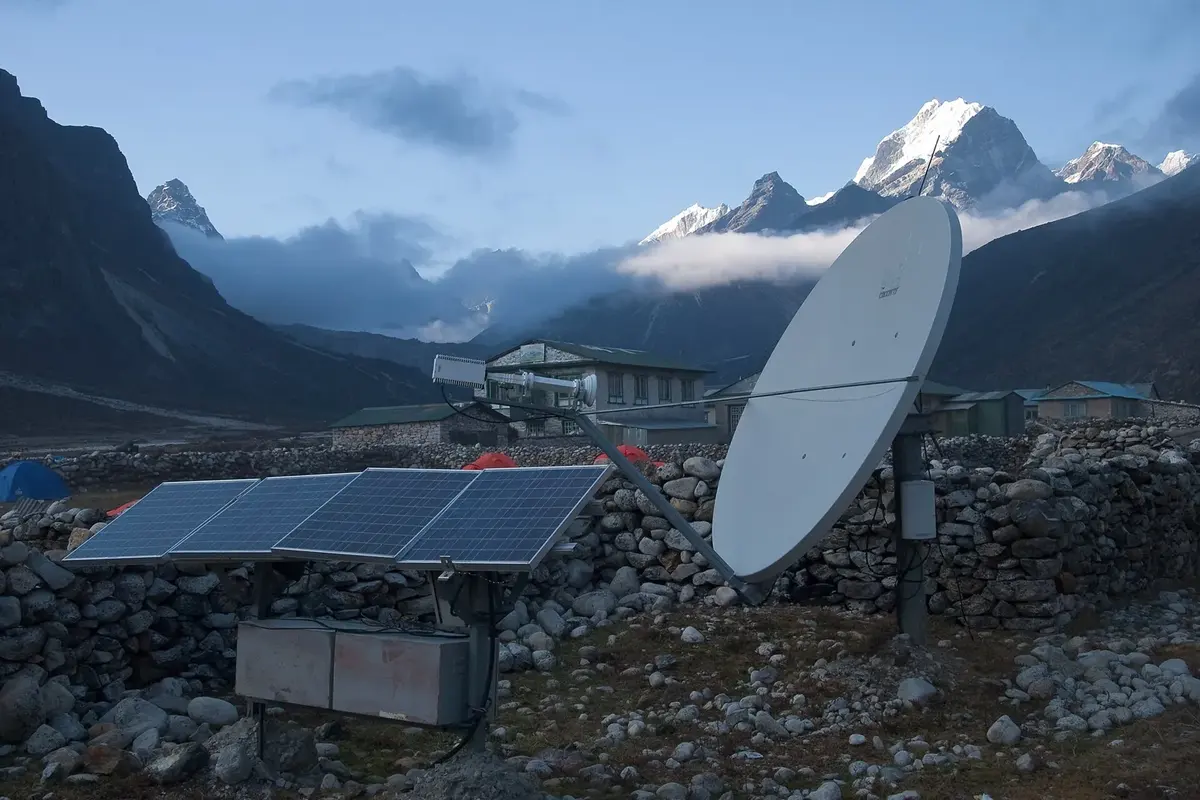
- Dish TV (satellite TV) and internet TV. A dish on the roof receives digital signals sent down from a satellite far above the Earth. Internet TV (IPTV) comes as digital data through the internet connection.
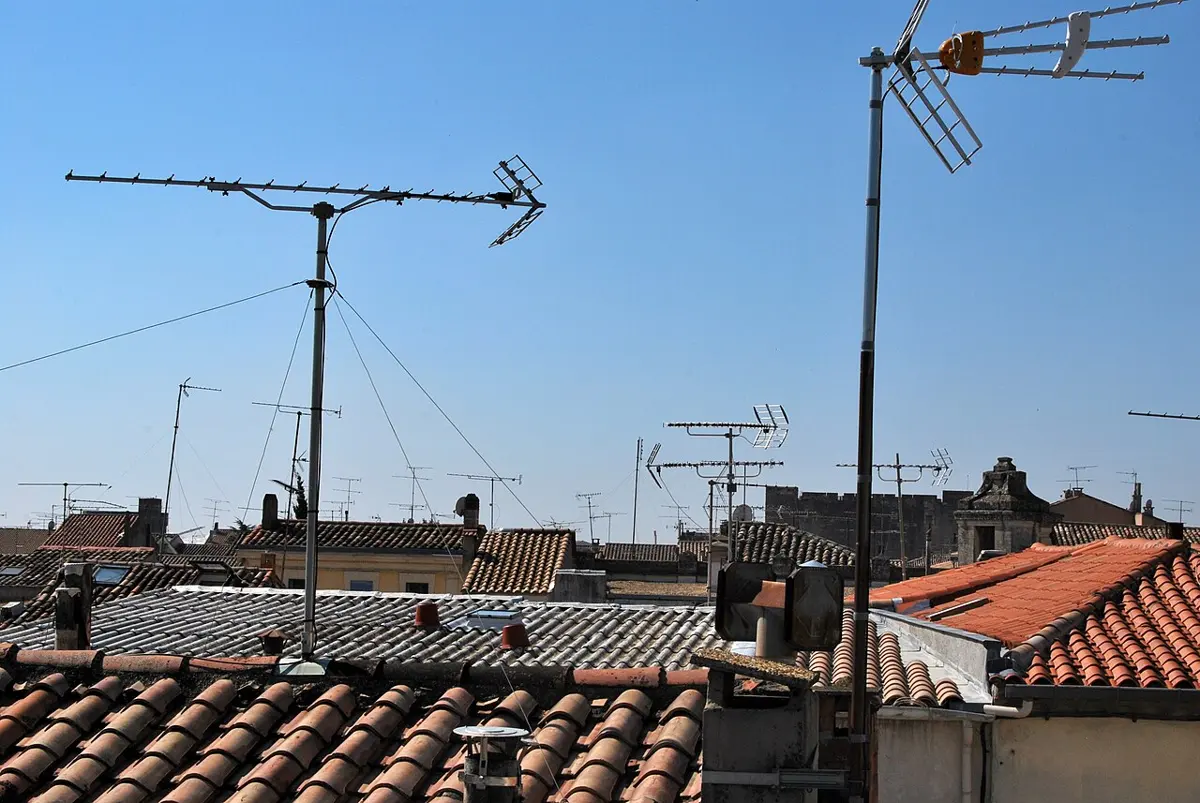
Inside a modern TV, the incoming signal is turned into digital signals by the TV’s own circuits. But your eyes and ears can’t use 0s and 1s: in the end, the digital signal must be turned back into the analog signals that make light on the screen and sound in the speaker.
Analog and digital signals
From sound to numbers and back
When you speak, your voice is a wave of air pressure that rises and falls smoothly. A microphone turns it into a voltage that also rises and falls smoothly, copying the sound. A signal like this, which changes continuously, is analog (it is an analog, a copy, of the sound).
To send it digitally, a device called an analog-to-digital converter (ADC) measures the voltage many times a second and writes each measurement as a number in binary, using only 0s and 1s. At the other end, a digital-to-analog converter (DAC) turns the numbers back into a smoothly changing voltage, and a loudspeaker turns that back into sound.
Digital signals are so easy to send that they now carry almost all information and communication. People who have grown up with phones, the internet and social media are sometimes called digital natives. How we behave online now matters as much as how we behave anywhere else. Courtesy and kindness in online conversation build a good online reputation; careless or unkind use of online tools can harm our own and other people’s physical, mental and emotional health. We come back to this at the end of the unit.
Digital signal: Activity 13.1
Any physical quantity that changes with time and carries information is a signal. In Activity 13.1, you made a digital signal by flicking a switch. Inside electronic devices, millions of tiny switches called transistors do the same, billions of times a second.
If you never switch off, and measure the voltage of the a.c. mains across the bulb, the graph rises and falls smoothly through every value between −V and +V: an analog signal.
Binary numbers
A digital signal uses only two digits, 0 and 1, so it counts in the binary system. Each 0 or 1 is called a bit (short for binary digit). With more bits, you can make more patterns:
| Number of bits | Possible patterns | How many |
|---|---|---|
| 1 | 0, 1 | 2 |
| 2 | 00, 01, 10, 11 | 4 |
| 3 | 000, 001, 010, 011, 100, 101, 110, 111 | 8 |
| 4 | 0000 … 1111 | 16 |
| 8 | 00000000 … 11111111 | 256 |
Each extra bit doubles the number of patterns: n bits give patterns. Every pattern can stand for a number, a letter, a color or a note of music. You can picture each bit as a switch, on for 1 and off for 0; for example 0011 means the last two switches are on.
Storing data: bits and bytes
These patterns of bits are stored in a computer’s memory: text, pictures, sound and video, all as 0s and 1s. Memory is measured in these units:
| Unit | Equal to |
|---|---|
| 1 bit (binary digit) | a single 0 or 1 |
| 1 nibble | 4 bits |
| 1 byte | 8 bits (2 nibbles) |
| 1 kilobyte (KB) | 1024 bytes |
| 1 megabyte (MB) | 1024 KB |
| 1 gigabyte (GB) | 1024 MB |
| 1 terabyte (TB) | 1024 GB |
- A bit is the smallest piece of data in a computer: a single 0 or 1.
- A byte is a group of 8 bits that the computer handles as one unit. One byte can store one letter of English text.
Analog and digital signals compared
| Analog signal | Digital signal |
|---|---|
| A signal that represents a physical quantity that changes continuously. | A signal that represents a physical quantity in separate steps. |
| It can take any value in a range at any moment. | It has only two values, which it switches between (0 and 1). |
| Drawn as a smooth wave, such as a sine wave, e.g. from −5 V to +5 V. | Drawn as a square wave, e.g. between 0 V and 5 V. |
| An ADC turns it into a digital signal (e.g. in a digital thermometer, the temperature sensor’s signal). | A DAC turns it into an analog signal (e.g. playing music on a computer). |
Which of these gives an analog signal?
Pick an answer to see why.
Signal transmission
We talk using sound, an analog signal. An old landline telephone turns your voice into an analog electrical signal and sends it along a wire. Sending a signal from one place to another through a medium, or channel (a wire, a glass fiber, the air), is called signal transmission. Signals can be sent as voltages in wires, as light in fibers, or as electromagnetic (radio) waves through the air.
Older ways of communicating used analog signals. Radio stations on medium wave (MW) and short wave (SW) send analog signals. On the way, other waves, lightning and the atmosphere add noise: the hiss and crackle you hear on an MW radio at night. Analog telephone calls could also be secretly recorded by anyone who tapped the wire.
The answer to both problems is to digitize the signal: turn it into 0s and 1s. A receiver only has to decide “is this a 0 or a 1?”, so a little noise does no harm, and the data can be locked with a code. In a digital system, data can be stored, transmitted and recreated using only 0s and 1s; processing it is easier, and errors are much rarer.
Components of a digital communication system
- Source: the original message, for example the sound of your voice.
- Input transducer: turns the message into an electrical signal. A microphone turns sound into electricity. (A transducer is anything that changes one form of energy into another.)
- Encoder: turns the signal into bits and compresses the data into as few bits as possible, so it takes up less of the available range of frequencies, the bandwidth. It can also add check bits and lock the data with a code.
- Modulator: puts the bits onto a carrier wave (a radio wave or light) so they can travel through the channel. The digital sequence becomes an analog wave.
- Channel: the path from the transmitter to the receiver: a wire, an optical fiber, or the air (radio waves). Noise gets in here.
- Demodulator: the first step at the receiver. It takes the bits back off the carrier wave.
- Decoder: turns the received bits back into the message, using the check bits to find and correct errors.
- Output transducer: turns the electrical signal back into the original physical form. A loudspeaker turns current into sound.
- Output signal: the result. If sound went in, sound comes out.
The order matters, and exams ask it: source → input transducer → encoder → modulator → channel → demodulator → decoder → output transducer → output. Notice the receiver does the sender’s steps in reverse.
Analog and digital communication compared
| Analog communication | Digital communication |
|---|---|
| Data is sent from transmitter to receiver as analog signals. | Analog signals are digitized, sent, and turned back into analog signals at the end. |
| Noise and other outside influences affect it a lot. | Outside influences affect it much less. |
| Coding is not possible. | Coding (for privacy and error checking) is possible. |
| Needs a small bandwidth. | Needs a large bandwidth (unless the data is compressed). |
Baseband and broadband transmission
Baseband transmission sends digital signals through the channel as they are, without turning them into analog waves. The whole channel carries one signal at a time, used for both sending and receiving. It is used over short distances: connecting one computer to another with a cable, as in a school computer lab, is baseband.
Broadband transmission first modulates the digital signals onto carrier waves (analog), as electromagnetic waves or as light in optical fibers. Different signals use different carrier frequencies, so many can travel through the same channel at once; the channel is divided into separate channels for sending and receiving (or two separate cables are used). It is used over long distances. In everyday language, “broadband internet” simply means fast internet, and it is broadband in this sense too.
In which kind of transmission are many signals sent through one cable at the same time, each on its own frequency?
Pick an answer to see why.
Advantages of digital transmission
- Noise and distortion affect digital signals very little.
- Digital circuits are much more reliable.
- Digital circuits are cheaper and easier to design than analog ones.
- There is less overlap and cross-talk between signals.
- The properties of digital signals don’t change under normal conditions.
- Information can be kept secure by encoding (encryption), and made smaller by compression.
- Error-detecting and error-correcting codes mean fewer mistakes in transmission.
How digital technology changed communication
Digital technology has made information and communication faster, better and available to far more people. Modern telecommunication, the internet, digital media and digital TV all grew out of it.
- a.Digital telecommunication. Calls connect fast and sound clear. Many telephone calls can be sent at once through a single channel or bandwidth, each as its own stream of bits.
- b.Digital media. Phones, computers and tablets let us create our own media, watch the news, and share information online.
- c.Digital TV. Digital TV comes by different routes, each with its own strengths: terrestrial (from a transmitter tower to an antenna), satellite (to a dish; Dish TV has spread TV service to remote parts of Nepal), cable (from a cable company’s center, the headend, along cables), and mobile (to phones and cars). High-definition (HD) TVs are built with the latest digital technology.
How a message crosses the internet
When you send a photo, the internet doesn’t open one long wire to your friend. It cuts the photo into small packets of bits, writes the destination address and a number on each, and sends them off. Machines called routers pass each packet towards the address, each choosing a good next step at that moment. Different packets may take different roads and arrive out of order; your friend’s phone puts them back in order by their numbers, and asks again for any that went missing.
Digital technologies in daily life
Digital devices make daily work easier in education, health, entertainment and money:
- infrared and digital thermometers (temperature shown as numbers)
- calculators
- online newspapers
- digital wallets, such as the apps used to pay by QR code
- online libraries (e-libraries)
- digital speedometers in vehicles
- digital cameras and phone cameras
- smartwatches
- digital calendars
Positive effects
- Digital libraries: digital copies of textbooks and other books, like those in the CDC’s online library, build reading habits and reach students anywhere.
- Online newspapers: with the internet and a smartphone, you can read news portals such as gorkhapatraonline.com.
- Digital payment: no need to carry a lot of cash. Scan a shop’s QR code and money goes straight to its bank account. You can also pay taxes, and book bus and plane tickets.
- Online business: goods can be advertised and sold over the internet.
- Social networks: people can share their opinions publicly, and stay connected with family and friends far away.
- Entertainment: games and music apps.
Negative effects
- People who spend too long online may change how they behave with others face to face.
- Crimes can be committed through social media, harming people’s personal, family and social lives; a damaged reputation causes great mental stress.
- Reading and buying more digital material means less use of physical things like printed books, and some businesses lose work.
- Children who don’t exercise enough risk obesity and weakness.
- Games full of killing and violence can harm mental health and social behavior.
- Misuse of digital technology harms others, for example through cybercrime (fraud, hacking, cyberbullying).
The internet is behind most of these effects, good and bad. People all over the world spend a long time online doing similar things, and an active internet user is called a netizen (a citizen of the net).
Digital citizenship
In the age of the internet, everyone has the same right to use it and take part in it. A netizen is a person who actively uses the internet: a citizen of the worldwide, connected internet. Digital citizenship is being a responsible citizen of that online world. Telephones, internet calls and social networks connect people across the world so closely that the world is often called a global village.
Qualities of a good netizen
- Behave online in a way that is socially acceptable, as you would face to face.
- Use polite, decent language in emails, chats, comments and public posts.
- Respect others, even people you will never meet. There is a real person on the other side of every screen.
- Remember that anything posted online is permanent. It can be copied, shared and found years later, even after you delete it.
- Respect intellectual property: photos, music, writing and videos online belong to the people who made them. Don’t use them without permission, and always cite the source.
- Don’t spread rumors or unchecked news; check before you share.
- Protect your own and others’ privacy and security.
Online reputation
Just as in daily life, your reputation online, what people think of you from what they see of you on the internet, needs looking after.
- A genuine profile, with your real name, a real photo and true public details, shows that the profile is authentic and can be trusted. (For students, keep the public details few: your name is enough. Never put your phone number, home address or school timetable in public.)
- Using the same user name on all your social media profiles makes you easy to recognize.
- Your posts, comments and shares show your knowledge, interests and skills, or your carelessness.
- Security matters: poor privacy settings can lead to stolen passwords and someone else posting harmful things in your name.
Reputation online belongs to organizations too. Information on an organization’s website and posts on its social media pages are official. The number of followers of its page shows how far it is trusted. A good organization is present on the major sites and networks, and manages its reputation by answering comments and complaints promptly.
Which of these is the strongest password?
Pick an answer to see why.
Digital wellbeing
Sitting online for hours without balancing it with other activities harms health. It can cause obesity, sleeplessness (insomnia), eye problems and stress, and uncontrolled internet use can lead to depression, anxiety, dishonesty, low self-esteem, isolation, loneliness and aggression.
Digital wellbeing is being healthy mentally, physically, socially and emotionally by balancing the time spent on online and offline activities. When we use online technology, we should look after our digital health so that it doesn’t harm our overall health.
Cautions for digital wellbeing
Addiction to digital technology makes life chaotic. Digital wellbeing skills mean knowing the effects of needless screen use and building habits to control it:
- set aside fixed screen-free times (meals, homework, the hour before sleep);
- set time limits for social media and games;
- turn off notifications while working or studying;
- keep the phone out of the bedroom at night;
- take a break every 20 minutes: look at something 20 feet (6 m) away for 20 seconds, to rest your eyes.
Apps can help. Android phones have Digital Wellbeing built into their settings, and iPhones have Screen Time; apps such as ActionDash, Digital Detox and Microsoft Launcher do the same. They show how long you spend in each app and let you set limits.
The internet is full of learning materials, from lessons and experiments to whole courses. In Nepal, the National Centre for Educational Development (NCED) publishes video lessons. While searching and watching, keep your digital wellbeing in mind: decide in advance what you are looking for and how long you will spend, so a 5-minute search doesn’t become a 2-hour scroll.
Making audio and audio-visual materials
You can make your own learning materials. Audio content is made by recording sound with the microphone of a computer or phone. Audio-visual content (video) is recorded with a phone camera or a digital camera.
The recorded file’s name ends with an extension that tells its format: a video saved as class 10 ICT.mp4 is an MP4 file. Other video formats are 3GP, AVI, MOV and MKV. Audio formats include MP3, WAV, WMA and AAC.
Video editing
If some part of a recording isn’t needed, it can be cut out, and two or more clips can be joined into one file. This is video editing. It needs an app on a phone or software on a computer, such as Adobe Premiere Pro or Filmora, or the editor that comes with Windows (the Photos app’s Video Editor on older versions; Clipchamp on Windows 11).
Audio editing works the same way. If no audio editor is installed, a free one such as Audacity (from audacityteam.org) can be downloaded and installed; always download software from its official website or the official app store, never from unknown links.
Project work
Exercise
1. Choose the correct option
a. Which of the following uses an analog signal?
Pick an answer to see why.
b. Which of these is 1 byte of memory?
Pick an answer to see why.
c. Which is the correct order of the steps of digital signal transmission?
Pick an answer to see why.
d. Which of the following is an audio file format?
Pick an answer to see why.
e. Someone regularly posts news of new scientific discoveries on social networks. What does this show?
Pick an answer to see why.
2. Differentiate between
Analog signals and digital signals
Answer
| Analog signal | Digital signal |
|---|---|
| Changes continuously with time. | Changes in steps, between fixed values. |
| Can have any value in a range. | Has only two values (0 and 1). |
| Shown by a sine wave. | Shown by a square wave. |
| Easily affected by noise. | Little affected by noise. |
| e.g. the voltage from a microphone, MW radio | e.g. data in a computer, a switch turned on and off |
Analog signal transmission and digital signal transmission
Answer
| Analog transmission | Digital transmission |
|---|---|
| The signal is sent as an analog signal all the way. | The signal is digitized, sent as bits, and turned back to analog at the end. |
| Strongly affected by noise and outside influences. | Much less affected. |
| No coding possible, so less secure. | Coding possible: secure, with error correction. |
| Needs a small bandwidth. | Needs a larger bandwidth (unless compressed). |
| e.g. MW and SW radio, old landline phones | e.g. mobile phones, the internet, Dish TV |
Digital integrity and digital reputation
Answer
| Digital integrity | Digital reputation |
|---|---|
| Being honest and responsible online: what you do. | What others think of you from what they see of you online. |
| Comes from inside: telling the truth, citing sources, not copying others’ work, not cheating, not using fake accounts, keeping promises. | Is built up over time from your posts, comments, shares, profile and what others say about you. |
| You keep it even when no one is watching. | Depends on what is visible to others. |
| e.g. writing a project in your own words and listing your sources | e.g. a profile known for helpful, accurate science posts |
Good integrity, over time, is the surest way to a good reputation.
3. Answer the following questions
Define the bit and the byte used in computer memory.
Answer
A bit (binary digit) is the smallest unit of data in a computer: a single 0 or 1. A byte is a group of 8 bits that the computer handles as one unit; one byte can store one letter of text.
Explain how today’s high-speed internet is a broadband transmission.
Answer
In broadband transmission, the digital data is modulated onto carrier waves, as light in optical fibers or as radio waves for 4G and Wi-Fi. Different streams of data use different carrier frequencies, so many signals, for sending and receiving, travel through the same fiber or air at the same time and over long distances. Because so many channels share the medium at once, a very large amount of data flows every second, which is why it is fast. (Speeds are measured in megabits per second with a speed test.)
Write four advantages of digital transmission.
Answer
Any four:
- 1.noise and distortion affect it very little;
- 2.the circuits are more reliable;
- 3.digital circuits are cheaper and easier to design;
- 4.less overlap and cross-talk between signals;
- 5.data can be kept secure by encryption, and compressed;
- 6.error-detecting and error-correcting codes reduce mistakes;
- 7.copies are perfect.
Explain the impact of digital technology on the development of information and communication technology, with any two examples.
Answer
Digital technology has made communication faster, clearer, cheaper and available to far more people.
- Digital telecommunication: calls connect quickly and sound clear, and many calls share one channel at once, so mobile phones reach almost everyone, even in remote villages.
- Digital TV: compression fits many channels into the space of one, and satellite (Dish TV) brings clear pictures to remote parts of Nepal.
(Also: the internet, digital media, online payment, e-libraries.)
Give four examples of digital technology used in daily life.
Answer
Any four: digital (and infrared) thermometer, calculator, digital wallet / QR payment, online newspaper, online library, digital camera, smartwatch, digital speedometer, digital calendar, mobile phone.
Write two positive and two negative effects of digital technology in daily life.
Answer
Positive:
- 1.digital payment: no need to carry cash, and taxes and tickets can be paid from home;
- 2.digital libraries and online learning make books and lessons available anywhere.
Negative:
- 1.too much screen time leads to lack of exercise, obesity, eye strain and poor sleep;
- 2.cybercrime, such as online fraud and cyberbullying, harms people and their reputation.
Define digital citizenship.
Answer
Digital citizenship is being a responsible citizen (netizen) of the online world: using the internet and digital technology safely, respectfully, honestly and lawfully, with an awareness of one’s rights and duties online.
Write four qualities of a good netizen.
Answer
Any four:
- 1.uses polite, decent language online;
- 2.respects others, even people never met;
- 3.remembers that posts are permanent and thinks before posting;
- 4.respects intellectual property and cites sources;
- 5.checks facts before sharing;
- 6.protects their own and others’ privacy and security.
What is online reputation? Give examples.
Answer
Online reputation is the impression people form of a person or organization from what they can see of them on the internet: their profile, posts, comments, shares, and what others say about them.
Examples: a student known for sharing accurate science news has a good online reputation; a person whose old rude comments are found by a future employer has a damaged one; a business that answers customers’ complaints quickly on its page earns a good reputation, and the number of its followers shows people’s trust.
What is digital wellbeing?
Answer
Digital wellbeing is the state of being healthy mentally, physically, socially and emotionally by balancing the time spent on online and offline activities, so that the use of technology doesn’t harm overall health.
Write the advantages of digital wellbeing.
Answer
Good digital wellbeing:
- 1.protects physical health: more exercise and sleep, less eye strain and obesity;
- 2.protects mental and emotional health: less stress, anxiety and addiction;
- 3.improves concentration and study, with fewer distractions;
- 4.keeps real-life relationships with family and friends strong;
- 5.makes us use technology on purpose, as a tool, instead of being used by it.
What four precautions are necessary for digital wellbeing?
Answer
- 1.Set fixed screen-free times, such as at meals and before sleep.
- 2.Set time limits for social media and games (an app timer helps).
- 3.Turn off notifications while studying or working.
- 4.Take regular breaks, exercise and spend time with people offline.
(Also: keep the phone out of the bedroom at night; use a digital wellbeing app.)
What is digital reputation management?
Answer
Digital reputation management is the work of building, protecting and improving one’s reputation (or an organization’s) on the internet: posting responsibly, keeping profiles genuine and secure, removing or correcting harmful content, and, for organizations, answering comments and complaints promptly.
Give two examples of digital reputation management.
Answer
- 1.A student keeps the same real name on all profiles, sets strong privacy settings, and regularly shares useful, accurate posts on science.
- 2.A hospital answers patients’ complaints on its social media page quickly and politely, and keeps its official website up to date.
Mention four reasons digital reputation management is important.
Answer
Any four:
- 1.Employers, colleges and scholarship committees often look people up online.
- 2.Posts are permanent, and a careless one can harm a person for years.
- 3.Good security and privacy settings prevent stolen passwords and fake posts in one’s name.
- 4.For an organization, a good reputation brings trust, customers and followers.
- 5.It protects mental health: online attacks on a reputation cause great stress.
Write two positive effects of using social media.
Answer
- 1.It keeps people connected with family and friends far away, including those working abroad.
- 2.It spreads useful information quickly: news, learning materials, warnings during floods and earthquakes, and lets people share their opinions publicly.
(Also: online business and promotion.)
Write two possible negative effects of using social media.
Answer
- 1.Addiction and too much screen time, leading to poor sleep, less study and less time with people face to face.
- 2.Cyberbullying, fake news and rumors, and fraud, which harm people’s reputations and mental health.
Write your plan for a 5-minute audio-visual lesson on any one unit of Grade 10 science. How could it be made 3 minutes long? Write the steps.
A sample plan
Topic: Unit 11, the transformer.
5-minute plan:
- Opening (30 s): show a phone charger and ask, “How does 230 V become 5 V?”
- Construction (1 min): film a real transformer (from an old adaptor) or a drawing, and name the core and the two coils.
- Working (1.5 min): explain mutual induction, with a coil and a compass or LED.
- The formula and an example (1.5 min): write and solve the router-adaptor example.
- Summary and a question for viewers (30 s).
Steps: write a short script; gather materials; record each part on a phone held steady (landscape, good light, quiet room); record the voice clearly; copy the clips to a computer.
Making it 3 minutes: in the editor, trim pauses and repeated sentences from each clip, keep only one example, shorten the construction part, then join the clips in order, add titles, and export as an MP4 file.
Practice every question in the book, and keep track of the ones you miss →