
Send a message to a friend: “नमस्ते! See you at the Bhaktapur Durbar Square at 4.” Add a photo of the pagodas and a voice note of the temple bells. In less than a second it has all arrived on your friend’s phone, in the right letters, the right colors and the right sounds.
In Grade 6 you learned that a computer keeps everything as bits, 0s and 1s, and you counted in binary. But a letter is not a number. Neither is the red of a rhododendron, or the sound of a bell. So how does a computer keep them?
The answer is the big idea of this unit: everything is turned into numbers first. People agree on a rule for each kind of thing: which number stands for which letter, how a color is written as numbers, how a sound is measured. Then the numbers are stored in binary. In this unit you will add in binary, see the numbers behind English and Nepali letters, find out why old Nepali files turn into nonsense and fix one, mix colors from numbers, and turn a sound into samples.
Binary, both ways
First, a quick reminder from Grade 6. In binary, each place is worth twice the place to its right:
| 128 | 64 | 32 | 16 | 8 | 4 | 2 | 1 |
|---|
To read a binary number, add the place values that have a 1 under them: 10010110 = 128 + 16 + 4 + 2 = 150. To write a number in binary, you took away the biggest place value that fits, then the next, and so on.
Here is a second way to write a number in binary, which needs no list of place values: keep halving.
- Divide the number by 2. Write down the remainder (what is left over): it is always 0 or 1.
- Divide the answer by 2 again, and write down that remainder.
- Carry on until the answer is 0.
- Read the remainders from the last one to the first: that is the number in binary.
Why does it work? The first remainder tells you whether the number is odd or even, and that is exactly the ones place. Halving then moves every bit one place to the right, so the next remainder is the twos place, and so on. You collect the bits from the right-hand end first, which is why you read them backwards.
What is 10010110 in decimal?
Pick an answer to see why.
Adding in binary
You add binary numbers in columns, from the right, just as you add on paper in decimal. The only difference is that you run out of digits much sooner. In decimal, 7 + 5 = 12: you write 2 and carry 1 into the tens. In binary there are only four things that can happen in a column:
| In the column | Total | In binary | Write | Carry |
|---|---|---|---|---|
| 0 + 0 | 0 | 0 | 0 | 0 |
| 0 + 1 or 1 + 0 | 1 | 1 | 1 | 0 |
| 1 + 1 | 2 | 10 | 0 | 1 |
| 1 + 1 + a carried 1 | 3 | 11 | 1 | 1 |
That is the whole of binary addition. The last two rows are the ones to remember: 1 + 1 = 10 (write 0, carry 1), and 1 + 1 + 1 = 11 (write 1, carry 1).
Overflow: when the answer doesn’t fit
A cricket scoreboard with only two digits for each batter would be fine until someone scored 100. Then it would show 00. The score hasn’t gone, but the board has no place to show it.
Computers have the same problem. A computer keeps each number in a fixed number of bits, often 8, 16, 32 or 64. If an answer needs more bits than that, the extra bit has nowhere to go and is lost. This is called overflow.
What is 1 + 1 + 1 in binary?
Pick an answer to see why.
An 8-bit computer adds 250 and 10. What does its byte hold?
Pick an answer to see why.
Text is numbers
Think of a token you get at a busy momo shop. Your order isn’t shouted across the room: it becomes a number, and the number is called out when it is ready. Computers do the same with letters. Every letter, digit, space and punctuation mark is given a number, called its character code, and the computer stores the number, in binary.
A character is any single symbol of text: A, a, 7, ?, a space, or क. For this to work, every computer has to use the same codes, or a message typed on one would come out as different letters on another. So people agreed on a table of codes.
ASCII
The first table used almost everywhere was ASCII, the American Standard Code for Information Interchange, first published in 1963 (small letters were added in 1967). It uses 7 bits, so it has 2 × 2 × 2 × 2 × 2 × 2 × 2 = 128 codes, numbered 0 to 127.
- Codes 0 to 31, and 127, are control codes: they don’t print anything, but mean things like “start a new line” or “tab”.
- Codes 32 to 126 are the 95 characters you can see: the space (32), punctuation, the digits 0 to 9 (48 to 57), the capital letters A to Z (65 to 90) and the small letters a to z (97 to 122).
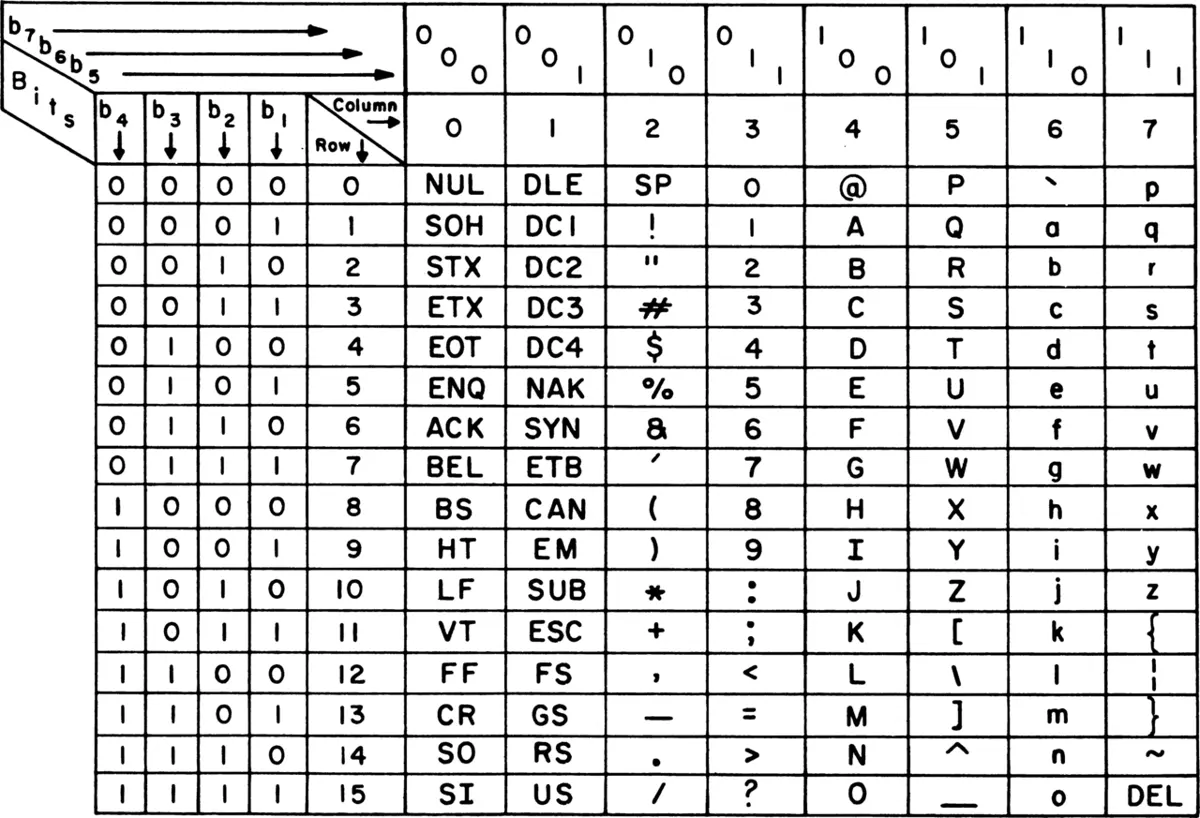
So the word Hi is stored as two numbers: 72 for H and 105 for i. In binary: 1001000 1101001.
In ASCII, B is 66. What is the code for b?
Pick an answer to see why.
Unicode: every script in the world
ASCII has room for English, and very little else. There is no é for French, no ñ for Spanish, and certainly no क or ङ. For years every country, and sometimes every company, made its own table of codes, each different. A file made with one table turned into nonsense with another.
In Grade 6 you met the answer: Unicode, one table of codes for every writing system in the world. Its first version came out in 1991. Its first 128 codes are exactly ASCII’s, so A is still 65; after them come the letters of every other script. Each character’s number is called its code point.
| Character | Script | Code point |
|---|---|---|
| A | Latin (English) | 65 |
| é | Latin (French) | 233 |
| अ | Devanagari | 2309 |
| क | Devanagari | 2325 |
| ० | Devanagari digit zero | 2406 |
| 中 | Chinese (middle) | 20013 |
| 😀 | emoji | 128512 |
Devanagari, the script of Nepali, Hindi, Sanskrit and Marathi, has the codes from 2304 to 2431, and a few more blocks elsewhere for rarer letters. Unicode’s Devanagari codes were based on an Indian standard, ISCII, so they follow the order of the Devanagari alphabet: अ आ इ ई… then क ख ग घ ङ…
How Nepali is stored
Unicode doesn’t give a separate code to every Nepali syllable you can write: there are thousands of them. Instead, it gives codes to the parts, and a syllable is stored as a few codes, in the order you say it:
- a consonant, such as क (2325);
- a vowel sign (मात्रा), such as ा (2366) or ि (2367), stored after the consonant it belongs to;
- the halant (हलन्त), ◌् (2381), which joins a consonant to the next one to make a half letter or a conjunct.
So का is two codes, क then ◌ा, and क्ष is three: क, ◌्, ष.
The shapes are the font’s job (below). The stored codes only say which sounds come in which order; the font decides that ि goes on the left, and that क + ् + ष is drawn as one letter, क्ष.
How many bytes? UTF-8
In Grade 6 you read that one byte can hold one English letter, but that Nepali letters usually take more. Here is why.
A Unicode code point can be as big as 1,114,111, far more than one byte can hold (255). Storing every character in 4 bytes would work, but it would make every English text four times bigger. So most computers and nearly every website use a clever way of storing the code points, called UTF-8:
| Code point | Bytes in UTF-8 | Examples |
|---|---|---|
| 0 to 127 (ASCII) | 1 | A, a, 7, ?, space |
| 128 to 2,047 | 2 | é, ñ, Greek, Arabic |
| 2,048 to 65,535 | 3 | क, ा, ०, Chinese |
| 65,536 and up | 4 | 😀 and most emoji |
The bigger the number, the more bytes it takes. Every Devanagari code is between 2,304 and 2,431, so each one takes 3 bytes. Namaste in English letters is 7 bytes; नमस्ते is 6 codes × 3 = 18 bytes.
Why does a text in Nepali take more bytes than the same length of text in English?
Pick an answer to see why.
Fonts
A code point says which character, not what it looks like. The shape is drawn by a font: a file with a drawing for each character it knows. The same codes, 2325 and 2366, can be drawn in many fonts, plain or fancy, thin or bold, and they still say का.
- A Nepali Unicode font draws Devanagari, and also knows the rules for joining letters: put ि on the left, draw क + ् + ष as क्ष, put the reph on top.
- If no font on a device has a shape for a code, the device shows an empty box, ☐, or a question mark. The text isn’t broken: the codes are all there. Install a font with the shapes, and it appears.
- The drawings in a font are not stored as pixels but as outlines, so letters stay sharp at any size. You will see why below, in Raster and vector pictures.
A phone shows a message as ☐☐☐☐. What has most likely happened?
Pick an answer to see why.
Old Nepali files: Preeti
In Grade 6 you saw that text typed in the Preeti font is saved as English letters, so g]kfn shows as नेपाल only where the Preeti font is installed. Now you can see why it was made that way.
Before Unicode was everywhere, a computer’s text was one byte per character, with ASCII in the first 128 codes. There were no codes for Nepali at all. So font makers in Nepal did something clever: they made fonts that draw Nepali shapes in place of the English letters. The code for k (107) was still stored, but the Preeti font drew प for it. On that one computer, it looked perfect.
But the file holds only ASCII codes. To every other computer, and to every search and spell-checker, they are English letters. Many other fonts did the same thing with different maps (Kantipur, PCS Nepali, Sagarmatha, Himalb…), so a file typed in one of them is nonsense even in another of them.
Converting Preeti to Unicode
A converter is a program that turns an old Preeti text into real Unicode Nepali. It has to do more than swap one key for one letter, because Preeti was typed the way the shapes are drawn, not the way the codes must be stored:
- ि is typed first. In Preeti you type l (ि) before the consonant, as you would write it: ls for कि. Unicode stores क first, then ि. The converter moves it.
- The reph comes last. The र् that sits on top of a letter is typed after that letter, with {: wd{ is धर्म. Unicode stores र् before म. The converter moves it.
- Some letters are two keys. In Preeti k is प, and k then m is फ; G is a half न, and G then f (ा) is the full न.
So a converter swaps every key for its shape, then moves the signs typed out of order into Unicode’s order. Then it is real Nepali, which any phone shows and any search finds.
How Nepali search and spell-check work
A search doesn’t look at shapes. It compares numbers: to find नेपाल, it looks for the codes 2344, 2375, 2346, 2366, 2354, one after another. That is why Preeti text can’t be found (its codes are English letters), and why the same word must be typed the same way to be found.
Nepali makes this harder in two ways:
- Two spellings of one word. बिद्यालय and विद्यालय have different codes (ब and व). A search for one misses the other. The dictionary decides which spelling is right (विद्यालय), and a careful writer uses it.
- Endings. घर, घरमा, घरको, घरहरूमा are one word with different endings. A good search knows the common endings and finds them all when you search for घर.
A spell-checker works with a long word list, and rules for the endings each word can take, so it doesn’t need to list घरमा and घरको separately. It takes each word you typed, finds the word underneath its ending, and checks it against the list. A word that isn’t there gets a red line. To suggest a correction, it looks in the list for words that differ by one or two letters: for बिद्यालय it finds विद्यालय. None of this can work on Preeti text, because its codes aren’t Nepali letters at all.
A search for विद्यालय doesn’t find a notice, though the notice shows विद्यालय on your screen. Which is the most likely reason?
Pick an answer to see why.
Colors from numbers
Look at a phone’s screen through a drop of water on the glass, or with a magnifying glass. In Grade 6 you saw that the picture is made of pixels. Look closer, and each pixel is really three tiny lights: one red, one green and one blue.
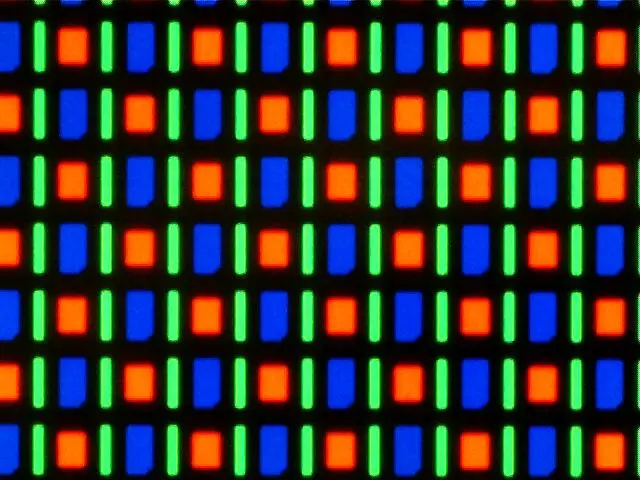
Every color on a screen is made by mixing these three lights at different brightnesses. This is mixing light, not paint, and it works differently from the paint box at school:
- red + green light = yellow;
- red + blue = magenta (a pinkish purple);
- green + blue = cyan (a sky blue);
- all three at full brightness = white;
- none at all = black: the screen gives no light there.
Each light’s brightness is stored as a number from 0 (off) to 255 (full): one byte. So a pixel’s color is three bytes, written as three numbers in the order red, green, blue. This is called RGB.
| Color | Red | Green | Blue |
|---|---|---|---|
| black | 0 | 0 | 0 |
| white | 255 | 255 | 255 |
| red | 255 | 0 | 0 |
| yellow | 255 | 255 | 0 |
| gray | 128 | 128 | 128 |
| orange | 255 | 140 | 0 |
How many colors can a pixel show? Each of the three lights has 256 levels, so there are 256 × 256 × 256 = 16,777,216 colors: almost seventeen million. That is enough that the steps between neighboring colors are too small for your eyes to see.
Color pictures
A color picture is a grid of pixels, as in Grade 6, but now each pixel is 3 bytes (24 bits) instead of 1 bit.
A pixel is stored as red 255, green 255, blue 0. What color is it?
Pick an answer to see why.
Raster and vector pictures
There are two quite different ways to keep a picture.
A raster picture (also called a bitmap) is what you have seen so far: a grid of pixels, with the color of every one stored. A photo is a raster picture. It can hold any detail, however messy: leaves, faces, clouds.
A vector picture stores instructions to draw shapes: “a circle, with its center here, this big, filled yellow”; “a line from this point to that point, 2 units thick, black”. To show it, the computer draws the shapes, at whatever size the screen needs. You did this in Grade 6 with the turtle: the blocks were a vector picture, and the turtle drew it.
The difference shows when you make a picture bigger. A raster picture has only the pixels it has: blow it up, and each pixel becomes a big square block, so edges look jagged. A vector picture is simply drawn again at the bigger size, so its edges stay sharp at any size, from a visiting card to a banner across the street.
| Raster | Vector | |
|---|---|---|
| What is stored | the color of every pixel | shapes: lines, curves, circles, with their colors |
| Made bigger | goes blocky | stays sharp |
| File size | grows with the number of pixels | grows with the number of shapes |
| Good for | photos, paintings, anything detailed and natural | logos, icons, maps, diagrams, letters |
| Examples | a phone photo, a scanned page | a school’s logo, a font’s letters, the diagrams in this book |
So which to use? A photo must be raster: there are no simple shapes in a face or a hillside. A logo should be vector: it is made of a few clean shapes, and it must look sharp on a small badge and a large signboard. The letters of a font are vector too, which is why text on a phone stays sharp however far you zoom in. Every drawing in this book is a vector picture.
The school wants its logo printed on a small ID card and on a large banner for the gate. How should the logo be kept?
Pick an answer to see why.
Sound as samples
Bang a madal, and its skin shakes back and forth very fast. It pushes the air, and waves of pressure travel to your ears. A microphone turns those waves into an electric signal that rises and falls the same way. Draw it, and you get a wavy line.
A wavy line is smooth: it has a value at every moment. A computer can only keep a list of numbers. So it measures the wave many times a second, and keeps each measurement as a number. Each measurement is a sample, and the whole process is called sampling.
Two choices decide how good the stored sound is:
- Samples a second (the sample rate): how often the wave is measured. Too few, and quick wiggles in the wave, the high sounds, are missed.
- Bits a sample: how exactly each measurement is kept. With 3 bits there are only 8 levels to choose from, so each sample is rounded to the nearest level and the sound comes out rough. With 16 bits there are 65,536 levels.
To play the sound back, the computer sends the numbers, one after another, at the same speed, to the speaker, which moves back and forth and makes the air wave again.
What happens if a sound is stored with more samples a second and more bits a sample?
Pick an answer to see why.
In short
Exercise
Which is 22 in binary?
Pick an answer to see why.
What is 0110 + 0011 in binary?
Pick an answer to see why.
How many bytes does the word घर (घ and र) take in UTF-8?
Pick an answer to see why.
Explain the meaning of these words: character code, ASCII, Unicode, code point, font, overflow, RGB, sample.
Answer
Change into binary by halving, and check each answer by adding place values: i. 13 ii. 45 iii. 130 iv. 255
Answer
Add these binary numbers. Check each answer in decimal.
- i.0011 + 0100
- ii.0111 + 0001
- iii.1011 + 0110
- iv.00111100 + 00011110
Answer
An 8-bit computer adds 11110000 and 00100000.
- i.What is the true answer, in binary and in decimal?
- ii.What does the computer’s byte hold?
- iii.What is this problem called, and how can a program avoid it?
Answer
Use Figure 2.1 to decode this message: 75 97 116 104 109 97 110 100 117
Answer
Why was Unicode needed when ASCII already existed? Give two reasons.
Answer
The word किताब looks like it begins with ि. In what order are its codes stored, and why does it look different on the screen?
Answer
Rita opens a notice her father typed in 2008 and sees ;"rgf. On her father’s old computer it showed सूचना.
- i.Why does Rita see different letters?
- ii.Why can’t she find the notice by searching for सूचना?
- iii.How can she fix the file? What must she check after fixing it?
Answer
How does a spell-checker decide that a Nepali word is wrong? Give one kind of mistake it can’t catch.
Answer
Write the RGB numbers for: i. black ii. red iii. yellow iv. cyan. Explain why red and green light make yellow, when red and green paint don’t.
Answer
A picture is 800 pixels across and 600 pixels down, with 3 bytes a pixel.
- i.How many pixels does it have?
- ii.How many bytes do the pixels need?
- iii.About how many MB is that?
Answer
Give three differences between raster and vector pictures. Which would you use for: i. a photo of your class ii. the logo of a cooperative iii. a map of the school’s fire exits to print on a large board?
Answer
Explain how a sound is stored in a computer. What two choices decide how good the stored sound is, and what does each cost?
Answer
A voice message is stored with 8,000 samples a second, 8 bits each, for one loudspeaker. How many bytes does a 30-second message take? How many KB?
Answer
Quiz yourself: Data and representation, Grades 6–12 →
Practice every question in the book, and keep track of the ones you miss →