
A phone in your pocket can hold thousands of photos, hundreds of songs, every message you have ever sent, and the videos your cousins share on Dashain. You might think a machine that holds so much must use a huge number of different symbols. It uses only two: 0 and 1.
In this unit you will find out how two symbols can say so much. You will switch bits on and off, count the way a computer counts, make a picture out of zeros and ones, and learn what a kilobyte, a megabyte and a gigabyte really are. By the end, “this photo is 3 MB” and “a 1 GB data pack” will mean something exact to you.
On and off
Think of the light switch in your room. It can be in only two states: on or off. There is nothing in between. During load-shedding, the power in a house was either there or not there. A cricket toss lands heads or tails. A question in a quiz can be answered yes or no.
A computer is built from switches like that, but tiny ones. They are called transistors, and they are switched by electricity, not by a finger. The chip inside a phone has billions of them, each one smaller than a germ. Each transistor is either on or off at any moment, and it can switch billions of times every second.
We write the two states as two digits:
- 1 for on,
- 0 for off.
A single 0 or 1 is called a bit, short for binary digit. “Binary” means “made of two”, like a bicycle’s two wheels. A bit is the smallest piece of information a computer can hold: it answers one yes-or-no question.
Everything a computer stores is kept as bits, though different devices keep them in different ways:
| Where | What holds the bits |
|---|---|
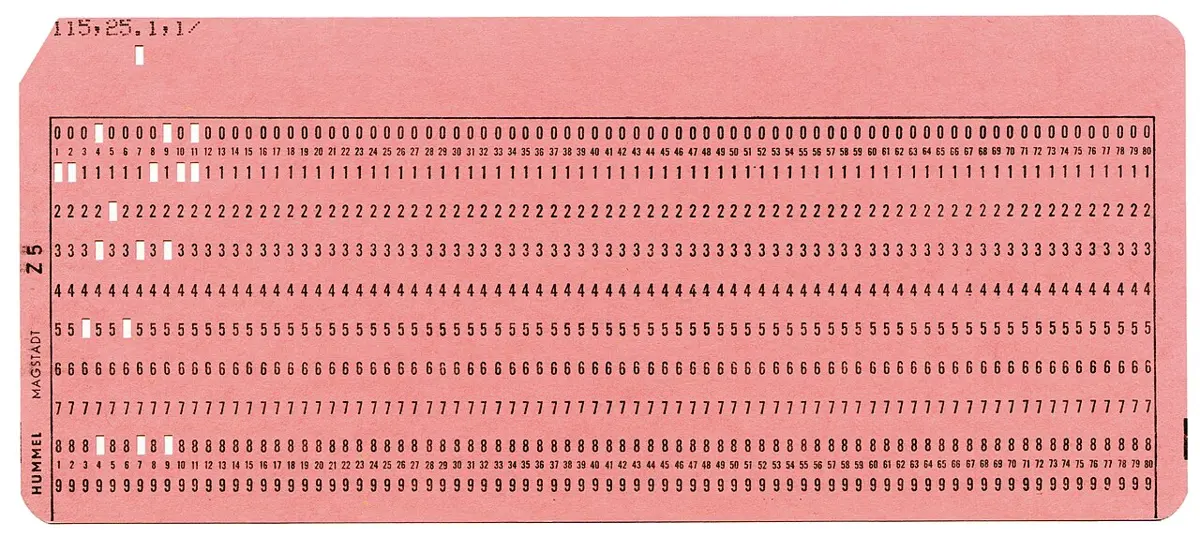
| a computer’s working memory | tiny switches, or tiny stores of electric charge, each full or empty |
| a phone’s storage, a pen drive, a memory card | tiny cells that trap electric charge |
| a hard disk | tiny spots of magnet on a spinning disk, each pointing one way or the other |
| a CD or DVD | tiny pits and flat places along the shiny surface, read by a laser |
Why is a bit like a light switch?
Pick an answer to see why.
More bits, more patterns
One bit can answer only one yes-or-no question. That is not much. But put bits side by side and they can make patterns, and each pattern can stand for something different.
With one bit there are 2 patterns: 0 and 1. With two bits there are 4: 00, 01, 10 and 11. How many with three?
Three bits make 8 patterns. Look at why: take the 4 patterns of two bits, and put a 0 in front of each, then a 1 in front of each. That is 4 + 4 = 8. Every bit you add doubles the number of patterns:
| Bits | Patterns |
|---|---|
| 1 | 2 |
| 2 | 2 × 2 = 4 |
| 3 | 2 × 2 × 2 = 8 |
| 4 | 16 |
| 5 | 32 |
| 6 | 64 |
| 7 | 128 |
| 8 | 256 |
A group of 8 bits is called a byte. A byte has 256 different patterns, from 00000000 to 11111111. That is enough to give every capital letter, small letter, digit and punctuation mark of English a pattern of its own, with plenty to spare. So one byte can hold one letter of English text. (Nepali letters usually take more than one byte. You will find out why in Grade 7.)
How many different patterns can 4 bits make?
Pick an answer to see why.
Counting in binary
You already know one way of writing numbers. It uses ten digits, 0 to 9, so it is called the decimal system (“deci” means ten). After 9, we have run out of digits, so we write 10: a 1 in the tens place and a 0 in the ones place. Each place is worth ten times the place to its right:
| thousands | hundreds | tens | ones |
|---|---|---|---|
| 2 | 0 | 8 | 3 |
So 2083 means 2 thousands + 0 hundreds + 8 tens + 3 ones. Each digit is worth a different amount depending on its place.
A computer has only two digits, 0 and 1. So it counts in the binary system, also called base 2. It runs out of digits after 1, not after 9. So in binary, each place is worth two times the place to its right:
| … | 128 | 64 | 32 | 16 | 8 | 4 | 2 | 1 |
|---|
These numbers are the place values of binary. Each place holds a 0 (that place adds nothing) or a 1 (that place adds its value).
Counting goes like this. 0, then 1. Now the ones place is full. To add one more, the ones place goes back to 0 and we carry 1 into the next place, the twos: 10. That is two. Then 11 is three. Then both places are full, so both go back to 0 and the carry goes into the fours place: 100 is four. It is exactly what happens in decimal when 9 becomes 10, or 99 becomes 100, only much sooner.
Here are the numbers from 0 to 10 in binary:
| Decimal | Binary | Decimal | Binary |
|---|---|---|---|
| 0 | 0 | 6 | 110 |
| 1 | 1 | 7 | 111 |
| 2 | 10 | 8 | 1000 |
| 3 | 11 | 9 | 1001 |
| 4 | 100 | 10 | 1010 |
| 5 | 101 |
Reading a binary number
To find what number a binary number stands for, write the place values over its digits, starting from 1 on the right. Then add the place values that have a 1 under them.
Writing a number in binary
To go the other way, from an ordinary number to binary, take the place values from the biggest one that fits.
- Find the biggest place value that is not more than your number. Put a 1 there.
- Take that place value away from your number.
- Go to the next place to the right. If it fits into what is left, put a 1 there and take it away; if not, put a 0.
- Carry on until you have done the ones place. What is left must be 0.
What number is the binary 110?
Pick an answer to see why.
Which is 9 in binary?
Pick an answer to see why.
Pictures made of pixels
Look very closely at a phone’s screen, through a drop of water or a magnifying glass. The picture is made of tiny dots of light, in rows and columns. Each tiny dot is called a pixel, short for “picture element”. The moving red-dot signs in shops and on some buses work the same way, with dots you can see from across the road. So does a cross-stitch pattern on cloth.
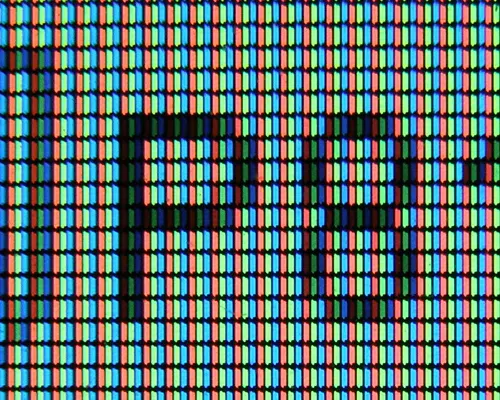
The simplest kind of picture is black and white: every pixel is either black or white. That is just two states, so each pixel needs exactly one bit. We agree on a rule: 1 means black, 0 means white. Then a computer can keep a whole picture as rows of 0s and 1s: one row of bits for each row of pixels.
This is all a computer keeps of the picture: 64 bits, which is 64 ÷ 8 = 8 bytes. To show it, the computer reads the bits back, row by row, and lights each pixel the way its bit says. Anyone who knows the rule (1 = black, how many pixels a row) can turn the bits back into the picture.
In a black-and-white picture with the rule 1 = black, a row of pixels is stored as 11000011. What does the row look like?
Pick an answer to see why.
More pixels, sharper pictures
An 8 × 8 picture looks blocky. Curved lines come out as steps, and small details vanish. Use more pixels, each one smaller, and the picture looks more like the real shape. The number of pixels across and down a picture is called its resolution. A picture of 32 × 32 pixels has a higher resolution than one of 8 × 8.
So there is a trade: a higher resolution gives a sharper picture, but it needs more bits to store and more time to send.
Photos in color need more than one bit for each pixel, because each pixel must say which of millions of colors it is. You will learn how in Grade 7. But the idea is the same: a photo is a grid of pixels, and each pixel is stored as bits.
Kilobytes to terabytes
You have heard sizes like “a 1 GB data pack”, “this video is 25 MB”, “the phone has 128 GB”. These are all ways of counting bytes.
A byte is small: one letter. So for bigger things we use bigger units. Computers count in powers of 2, so each unit is 1,024 times the one before (1,024 = 2 × 2 × 2 × 2 × 2 × 2 × 2 × 2 × 2 × 2, a round number in binary). For working things out in your head, “about a thousand” is close enough.
| Unit | Short | Equal to | About |
|---|---|---|---|
| bit | b | a single 0 or 1 | |
| byte | B | 8 bits | one English letter |
| kilobyte | KB | 1,024 bytes | a thousand bytes |
| megabyte | MB | 1,024 KB | a million bytes |
| gigabyte | GB | 1,024 MB | a thousand million bytes |
| terabyte | TB | 1,024 GB | a million million bytes |
In short
Exercise
What is a bit?
Pick an answer to see why.
How many bits are there in 2 bytes?
Pick an answer to see why.
What is the biggest number you can write with 5 bits?
Pick an answer to see why.
A black-and-white picture is 16 pixels across and 16 down. How many bytes does it take?
Pick an answer to see why.
Which is the biggest?
Pick an answer to see why.
Explain the meaning of these words: bit, byte, binary, pixel, resolution.
Answer
Why do computers use binary, only 0 and 1? Give two reasons.
Answer
Change these binary numbers into decimal: i. 101 ii. 1100 iii. 10011 iv. 11111111
Answer
Change these decimal numbers into binary: i. 6 ii. 9 iii. 20 iv. 31 v. 100 vi. 200
Hint
Answer
Write the numbers from 0 to 8 in binary. What do you notice about the numbers 1, 2, 4 and 8 in binary?
Answer
Copy and complete the table.
| Number of bits | Number of patterns | Biggest number |
|---|---|---|
| 2 | 3 | |
| 3 | 8 | |
| 4 | ||
| 8 |
Answer
Draw an 8 × 8 grid and color it from these bits (1 = black, 0 = white). What is the picture?
00000000 · 00011000 · 00111100 · 01111110 · 11111111 · 01000010 · 01011010 · 01011010
Answer
A black-and-white picture is 40 pixels across and 30 pixels down.
- i.How many pixels does it have?
- ii.How many bits does it take?
- iii.How many bytes?
Answer
A memory card holds 16 GB. A song takes about 4 MB. About how many songs can it hold? (Use 1 GB = 1,024 MB.)
Answer
Sita says her internet is “10 Mbps”, so a 10 MB video will arrive in one second. Is she right? Explain.
Answer
Arrange from smallest to biggest: 1 GB, 1 bit, 1 TB, 1 KB, 1 byte, 1 MB.
Answer
Here is a black-and-white picture, 5 pixels across and 5 down (■ is black, □ is white). Write its bits, one row at a time, using 1 = black and 0 = white. What letter is it?
■ □ □ □ ■■ □ □ □ ■■ ■ ■ ■ ■■ □ □ □ ■■ □ □ □ ■Answer
Choose the most sensible unit (bytes, KB, MB, GB or TB) for the size of each of these, and say why.
- i.a short text message
- ii.a photo from a phone’s camera
- iii.a full-length film
- iv.all the storage in a phone
Answer
Quiz yourself: Data and representation, Grades 6–12 →
Practice every question in the book, and keep track of the ones you miss →