
Bina sits in a cyber café in Banepa and types moecdc.gov.np. The page appears in about a second. In that second her computer, made by one company, running software from another, joined by a Wi-Fi router from a third, asked questions of machines in Kathmandu and perhaps in other countries, built by dozens of other companies. None of them had ever met. Yet every one of them understood every message. How?
In Grade 7 you followed a message cut into packets, carried by routers one hop at a time, along cables that cross the border into India and China. That told you where a message goes. This unit is about the rules that make it work: the kinds of networks and how they are joined, the devices in between, the protocols every machine agrees to follow, how addresses are given out and read, how a name like moecdc.gov.np becomes a number, and exactly what happens when a page opens. At the end, you will design and draw a network of your own.
Networks of every size
A computer network is two or more computers and other devices joined together, by cables or by radio, so that they can share data and resources. You have been using networks since Grade 6. Here are the reasons they are built:
- to communicate: messages, calls, email;
- to share resources: one printer, one internet connection, one big disk for a whole office;
- to share data: a school’s results kept in one place and seen from every office computer;
- to back up and keep things safe in one place, managed by one person.
Networks are often named by how much ground they cover:
| Kind | Covers | Example in Nepal |
|---|---|---|
| PAN (personal area network) | a few meters around one person | your phone joined to earbuds and a smartwatch by Bluetooth |
| LAN (local area network) | one room, building or campus, up to about a kilometer | a school’s computer lab; the Wi-Fi in a home or a café |
| MAN (metropolitan area network) | a city or a valley | a bank joining its branches across the Kathmandu Valley; an internet company’s fiber network in Pokhara |
| WAN (wide area network) | a country, or the whole world | Nepal Telecom’s network across the country; a bank’s network joining all its branches and ATMs; the internet, the biggest WAN of all |
A LAN wirelessly joined, like the Wi-Fi in a home, is sometimes called a WLAN (wireless LAN). The boundaries are rough: a big university’s campus network is a LAN by ownership and nearly a MAN by size. What matters more is who owns it. A LAN is usually owned by one family, school or company, which sets it up as it likes. A WAN almost always uses lines rented from telecom companies, because no one school or bank lays its own cables across the country.
Who serves whom
In some networks, a few powerful computers serve all the others. These are servers; the computers that use them are clients. This is a client–server network. The school office’s file server, which keeps every teacher’s files, is one; a website is another, with your browser as the client. Because everything important is on the servers, one person can manage it, back it up in one place and decide who may see what. But if a server fails, every client that needs it must wait.
In a peer-to-peer network (P2P), every computer is equal: each can share its own files and printer with the others, and each is managed by whoever uses it. Three computers in a small shop, sharing one printer and a folder, are a peer-to-peer network. It costs nothing extra and needs no server, but with more than a few computers it gets hard to keep track of who shares what, and backups are left to each person.
| Client–server | Peer-to-peer | |
|---|---|---|
| Who provides the services | one or more servers | every computer, a little |
| Managed by | one administrator | each user, for their own computer |
| Backups and security | in one place, easier to control | on each computer, harder |
| Cost | a server, and someone to run it | nothing extra |
| Good for | schools, offices, banks, websites | a few computers in a home or small shop |
A dental clinic in Butwal has three computers that share one printer and a folder of appointments. There is no server. What kind of network is it?
Pick an answer to see why.
Why is the internet called a WAN?
Pick an answer to see why.
The shape of a network
A school with thirty computers could join them in several patterns. The pattern of the links between the devices of a network is called its topology (from the Greek for “the study of place”). The topology decides how much cable is needed, how easy it is to add a computer, and, most of all, what happens when something breaks.
- Bus topology: one long cable, the bus, runs past every computer, and each one is joined to it. A message travels along the whole cable, and every computer hears it; the one it is addressed to keeps it. Each end of the cable has a terminator, which soaks up the signal so it doesn’t bounce back. It needs the least cable, but one break anywhere stops everything.
- Star topology: every computer has its own cable to a central device, usually a switch. A broken cable cuts off only one computer, and a computer is added by plugging in one more cable. But if the switch fails, the whole star stops. Almost every LAN today, cabled or Wi-Fi, is a star.
- Ring topology: each computer is joined to the next, in a closed loop, and messages are passed round from one to the next in one direction. No computer is in charge. But a single break, or one computer switched off, stops the ring, unless a second ring is built going the other way.
- Mesh topology: devices are joined to many others, so there are several paths between any two. In a full mesh every device is joined to every other. It keeps working through many breaks, as you saw in Grade 7, but needs a great deal of cable. The middle of the internet, its routers, is a partial mesh.
- Hybrid topology: two or more of these joined together. A school with a star of computers in each room, the rooms’ switches joined to one main switch, is a hybrid (this one, stars joined to a star, is also called a tree).
| Topology | Cable needed | One cable breaks | Adding a computer | Used today |
|---|---|---|---|---|
| bus | least | whole network stops | tap into the bus | rarely, in old networks |
| star | a cable per device | only that device is cut off | one more cable to the switch | almost every LAN |
| ring | a cable per device | whole ring stops (unless doubled) | break the ring to add it | some long fiber rings between cities |
| mesh | most | nothing stops; messages go round | many new cables | the routers of the internet |
| hybrid | depends | depends on which cable | easy | schools, offices, campuses |
A switch in the school lab stops working. In a star topology, what happens?
Pick an answer to see why.
Which topology needs the most cable for the same number of computers?
Pick an answer to see why.
Cables and radio
The path a signal takes between two devices is the transmission medium (plural media), also called the communication medium. There are two kinds:
- Guided (wired, or bounded) media: the signal is guided along a cable.
- Unguided (wireless, or unbounded) media: the signal travels through the air, or through space, as radio waves, microwaves or infrared light.
Guided media
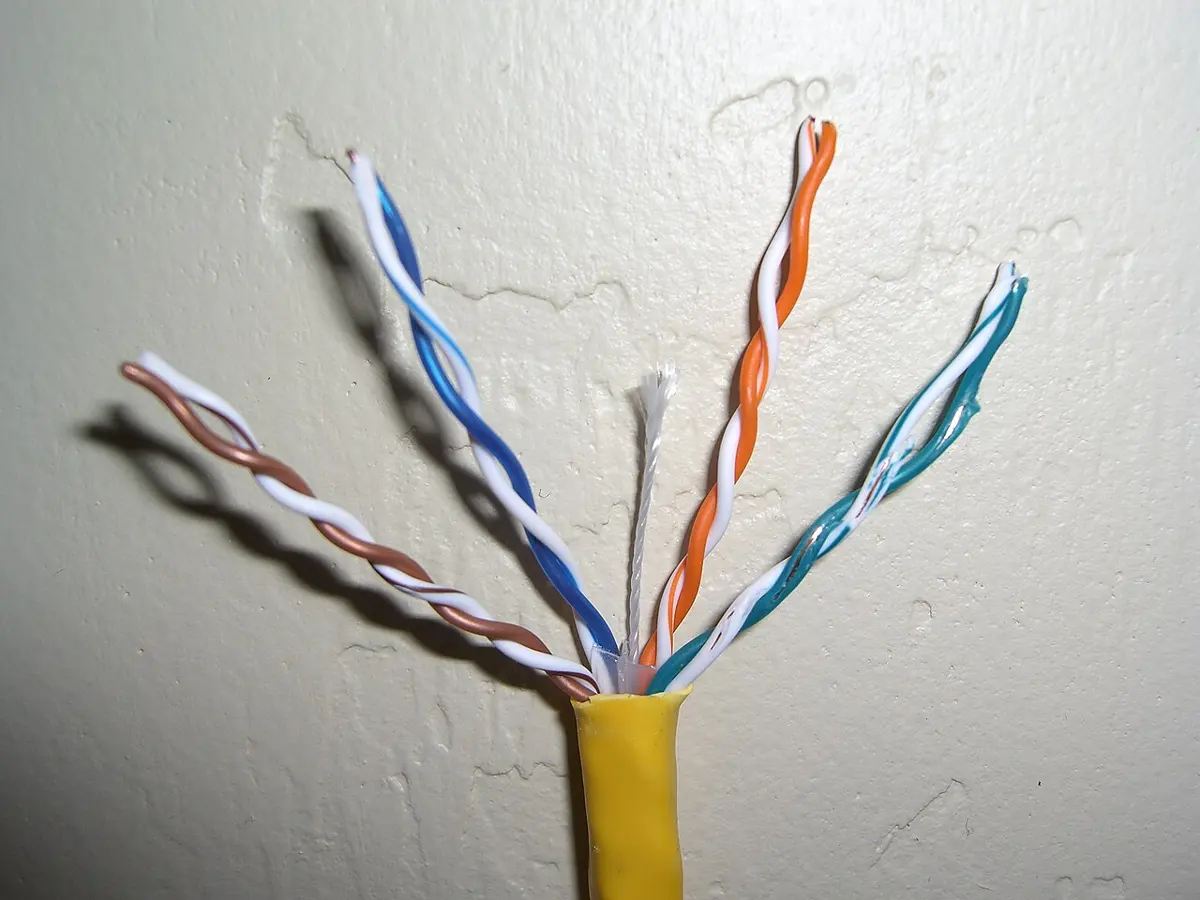
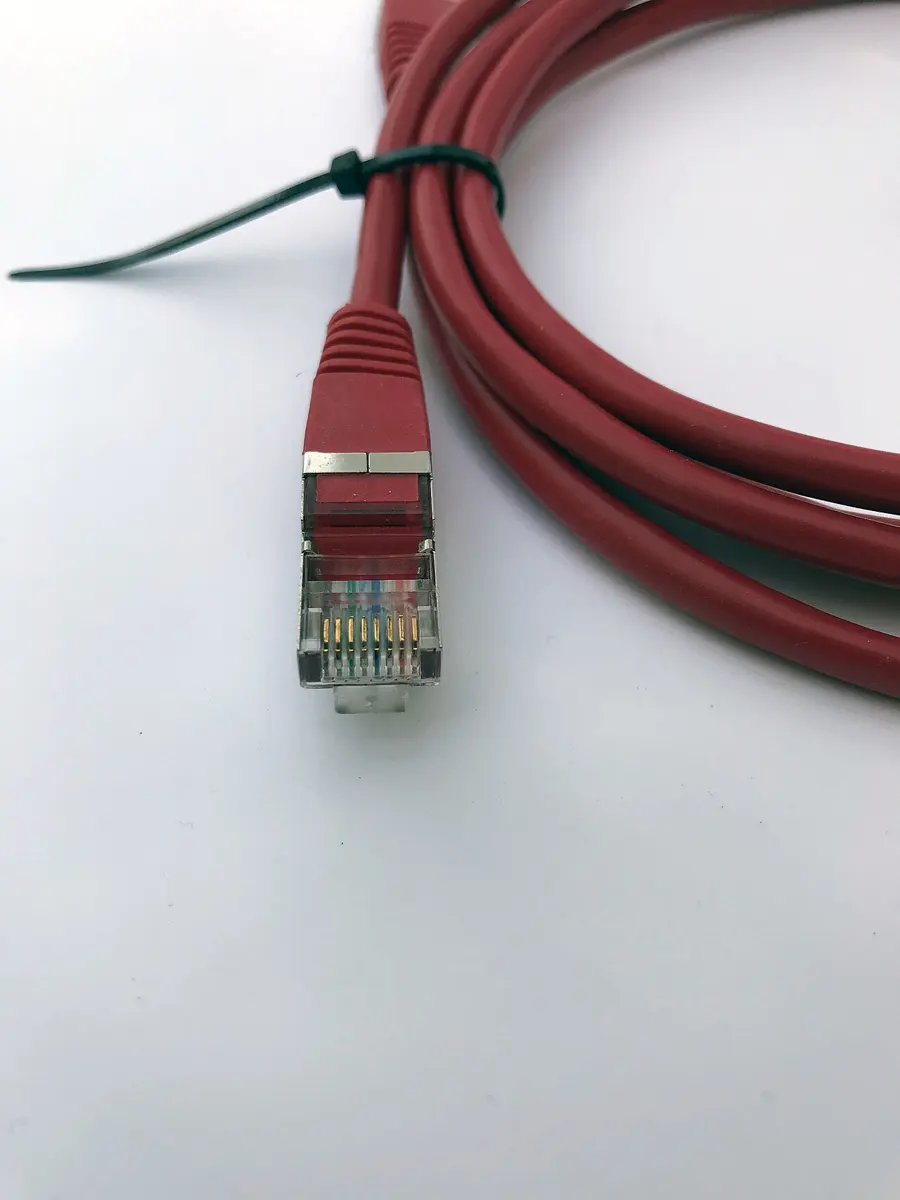
Twisted pair cable is the network cable of almost every office and school: eight thin copper wires in four pairs, each pair twisted round each other. Twisting makes the noise picked up from nearby wires and motors cancel out. The common kinds are named by category: Cat 5e, and the newer Cat 6, which carries 1 gigabit per second (1,000 megabits) up to 100 meters, and 10 gigabits per second over about 55 meters. Its plug is the RJ-45 connector, with eight metal contacts, one for each wire.
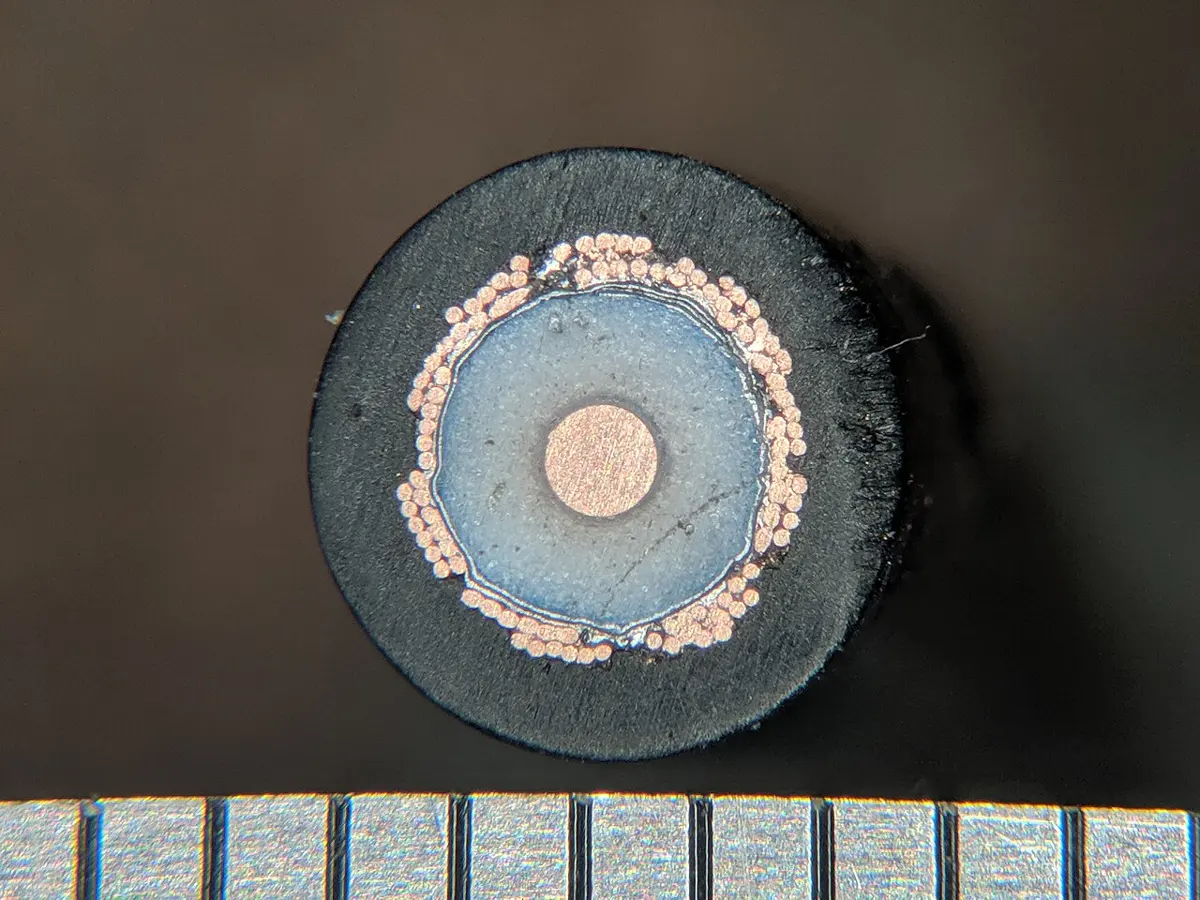
Coaxial cable has one copper wire in the middle, then a layer of insulation, then a tube of woven copper or foil all round it, then a plastic jacket. The outer tube shields the middle wire from noise. It is the cable that brings cable TV into homes, and it carried some of the first LANs and cable internet.
Optical fiber is a hair-thin thread of very pure glass. It carries data as flashes of light, kept inside the glass by reflecting off its walls, as you saw in Grade 7. Light in fiber isn’t affected by electrical noise or lightning, loses very little strength, and can carry far more data than copper. One fiber can run tens of kilometers without any help, and the cables under the oceans run thousands of kilometers, with amplifiers along the way. It costs more to join and repair than copper, and needs special tools to cut and join.
Unguided media
- Radio waves: Wi-Fi reaches tens of meters; Bluetooth, made for a few meters, joins earbuds, speakers and watches; mobile data reaches a few kilometers from a tower. They pass through walls, more or less.
- Microwaves: radio of very high frequency sent in a narrow beam between dishes on towers, which must see each other. In Nepal’s hills, where laying a cable up a ridge is hard, a dish on one hilltop often talks to another on the next.
- Satellites: a signal is sent up to a satellite, which sends it down somewhere else. It reaches the most remote places, but it is costly, and the trip to a high satellite and back takes time.
- Infrared: light just too red to see, as from a TV remote. It reaches only a few meters and needs a clear line to the receiver.
| Guided media | Unguided media | |
|---|---|---|
| The signal travels | along a cable | through the air or space |
| Examples | twisted pair, coaxial, optical fiber | radio (Wi-Fi, Bluetooth, mobile), microwave, satellite, infrared |
| Affected by weather and walls | hardly | more: rain, walls, distance |
| Who can pick up the signal | only someone at the cable | anyone in range, so it must be scrambled |
| Moving devices | no | yes: phones, laptops |
| Setting up | lay cables | put up a router or tower; often needs a license |
How fast? Bandwidth, throughput and delay
An internet plan says “100 Mbps”. That is its bandwidth: the most data the connection can carry each second, measured in bits per second: kbps (kilobits, thousands of bits), Mbps (megabits, millions) and Gbps (gigabits, billions). Notice the small b: network speeds are in bits, file sizes in bytes (B), and a byte is 8 bits.
The speed you really get is the throughput: the data that actually arrives each second. It is usually less than the bandwidth, because the line is shared with the neighbors, the Wi-Fi is weak, or the server far away is slow. The delay, or latency, is how long one message takes to arrive, in milliseconds (ms). A video call needs low latency more than high bandwidth; downloading a film needs bandwidth more than low latency.
One way, or both ways?
Data can flow between two devices in three ways, called modes of transmission:
- Simplex: one way only, always. A radio station sends; your radio only listens. A keyboard sends to the computer; it never receives.
- Half duplex: both ways, but only one way at a time. A walkie-talkie: press to talk, let go to listen.
- Full duplex: both ways at once. A phone call: both people can talk and hear at the same moment. A network cable between a computer and a switch works full duplex.
Why do the wires in a network cable come in twisted pairs?
Pick an answer to see why.
A plan offers 50 Mbps. How many megabytes can arrive in one second, at most?
Pick an answer to see why.
The boxes in between
Every device that joins a network has a network interface card (NIC), or network adapter: the part, a card or a chip, that sends and receives the signals, through a socket for a cable or an antenna for Wi-Fi. A phone has several: Wi-Fi, Bluetooth, mobile data. Each has a MAC address (media access control address), a number fixed in it at the factory and different for every adapter in the world, written as six bytes in hexadecimal (Unit 2), like 3C:22:FB:9A:41:07. A MAC address names the device on its own local network, as a person’s name does in a classroom; an IP address, which you will meet below, says where on the whole internet it is, as a postal address does.
The devices that join the parts of a network each have one job:
| Device | Its job |
|---|---|
| repeater | takes a weak signal and sends it on at full strength, so that it can go farther than one cable allows |
| hub | a box with many sockets; whatever arrives at one socket it repeats out of every other socket, to every device, whoever it is for |
| switch | a box with many sockets; it learns which device (by MAC address) is on which socket, and sends each message only out of the socket it is for |
| bridge | joins two parts of one LAN, passing on only the messages meant for the other side |
| router | joins different networks, and passes each packet on towards its IP address (Grade 7) |
| modem | turns a computer’s digital signals into signals that can travel along a telephone line, a TV cable or a fiber, and back; for fiber it is called an ONT, the fiber box |
| access point | joins devices to a LAN by Wi-Fi radio |
| gateway | joins two networks that follow different rules, and translates between them; a network’s default gateway is the router its devices send everything for other networks to |
A home’s Wi-Fi router is really several of these in one box: a router, a small switch with four sockets, an access point, and often the fiber box too.
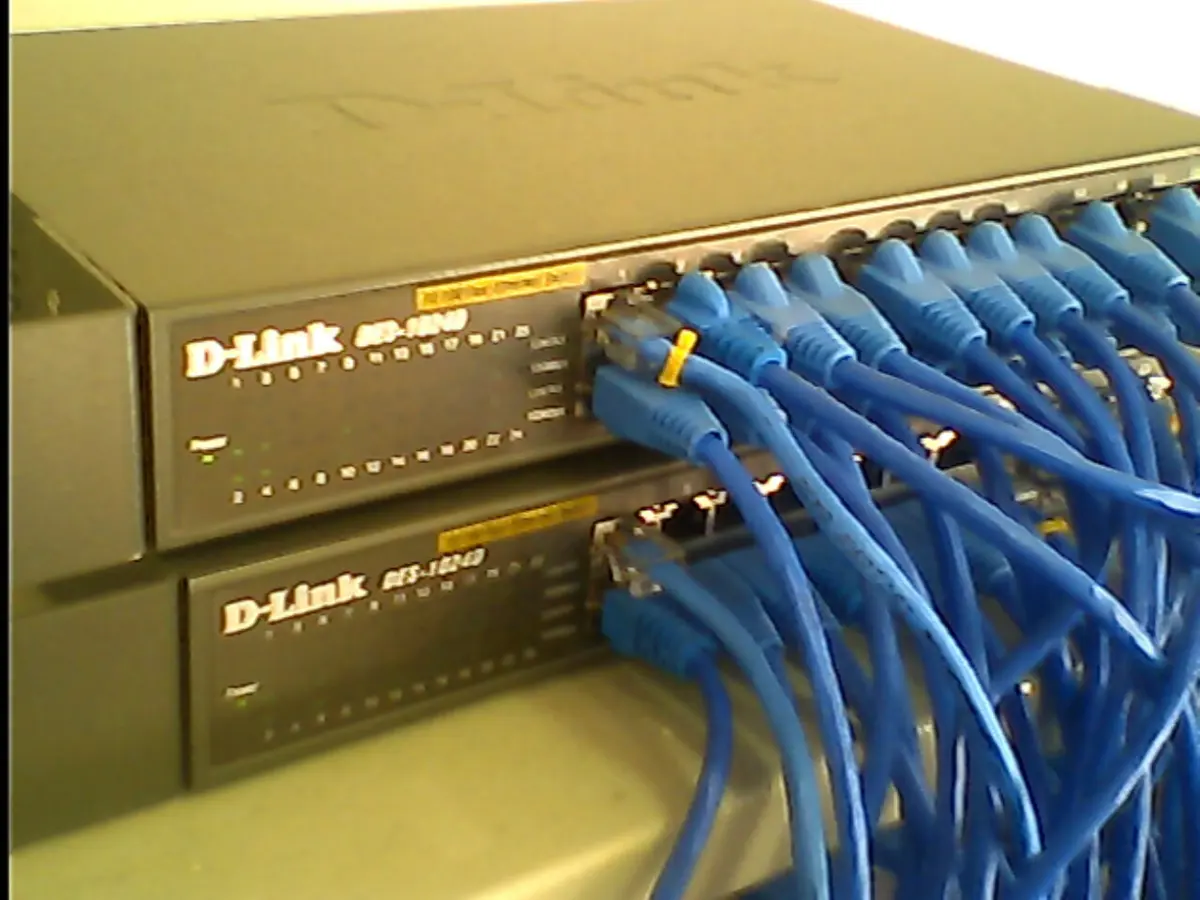

In a school lab, PC 3 sends a file to the printer. With a switch in the middle, which devices receive the file?
Pick an answer to see why.
What is the job of a router?
Pick an answer to see why.
Protocols: rules for talking
Watch a tea shop in Thamel at eight in the morning. A customer says “Two milk tea, one black.” The owner shouts it to the boy at the stove; he answers “Two milk, one black!” to show he heard. If he heard wrong, the owner says it again. When the tea is ready, it goes back the way the order came. Everyone follows the same few rules without thinking: who speaks first, the words for each kind of tea, saying it back, what to do if it went wrong.
Computers need the same, but written down exactly, because a computer can’t guess. A protocol is a set of rules that devices follow to communicate: what the messages look like, in what order they are sent, what each one means, and what to do when something goes wrong. Any two devices that follow the same protocol can talk, whoever made them. That is the answer to the question at the start of this unit.
Layers
Sending a message across the world is too big a job for one set of rules. So the job is split into layers, each with its own protocols, each doing one part and using the layer below it. Think of sending a book from Bhaktapur to a cousin in Japan:
- you write a letter and tuck it inside the parcel (you care only about what it says);
- the post office in Bhaktapur numbers the parcels and keeps a record, so that a lost one can be traced and sent again;
- the address on each parcel lets every sorting office decide where to send it next;
- buses, planes and postmen carry it, each in its own way, one stretch at a time.
You don’t need to know which plane carried your parcel, and the pilot doesn’t open it. The internet works the same way, in four layers, together called the TCP/IP model after its two most important protocols:
| Layer | Its job | Protocols |
|---|---|---|
| 4.Application | what the apps say to each other: a page, an email, a name to look up | HTTP, HTTPS, DNS, DHCP, SMTP, FTP |
| 3.Transport | between the two ends: cuts the data into numbered pieces, puts them back in order, sends again what was lost; uses port numbers to say which app on the device it is for | TCP, UDP |
| 2.Internet | across networks: an IP address on every packet, so routers can pass it on | IP |
| 1.Link | across one link, to the next device: the signals on this cable or radio, the MAC addresses | Ethernet (cables), Wi-Fi |
When your phone sends a message, each layer adds its own label, a header, around what it got from the layer above, like putting a letter in an envelope, the envelope in a numbered parcel, the parcel in a mail bag. On the way, each router opens only the link and internet layers, reads the IP address, and wraps the packet again for the next link. Only the device at the far end opens every layer and passes the message to the app.
TCP and UDP
At the transport layer, an app chooses between two protocols.
- TCP (Transmission Control Protocol) first sets up a connection with the other end, then numbers every piece, checks that each arrived, sends again anything lost, and puts everything back in order. It is reliable, and used where every byte matters: web pages, email, files, payments.
- UDP (User Datagram Protocol) just sends each piece and hopes. Nothing is checked or sent again, so it is faster and never waits. It is used where a late piece is useless anyway: a live video call, an online game, and short questions such as a DNS lookup, which can simply be asked again.
A device runs many apps at once, so each piece also carries a port number saying which app it is for: 443 for a secure web page, 53 for DNS, 25 for email between servers. The IP address is like a hostel’s street address; the port number is the room.
What is a protocol?
Pick an answer to see why.
A live video call loses a piece of the picture. Why is it carried by UDP and not TCP?
Pick an answer to see why.
IP addresses
In Grade 7 you met IP addresses: four numbers from 0 to 255, like 203.0.113.25, four bytes, 32 bits in all. This version of IP is IPv4. Now look closer.
Network part and device part
An IP address has two parts, like a postal address with a district and a house. The first part names the network; the rest names the device (the host) on that network. Every device on one LAN has the same network part, and a different host part.
Where does one part end and the other begin? The subnet mask says. Written like an address, it has 255 for each number that belongs to the network, and 0 for each that belongs to the device. With the mask 255.255.255.0, the address 192.168.1.23 has the network part 192.168.1 and the device part 23. The same mask is often written /24, meaning the first 24 bits are the network.
Before a device sends a packet, it compares the network parts:
- the same: the other device is on this network. Send the packet straight to it, through the switch or the Wi-Fi.
- different: it is on another network. Send the packet to the default gateway, the router, which passes it on.
Private addresses and sharing one address
In Grade 7 you saw that a home router gives each device a “home address”, and that the whole home shares one address on the internet. Here are their real names.
Three ranges of addresses are set aside for use inside a network, never on the internet itself. They are private addresses:
- 10.0.0.0 to 10.255.255.255
- 172.16.0.0 to 172.31.255.255
- 192.168.0.0 to 192.168.255.255
Millions of homes and schools use the same private addresses, such as 192.168.1.23, at the same time, and it doesn’t matter, because they are used only inside each network. An address that is used on the internet, and belongs to only one device or network in the whole world, is a public address.
The router changes the private address on every packet going out into its own public address, and remembers which device asked for what, so it can hand back the answers. This is called network address translation, or NAT. It is how a whole family, or a whole school, shares one public address.
IPv6
The long-term answer is a new version of IP, IPv6, with addresses of 128 bits: enough for about 3.4 × 10³⁸ addresses, more than a billion billion billion for every person alive. (IPv5 was used for an experiment, so the next number was 6.) An IPv6 address is written as eight groups of four hexadecimal digits (Unit 2), separated by colons:
2001:0db8:0000:0000:0000:0000:0000:0025
Two rules make it shorter. In each group, leading zeros can be left out (0db8 → db8, 0025 → 25). And one run of groups that are all zero can be replaced by a double colon, once in an address. So the address above is 2001:db8::25.
| IPv4 | IPv6 | |
|---|---|---|
| Length of an address | 32 bits (4 bytes) | 128 bits (16 bytes) |
| Number of addresses | about 4.3 × 10⁹ | about 3.4 × 10³⁸ |
| Written as | four decimal numbers with dots: 192.168.1.23 | eight groups of hexadecimal with colons: 2001:db8::25 |
| Getting an address | set by hand, or by DHCP | by hand, by DHCP, or a device can make its own from the network’s part |
| Sharing addresses (NAT) | needed almost everywhere | not needed: every device can have its own public address |
| Header | 20 to 60 bytes | a fixed 40 bytes, simpler for routers |
How routers choose the next hop
In Grade 7 each router looked up a packet’s address in its routing table and sent it one hop nearer. Now you can see what the table holds: not every address in the world, but networks, written as a network part and its length. A router in an internet company’s network in Kathmandu might hold lines like these (the addresses are examples):
| Network | Send to |
|---|---|
| 192.0.2.0/24 | the link to the Pokhara office |
| 198.51.100.0/24 | the link to npIX, where another company’s network joins |
| 0.0.0.0/0 (everything else) | the link to India |
For each packet, the router finds the line whose network part matches the packet’s address, and sends it that way. If more than one line matches, it chooses the most exact one, the longest network part. The last line matches every address: it is this router’s default gateway, for anything it doesn’t know.
Every packet also carries a number called its time to live (TTL), often 64 or 128 to start with. Each router takes 1 off it, and throws the packet away when it reaches 0. So a packet caught in a loop, by a mistake in some routing table, can’t go round for ever. The tracert command of Grade 7 uses this: it sends packets with TTL 1, then 2, then 3, and each router that throws one away sends back a note, so each hop is found in turn.
A laptop has the address 192.168.10.42 with the mask 255.255.255.0. Which address is on the same network?
Pick an answer to see why.
How does a whole school share one public IP address?
Pick an answer to see why.
Which of these is a correctly shortened IPv6 address?
Pick an answer to see why.
Names into numbers: DNS
Routers deliver packets by number. People remember names. So before your phone can send anything to moecdc.gov.np, it must find that name’s IP address. The system that does this is the Domain Name System, DNS.
A tree of names
Read a domain name from the right. moecdc.gov.np is:
- np: Nepal’s top-level domain (TLD), one of over 1,400 (country ones like .np, .in and .jp; general ones like .com and .org);
- gov.np: the part of .np for Nepal’s government;
- moecdc.gov.np: the Curriculum Development Centre’s own name.
Above every top-level domain is the root of the tree. Each level knows only the level below it: the root servers know which servers look after .np; the .np servers know which servers look after each name ending in .np; those servers know the addresses of the computers in their own domain.
A lookup, step by step
Your phone doesn’t walk the tree itself. It asks a DNS resolver, a server usually run by your internet company (DHCP told the phone where it is). The resolver asks its way down the tree, from the root.
The resolver keeps a copy of each answer it gets, so the next person who asks gets it at once. Keeping copies is called caching. Your phone and your browser keep their own copies too. Each answer says how long it may be kept: the root’s answer about .np, two days; moecdc.gov.np’s own answer, five minutes (in October 2026). So the root servers are asked surprisingly rarely, and most lookups take a few milliseconds.
Your phone looks up a name your internet company’s resolver looked up for someone else a minute ago. What happens?
Pick an answer to see why.
In the name results.neb.gov.np, which part is the top-level domain?
Pick an answer to see why.
Opening a web page, step by step
Now put it all together. Bina, in the café in Banepa, taps a link to https://moecdc.gov.np. In Grade 6 you met the parts of such an address, a URL: the https at the start names the protocol; then the domain; then the page. Here is what her browser does.
- DNS: the name becomes an address (from a cache, or by asking down the tree).
- TCP: the browser and the server set up a connection with three short messages, often called the three-way handshake.
- TLS: because the address says https, they agree on a secret key and the server proves who it is with a certificate. From then on everything is scrambled.
- HTTP: the browser sends a request for the page; the server sends a response.
- The page’s HTML names other files (styles, pictures, scripts); the browser asks for each, and draws the page as they arrive.
HTTP: request and response
HTTP (Hypertext Transfer Protocol) is the protocol of the web: a browser asks, a server answers. Its messages are short lines of text. A request names a method (GET means “send me this”; POST means “here is some data”, such as a form), the page wanted, and some headers:
Bina’s browser asks
GET /index.html HTTP/1.1Host: moecdc.gov.npAccept-Language: ne, enThe response starts with a status code, then headers, a blank line, and the page itself:
The server answers
HTTP/1.1 200 OKContent-Type: text/html; charset=utf-8Content-Length: 18342 <!DOCTYPE html><html lang="ne">…| Status code | Means |
|---|---|
| 200 OK | here it is |
| 301 Moved Permanently | it is at another address now, which the browser goes to by itself |
| 404 Not Found | there is no such page on this server |
| 500 Internal Server Error | the server itself went wrong |
The Host line matters: one server often keeps many websites at one IP address, and the Host line tells it which one is wanted.
HTTP and HTTPS
HTTPS (HTTP Secure) is HTTP sent inside an encrypted connection (TLS). Grade 6 showed what the padlock means, and what it doesn’t; Unit 6 shows how two machines can agree a secret key in the open.
| HTTP | HTTPS |
|---|---|
| sent as plain text: anyone on the way (the café’s Wi-Fi, an internet company) can read and change it | encrypted: anyone on the way sees only scrambled bytes |
| no proof of who the server is | the server proves its name with a certificate |
| port 80 | port 443 |
| address starts http:// | address starts https://, with a padlock or similar symbol in many browsers |
| no longer safe for any page with a password, a form or a payment | used by almost every website today |
Other protocols at the application layer
| Protocol | Full name | Used for |
|---|---|---|
| SMTP | Simple Mail Transfer Protocol | sending email, from your email app to your server and from server to server |
| IMAP, POP3 | Internet Message Access Protocol; Post Office Protocol | fetching email from your server to your app (IMAP keeps it on the server, in sync on every device; POP3 downloads it) |
| FTP | File Transfer Protocol | copying files to and from a server, for example a website’s files |
| DHCP | Dynamic Host Configuration Protocol | giving a device its address when it joins a network |
| DNS | Domain Name System | turning names into addresses |
| SSH | Secure Shell | logging in to another computer and giving it commands, encrypted |
Using a computer from far away
Remote login means using a computer from another place over the network, as if you were sitting at it: typing commands on it (with SSH), or seeing and controlling its whole screen (with remote desktop apps). A school’s computer teacher can fix a computer in the office from the lab; a company’s helpdesk can fix yours from Kathmandu.
A VPN (virtual private network) builds an encrypted tunnel across the internet, from your device to the VPN’s server: everything you send goes through the tunnel first, then on to the internet from there. Companies use VPNs so that staff away from the office can use the office’s network safely, as if they were inside it. A VPN hides what you do from the Wi-Fi you are on, but the VPN’s company can see it instead, so choose one you trust; many free VPN apps make their money from their users’ data.
In what order do these happen when you open https://moecdc.gov.np for the first time?
Pick an answer to see why.
A browser asks for a page that has been deleted. What status code does the server send?
Pick an answer to see why.
A network of networks
In Grade 6 you learned that the internet is a network of networks. Now you can see what that means.
Each internet company (an internet service provider, or ISP), each big university, each cloud company runs its own network, with its own routers, cables and addresses, and its own rules inside. A network run by one organization, under one routing policy, is called an autonomous system (AS), and each has a number. Tens of thousands of them, joined together, make the internet (the box at the end of this section has the count).
The networks join in two ways:
- Peering: two networks agree to pass each other’s traffic directly, usually free, because both gain. Nepal’s internet companies peer with each other at npIX, the Nepal Internet Exchange (Grade 7), so traffic between two companies in Nepal stays in Nepal.
- Transit: a small network pays a bigger one to carry its traffic to the rest of the world, like a village bus that connects with a long-distance bus. Nepal’s internet companies buy transit from big networks in India and China, whose cables join the cables under the sea.
How does a router in Kathmandu know that a network in Brazil can be reached through India? The autonomous systems tell each other, using a protocol called BGP (Border Gateway Protocol): “I can reach these networks, through this chain of networks.” Each passes on what it hears, choosing by its own business and policy which route to use. This news spreads across the world within minutes of any change.
The internet and other networks
A school’s LAN and the internet are both networks of computers, sending packets by the same protocols. But they are very different things:
| A school’s LAN | The internet | |
|---|---|---|
| Owner | the school | nobody: tens of thousands of separate owners |
| Who decides the rules | the school’s administrator | each network inside itself; open standards agreed by all |
| Who may join | only the school’s devices | anyone who pays an internet company |
| Size | one building or campus | the whole world |
| Addresses | private, chosen by the school | public, handed out by regional bodies such as APNIC |
| How routes are found | set up by hand, or one router | every network tells the others, by BGP |
| If part fails | the school fixes it | the rest routes round it; no one is in charge of the whole |
An organization can also build a private network out of the internet’s own protocols and tools (web pages, email, file sharing) for its own people only. That is an intranet: a bank’s internal website, which only staff inside the bank can open. When it lets in chosen outsiders too, such as its suppliers or partner schools, each with a password, it is an extranet.
| Internet | Intranet | Extranet | |
|---|---|---|---|
| Who can use it | anyone | the organization’s own people | its people and chosen outsiders |
| Example | any public website | a bank’s staff portal | a school board’s portal where schools enter results |
Who runs it, then?
Nobody runs the whole internet, but a few bodies keep it working together:
- the IETF (Internet Engineering Task Force), open to anyone, writes and agrees the protocols (IP, TCP, HTTP, DNS…) in documents called RFCs, free for all to read;
- IANA and ICANN look after the lists everyone must share: the top-level domains, the root of DNS, and the big blocks of addresses;
- five regional internet registries hand out addresses and AS numbers: APNIC for Asia and the Pacific, Nepal included;
- each country’s regulator, in Nepal the Nepal Telecommunications Authority, licenses internet companies and radio frequencies.
Two internet companies in Kathmandu pass each other’s traffic directly at npIX, without paying each other. What is this called?
Pick an answer to see why.
Which is true of the internet, but not of a school’s LAN?
Pick an answer to see why.
A company’s staff use an internal website for leave forms and notices, which can’t be opened from outside the company. What is it?
Pick an answer to see why.
Drawing a network
Engineers plan, build and fix networks from network diagrams. A good diagram shows, at a glance:
- every device, as a labeled box or symbol: computers, phones, printers, servers, switches, access points, the router, the fiber box;
- every link: a cable as a solid line, Wi-Fi as a dashed one, fiber in its own color, with a key saying which is which;
- the software that matters: what the router does (DHCP, NAT, a firewall), which computer is a server and what it serves, the protocols used;
- the addresses where they help: the network’s range (192.168.1.0/24), the router’s address;
- where the network meets the internet: the internet company and the fiber or mobile link.
In short
Exercise
Which device joins different networks and passes packets on by their IP address?
Pick an answer to see why.
Which topology has every device joined to a central switch?
Pick an answer to see why.
How many bits long is an IPv6 address?
Pick an answer to see why.
Which protocol is used to send email?
Pick an answer to see why.
What does a DNS resolver do?
Pick an answer to see why.
Which of these is a private IP address, used only inside a network?
Pick an answer to see why.
Write the full forms: LAN, WAN, MAN, PAN, NIC, MAC, ISP, TCP/IP, UDP, HTTP, HTTPS, FTP, SMTP, DNS, DHCP, IPv6, NAT, VPN, URL.
Answer
Differentiate between a LAN and a WAN. Give one example of each from Nepal.
Answer
Draw the star and bus topologies for five computers. Give two advantages and one disadvantage of each.
Answer
What is the difference between a hub and a switch? Why are hubs no longer used?
Answer
Differentiate between guided and unguided media, with two examples of each.
Answer
What is a protocol? Name the four layers of the TCP/IP model and give one protocol at each.
Answer
Differentiate between TCP and UDP. Which would you use for: i. downloading a file, ii. a live video call? Why?
Answer
A computer has the IP address 192.168.5.14, the subnet mask 255.255.255.0 and the default gateway 192.168.5.1. i. What is its network part? ii. Will a packet to 192.168.5.200 go through the router? iii. And a packet to 192.168.6.14? Explain.
Answer
Differentiate between IPv4 and IPv6 in four points. Shorten the IPv6 address 2001:0db8:0000:0000:0000:ff00:0042:8329.
Answer
What are private IP addresses? Explain how NAT lets every device in a home share one public address.
Answer
Explain, step by step, how your phone finds the IP address of moecdc.gov.np. What is caching, and why does it make DNS fast?
Answer
Describe what happens, in order, from the moment you tap a link to https://moecdc.gov.np until the page appears. Which layer does each step belong to?
Answer
Differentiate between HTTP and HTTPS. Why should you never type a password into a page whose address starts with http://?
Answer
How does the internet differ from a school’s network? Explain with four points, and say what an intranet and an extranet are.
Answer
Design a network for a small school with a lab of 10 computers and a printer, an office with 2 computers and a file server, and Wi-Fi for teachers. Draw the diagram with a key, and say what software the router runs. Should it be client–server or peer-to-peer? Why?
Hint
Answer
Quiz yourself: Networks and the internet, Grades 6–12 →
Practice every question in the book, and keep track of the ones you miss →