
Your cousin works in Qatar. On Saturday morning she calls, and the whole family crowds round one phone to see her face. A few minutes later, your brother checks his exam results on a website, and your mother pays the milk bill by scanning a QR code. Three different jobs, and all three used the same thing: the internet.
The internet joins you to billions of people and to more information than any library has ever held. That is wonderful, and it also means strangers can reach you, some of them dishonest. In this unit you will find out what the internet and the web really are, how to search well and tell an ad from an answer, how to make a password nobody can guess, what to keep private, how to spot a scam, how to be kind online, and who to tell when something goes wrong.
Computers joined together
In Unit 1 you saw an ATM send your PIN to the bank’s computers and wait for their answer. Two computers, far apart, talking to each other. How?
When computers are joined together so that they can send each other data, they make a network. The computers in a school’s computer room, joined by cables to one box, are a small network. A bank’s computers and all its ATMs, joined across the country, are a bigger one. (Banks keep their ATMs on networks of their own, or send the messages scrambled, so that nobody on the way can read them.)
The internet is a network of networks: millions of networks, in homes, schools, offices and companies all over the world, joined together so that any computer on one of them can send data to a computer on any other. No one owns the whole internet. Each network belongs to someone, and they agree to pass each other’s data along.
How your phone reaches it
Your phone joins the internet in one of two ways:
- through Wi-Fi, by radio waves to a small box at home or school called a router, which is joined by a cable to the rest of the internet; or
- through mobile data, by radio waves to the nearest mobile tower, which is joined to the phone company’s network.
Either way, you pay a company that joins you to the internet. A company like this is called an internet service provider, or ISP. A data pack or a monthly Wi-Fi bill is what you pay your ISP.
Many of the computers you reach are servers: computers that store websites, videos, messages or accounts, and send them to anyone who asks. They sit in big rooms full of computers called data centers, and they run all day and all night, because someone, somewhere, is always asking.
Between countries, the internet travels mostly through optical fiber cables: thin threads of glass that carry data as flashes of light. Across the seas, these cables lie on the sea bed. Nepal has no sea, so its internet arrives by cables over land.
What is the internet?
Pick an answer to see why.
Your phone has no Wi-Fi, but it still opens a website. How is it reaching the internet?
Pick an answer to see why.

The web: pages joined by links
Most people say “the internet” and “the web” as if they were the same thing. They are not.
The World Wide Web, or just the web, is a huge collection of pages, joined to each other by links, that you open in a browser. A web page is one page: a news story, an exam notice, an article about Nyatapola. A website is a set of web pages kept together on a server by one person or organization, like a school’s website. A link is a word or picture on a page that takes you to another page when you tap it. A browser is the app that asks servers for web pages and shows them.
The web is one of many things that use the internet. Others are email, chat apps, video calls, online games and the maps in a phone. Think of the internet as the roads joining every town, and the web as one bus service that runs on them. Taxis, trucks and motorbikes use the same roads.
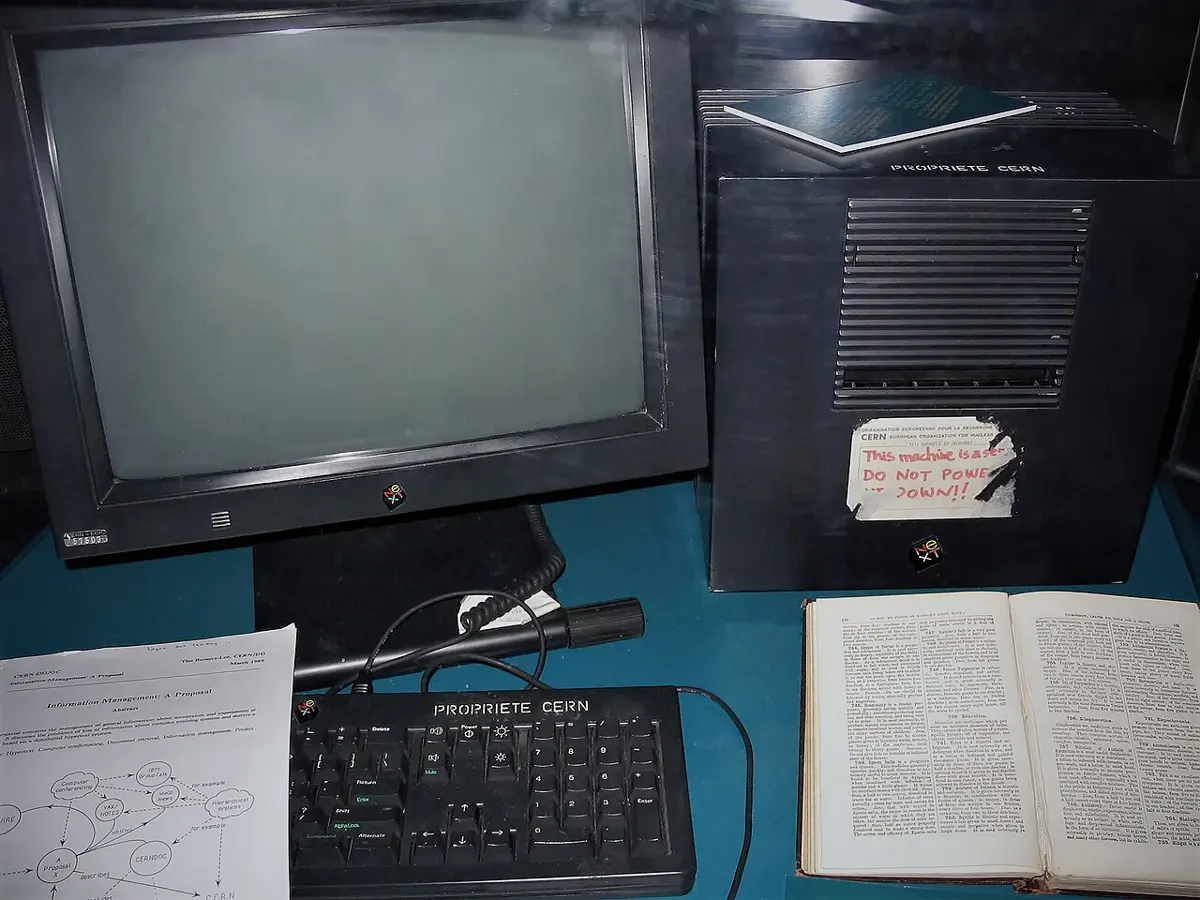
You met the web’s beginning in Unit 1: Tim Berners-Lee invented it in 1989 at CERN in Switzerland, twenty years after “LO”. The internet came first, and the web was built on top of it.
A web address
Every web page has its own address, so a browser can ask for exactly that page. A web address is also called a URL. It has parts, and each part tells you something.
- https:// says the page travels scrambled (the s stands for secure), so that nobody on the way, on the Wi-Fi or at the ISP, can read what you send or receive. Most websites use it now. Many browsers show a small symbol, such as a padlock, beside such an address.
- The domain is the website’s name. Read it from the right. The last part tells you what kind of site it is, or which country: .com was meant for companies, .org for organizations, .np is Nepal’s own ending, and .gov.np is only for Nepal’s government and .edu.np for schools and colleges in Nepal.
- The rest, after the next /, is the page on that website.
Which of these is the web, and not some other use of the internet?
Pick an answer to see why.
A web address ends in .gov.np. What does that tell you?
Pick an answer to see why.
Searching well
There are billions of web pages, and nobody can know where they all are. So people use a search engine: a website that finds pages for you. You type some words, and it shows a list of pages that contain them, the most useful first.
A search engine doesn’t look through the whole web while you wait. Long before you ask, its programs visit pages, follow every link to more pages, and keep a list of which words are on which page, like the index at the back of a book. When you search, it looks your words up in that list and puts the pages in order, best match first. So the words you choose decide what you find.
Choosing the words
- Use the key words, not a whole sentence. For “I want to know how tall the Nyatapola temple in Bhaktapur is”, search nyatapola height. Words like I, want, the are on every page, so they don’t help.
- Add a word that narrows it. monsoon finds the monsoon everywhere; monsoon Nepal 2025 rainfall finds what you need.
- Put words in “quotation marks” to find them together, in that order: “Rara Lake” finds the lake, not pages about rare things and other lakes.
- Check the spelling, and if nothing useful comes up, try other words for the same thing: bike or bicycle, cost or price.
- Search in Nepali too. Typed in Nepali Unicode (Unit 2), नेपालका राष्ट्रिय निकुञ्ज finds pages written in Nepali.
Ads and results
Look carefully at the top of a page of results. Often the first few are not the best matches at all: they are ads, also called sponsored results. A company paid the search engine to show its page there, whatever its quality. The ads are marked, but the mark is small.
Ads are not always bad: if you want to book a tour, an ad for one may be useful. But if you want to know something, skip the ads and read the results, and look at each result’s address before you tap. Some fake shops and scam sites pay for ads too, to appear above the real ones.
Is it true?
Anyone can make a web page, so not everything on the web is true. A few quick checks:
- Who made it? Look at the address and the page’s “About” part. A government office, a university or a well-known newspaper is more likely to be careful than someone you have never heard of.
- Do other sites agree? Check the same fact on two or three sites made by different people. If they disagree, find out why.
- When was it written? A price, a rule or a record from ten years ago may have changed.
- Is it trying to sell you something, or make you angry or scared? Then be extra careful.
In Grade 7 you will learn more ways to check what you find.
You want to find out how many districts Nepal has. Which search is best?
Pick an answer to see why.
The first result on a page of search results is marked Sponsored. What does that mean?
Pick an answer to see why.
Passwords
Many websites and apps let you have an account: your own space on them, with your messages, photos, marks or money, which only you should be able to open. To prove the account is yours, you type a password, a secret word that only you know. A wallet app may use a PIN, a password of numbers.
A thief who guesses your password can read your messages, pretend to be you, or take your money. So how do thieves guess? They don’t sit and try one at a time. A program does it for them, trying the most likely passwords first:
- the most common passwords in the world, like 123456 and password, which millions of people use;
- words and names, from lists of every word in a dictionary and every common name, in English, Nepali and other languages;
- those words with the usual changes: a capital first letter, numbers or a year on the end, @ for a and 0 for o;
- and only then, every possible mix of letters and numbers, starting with the short ones.
When thieves steal a website’s list of passwords (kept scrambled, but sometimes badly), their computers can try billions of guesses every second against it. A password that a person would take years to guess falls in less than a second.
Why longer is so much stronger
Every letter you add multiplies the number of passwords a guesser must try.
A rule for a strong password
Make it from random words: three at least, four or more for the accounts that matter most (your email and anything with money). Pick words that don’t belong together and have nothing to do with you: mango tractor purple violin, not I love my dog and not your name and birthday. Then picture a silly scene to remember it: a purple tractor playing the violin, with a mango on top. Many websites let you keep the spaces; if one doesn’t, join the words or put a dash between them. If a website insists on a capital letter, a number and a symbol, add them, but keep the words.
Why three, or four? The United Kingdom’s National Cyber Security Centre advises three random words, and for most accounts that is good advice: a website that locks you out after a few wrong tries, or keeps its passwords well scrambled, holds out for a very long time against three. The worked example above shows the worst case: a stolen list, badly scrambled, and a very fast computer. Three random words would last about 13 minutes there; four would last months. That is why a fourth word is worth adding where it matters most.
One password, one account
Use a different password for every account. Here is why. Every year, thieves break into some website somewhere and steal its list of email addresses and passwords. Their programs then try each stolen email and password on hundreds of other websites: email, social media, wallets. If you used the same password everywhere, one small website’s bad luck opens all your accounts at once.
But how can anyone remember twenty passwords? Two good ways:
- Write them down, in a notebook kept safely at home, not in your school bag and not on a sticky note on the screen. A thief on the internet can’t reach a notebook in your house.
- Use a password manager: an app that keeps all your passwords locked behind one strong password, and can make up random ones for you.
And never tell your password to anyone, not even your best friend. Friends fall out, and messages get passed on. While you are young, a parent may know your passwords; that is different.
A code sent to your phone
Many accounts also send a short code to your phone when you log in, or when you pay: a one-time password, or OTP. It works only once and only for a few minutes. Even a thief who knows your password can’t get in without that code, because the code goes to your phone. This is called two-step login (or two-step verification): something you know (the password) and something you have (your phone). Switch it on wherever it is offered.
That is exactly why thieves try so hard to get people to tell them the code. Your OTP is for you to type, never to tell. No real bank, wallet company or phone company will ever ask you for it.
Which of these passwords is the strongest?
Pick an answer to see why.
Bimala uses the same password for her email, her social media and a small game website. The game website is broken into. Why is that a danger for her email too?
Pick an answer to see why.
Keeping private things private
Some things about you are fine for anyone to know: your favorite cricket team, the films you liked, a photo of the momos you made. Other things are personal information: things that tell a stranger who you are, where to find you, or how to get into your accounts. Keep these private online:
- your full name together with your home address, or your school and class;
- your phone number;
- your date of birth;
- your passwords, PINs and OTP codes (always);
- where you are right now, or where you will be at a time;
- photos that show your school uniform, your house, or the name of your street;
- the numbers on your birth certificate, citizenship card or passport;
- your family’s bank and wallet details.
Why does it matter? With a few of these, a stranger can find where you live and when you are alone, pretend to be you to your friends, or answer the questions a bank asks to check it is you.
Remember too that what goes online stays online. A photo you post can be copied, saved or screenshotted in a second, and passed on to people you never meant to see it. Deleting it later doesn’t delete the copies. Before posting anything, ask: would I be happy for my parents, my teacher, and a stranger to see this, today and in five years?
The same goes for other people. Ask a friend before you post a photo of them, and never share something they told you in secret.
Rohan wants to post a photo of himself with his new bicycle. In the background are his house, its number and the street’s name. What should he do?
Pick an answer to see why.
Scams
A scam is a trick to cheat people out of money, or out of the passwords and codes that lead to money. A scam message that pretends to come from someone you trust, like a bank, a wallet company or a friend, to make you click a link or give away a code or password is called phishing, because the thief is fishing for your secrets.
Scams in Nepal often look like this:
- A prize you never entered for. “Your number has won Rs 25 lakh in our lucky draw. Pay the processing fee to receive it.” There is no prize; the fee is the scam.
- Someone from “customer support” asks for your code. “I am calling from your wallet company. Your account will be blocked. Tell me the code we just sent.” The code lets them into your account.
- Money “sent by mistake”. A stranger says they sent money to your wallet by accident, shows a screenshot, and asks you to send it back. No money came, and the screenshot is fake.
- A job abroad that is too good to be true. “Huge salary in Japan or Dubai, no experience needed. Pay the registration fee today.” The fee is taken, and there is no job.
- A shop page with prices far too low. A page on a social media app sells the latest phone at a third of its price. You pay first by QR code; the page blocks you and vanishes.
- A parcel waiting for you. “Your parcel is held at customs. Pay the charge at this link.” The link leads to a fake page that takes your card or wallet details.
- A friend asking for money. A message from a friend’s account says they are in trouble and need money now, and not to tell anyone. Thieves take over accounts and message every friend on them.
The warning signs
Scams change their stories, but they almost always show the same signs:
| The sign | What it sounds like |
|---|---|
| Too good to be true | a prize, a huge salary, a phone at a third of its price |
| Pay first | a fee, a tax, a charge before you get anything |
| A secret code or password | “tell us the code we sent you”, “enter your PIN at this link” |
| Hurry | “today only”, “within 24 hours”, “your account will be blocked” |
| A secret | “don’t tell anyone”, “don’t tell your parents” |
| A link or app you didn’t ask for | a short link that hides where it goes, an app to install |
| The wrong sender | a “bank” writing from an ordinary mobile number, an address that isn’t the company’s own |
Hurry and secrets are there for a reason: a scammer wants you to act before you have time to think, or to ask someone who would see through it.
What to do
- Stop. Don’t tap the link, don’t reply, don’t pay, and never tell anyone a code, PIN or password.
- Check another way. If a message says it is from your bank, call the bank on the number printed on your card or passbook, or on its official app, never the number in the message. If it is from a friend, call them or ask them face to face.
- Tell an adult you trust, straight away, even if you already tapped something or sent something. The sooner they know, the more they can save.
- Block and report the sender in the app, then delete the message.
Attacks and what stops them
A cyber attack is any attempt to break into computers, accounts or networks, or to cheat the people who use them. Here are the attacks you have met in this unit, and what stops each one:
| The attack | How it works | What stops it |
|---|---|---|
| guessing a password | a program tries common passwords, words and every mix of letters | a long password of random words; a website that locks after a few wrong tries |
| trying stolen passwords | passwords stolen from one website are tried on others | a different password for every account |
| phishing | a fake message or page tricks you into giving a password, PIN or code | never giving codes; checking another way; two-step login |
| scams that want money | a story (a prize, a job, a cheap phone) gets you to pay first | knowing the signs; never paying first to a stranger; asking an adult |
| taking over an account | a thief who got into an account messages your friends as you | two-step login; friends who check before they send money |
| a harmful app or file | a link installs a program that spies on you or steals from you | installing apps only from the phone’s official app store; not opening files from strangers |
No single defense stops everything. Some defenses are things you know (the signs), some are things you do (one password per account), and some are switched on in the app (two-step login). Together they stop almost every attack aimed at ordinary people. In Grade 7 you will learn about more attacks, such as viruses and other harmful programs, and how to keep your data safe with backups.
A caller says: “I am from your bank. Your account will be closed today unless you tell me the code we just sent to your phone.” What should you do?
Pick an answer to see why.
Which of these is not a warning sign of a scam?
Pick an answer to see why.
Being kind online
Online, it is easy to forget that a real person reads what you write. You can’t see their face when your words hurt. Kind behavior online is the same as kind behavior anywhere: treat people the way you would want to be treated.
Unkind behavior online includes calling people names, laughing at their photos, spreading rumors, leaving someone out of a group on purpose, sharing an embarrassing photo or a private message, and pretending to be someone else. When someone does this to a person again and again, it is called cyberbullying.
Cyberbullying can hurt even more than bullying at school, because:
- it can follow a person home and reach them at any hour, on their own phone;
- a hurtful post can be seen by hundreds of people and copied in seconds;
- it can stay online for years;
- the bully may hide behind a fake name.
Before you post or send anything, ask three questions: Is it true? Is it kind? Would I say it to their face? If the answer to any of them is no, don’t send it.
If you see it happen
You don’t have to be the bully or the person being bullied to make a difference. If you see someone being treated badly online:
- don’t join in, don’t like it, and don’t share it: every share spreads the hurt;
- send the person a kind message, so they know someone is on their side;
- report the post in the app;
- tell an adult you trust.
If it happens to you
- Don’t reply angrily: that is what a bully wants.
- Save the proof: take screenshots of the messages or posts, with the name and the date showing.
- Block the person and report them in the app.
- Tell an adult you trust. It is never your fault, and you won’t be in trouble for telling.
In a class chat group, someone posts an embarrassing photo of a classmate and others start laughing at it. What is the best thing to do?
Pick an answer to see why.
Who to tell
When something online worries you, scares you, or makes you feel bad, tell an adult you trust: a parent or guardian, an older brother or sister, or a teacher. You will not be in trouble for telling, even if you made a mistake first: they would far rather know. Tell them about:
- a stranger who keeps messaging you, asks to meet, or asks for photos;
- anyone who threatens you, or says they will share a photo of you unless you send money or more photos (never send anything; tell an adult at once);
- bullying, of you or of someone else;
- a scam message, or money or a code you already gave away;
- an account of yours that someone else has got into.
Keep the proof: screenshots of the messages, the sender’s name or number, and the dates. Don’t delete the messages until an adult has seen them.
Adults can then report it. In Nepal, crimes on the internet are handled by the Cyber Bureau of Nepal Police, and any police office will help too.
In short
Exercise
What is the difference between the internet and the web?
Pick an answer to see why.
What is an internet service provider?
Pick an answer to see why.
Which is the best reason to use a different password for every account?
Pick an answer to see why.
Which of these is fine to put in a public post?
Pick an answer to see why.
A message says: “You have won a new phone! Pay Rs 1,500 delivery charge within one hour at this link.” Which signs of a scam does it show?
Pick an answer to see why.
What is the difference between the internet and the World Wide Web? Give two examples of things that use the internet but are not the web, and one that is the web.
Answer
Look at this web address: https://www.example-school.edu.np/results/grade-6
- i.What does https tell you?
- ii.What is the domain, and what does its ending tell you?
- iii.Which part names the page on the website?
- iv.Does the https mean the website is honest? Explain.
Answer
Saraswati searches for: what are the names of the animals that live in Chitwan National Park please tell me. Write a better search, and explain why it is better.
Answer
How can you tell an ad from a result on a page of search results? Why does it matter?
Answer
Make a strong password using the rule from this unit (don’t use it anywhere!). Then explain why it is strong, and why you shouldn’t use the same password on two websites.
Answer
List six pieces of personal information that you should not share online, and say why one of them is dangerous to share.
Answer
Read this message, which arrived on a phone from an unknown number:
“Dear customer, your wallet account has been selected for a Rs 50,000 cash reward. To receive it, click the link below and enter your PIN within 2 hours. Do not share this offer.”
- i.Write four warning signs that show it is a scam.
- ii.What should you do?
Answer
Your grandmother gets a phone call: “Hajur, I am from the bank. We have sent a code to your phone. Please read it to me, or your account will be closed today.” She asks you what to do. What do you tell her, and why?
Answer
Give three examples of unkind behavior online. A classmate is being called names in a chat group every day. What can you do to help?
Answer
Name three people you can tell when something goes wrong online, and the part of Nepal Police that handles crimes on the internet. What should you keep to show them?
Answer
A phone’s screen lock is a PIN of 4 digits. How many different PINs are possible? How many would there be with 6 digits? How many times as many is that?
Answer
Kabir’s email password is four random words, and it is different from all his other passwords. One day a caller says he is from Kabir’s email company and asks for the code that has just come to Kabir’s phone. The code was for setting a new password. Kabir reads it out, and the caller sets a new password and gets into his email.
- i.Which attack was this?
- ii.Did Kabir’s strong password help? Explain.
- iii.Which defense would have stopped it?
Answer
Quiz yourself: Safety and society, Grades 6–12 →
Practice every question in the book, and keep track of the ones you miss →