
Three people in one family, on one evening. Bishnu’s grandfather in Gorkha remembers when the only telephone in the village was at the post office, and a call to Kathmandu had to be booked. Bishnu’s aunt works at a bank in Pokhara; a computer checks every payment she makes, and half the customers she used to serve at the counter now pay from their phones. Bishnu’s cousin Dolma lives in Humla. She shares her mother’s phone, the signal comes and goes, and the nearest computer is at the school, two hours’ walk away.
Computers did not just appear. People built them, paid for them and decided what they were for, and each new kind changed how people live and work, in ways nobody planned. Computers also don’t reach everyone in the same way. In this unit you will look at the eras of computing and who shaped each one; at what a new technology was meant to do and what it did as well; at how people in many jobs use the same ways of thinking you have been learning; at the jobs machines take, change and make; at who in Nepal has access to computers and the internet, and who doesn’t; and at how to design technology so that everyone can use it.
The eras of computing
In Grade 6 you followed the story of computing from the abacus to the phone. Now step back and look at it in large pieces. A stretch of time when one kind of computer was the usual kind, and people used it in one main way, is called an era. Each era began when something new became cheap or easy enough to spread; the eras overlap, because old machines stay in use long after new ones arrive.
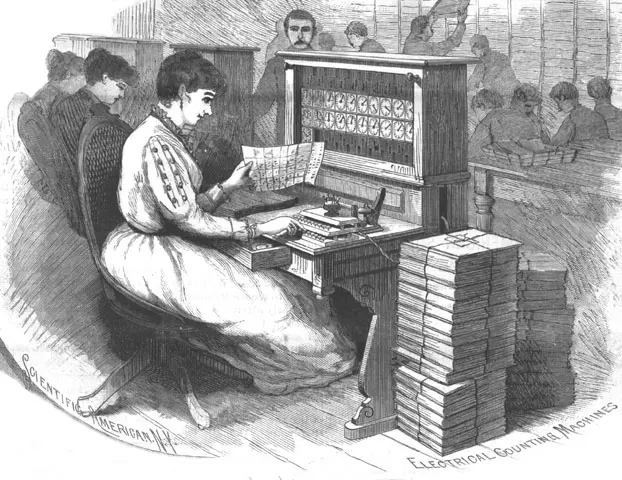
- Gears and punched cards (1640s to 1930s). Machines that added, and later machines that sorted and counted punched cards. They helped people do sums; most computing was still done by human computers, people whose job was to calculate.
- The electronic giants (1940s to 1970s). Computers worked by electricity alone, filled a room, cost a fortune and were run by experts. One computer served a whole organization; later, many people used one at the same time from terminals, a keyboard and screen joined to it by a cable. These big shared computers are called mainframes.
- Personal computers (1970s to 1990s). Cheap chips made a computer small and cheap enough for one person’s desk, at home, at school and in the office.
- The internet and the web (1990s and 2000s). Computers were joined together, and the web made it easy for anyone to publish and read.
- Mobile (2000s onward). The computer moved into the pocket: first phones for calls and text messages, then, from about 2007, phones with touchscreens and apps.
- Cloud and AI (2010s onward). Much of the computing now happens in huge data centers far away, buildings full of computers, reached through the phone; and programs that learn from examples (AI) became part of everyday apps.
Who shaped each era
In Grade 6 you saw that individuals, organizations, governments and communities all play a part. Compare which of them led in each era, and you find a pattern.
| Era | Who led | Why them |
|---|---|---|
| Gears and punched cards | inventors working alone; governments, which needed to count their people | a machine could be built by one person and a workshop; a census is a government’s job |
| Electronic giants | governments and armies (codebreaking, war, the census), big companies, universities | each computer cost millions; only they could pay |
| Personal computers | clubs of people who loved electronics, small new companies, then big companies | chips became cheap enough for anyone to build or buy one |
| Internet and web | a government research network, universities, a physics laboratory that gave the web away, volunteer communities | joining computers needed agreements that everyone shares, and gifts that nobody owns |
| Mobile | phone companies and a few big technology companies; governments, which sell the right to use radio waves | building towers and making billions of phones needs huge companies |
| Cloud and AI | a few giant companies; governments, which write the rules | a large data center costs as much as a big hydropower plant, or more |
So the pattern is: when computing is very expensive, the few who can pay (governments and giant companies) lead. When it becomes cheap, individuals and communities can join in and invent. Look at the newest era: a giant data center is again something only a few can afford.
Nepal’s own eras
Nepal’s story follows the same eras, often a little later, and shows the same pattern of who led:
- Government first. In 1971, for the census, the government rented Nepal’s first computer (Grade 6). For the 1981 census it brought in a bigger British mainframe that 64 people could use at once from their own terminals.
- Companies and scientists join. In 1993 and 1994, the Royal Nepal Academy of Science and Technology and a private company, Mercantile Office Systems, set up Nepal’s first email links; by 1995 the company offered internet service. In May 1999 Nepal’s first mobile phone network, run by the government’s telecom company, began.
- People and communities fill the gaps. Where no company found it worth building, people built for themselves, as you will see in the story of Nangi below.
In which era were computers usually shared by many people, through terminals joined to one big machine?
Pick an answer to see why.
Which is the best reason why individuals and small groups led the personal computer era, when governments had led the era before?
Pick an answer to see why.
Planned, and unplanned
Every technology is made for a purpose. What it was meant to do is its intended effect. But once millions of people use something, it also does things nobody planned: these are its unintended effects. Unintended effects can be good or bad, and they reach both society (how people live, work and treat each other) and the environment (the land, water, air and living things).
The mobile phone in Nepal
When the first mobile network began in 1999, its purpose was simple: to let people make calls without a telephone line, which most villages did not have. It did that. It also did a great deal more that nobody planned:
- Families apart stay together. Many Nepalis work abroad. A cheap call or a video call each week keeps a father in the Gulf close to his children in Dang.
- Money moves by phone. Phones became wallets: people pay shops, fees and bills, and receive money, from a phone, without a bank branch nearby.
- Help arrives faster. After the 2015 earthquake, phones and the internet helped people tell their families they were safe and helped volunteers find who needed help. Flood warnings now reach people’s phones as text messages.
- Farmers and traders know prices in the market before they carry their goods there.
- New harms. Scams by phone and message (Unit 8), cyberbullying and hours lost to endless feeds (Unit 9), and road accidents caused by drivers looking at phones.
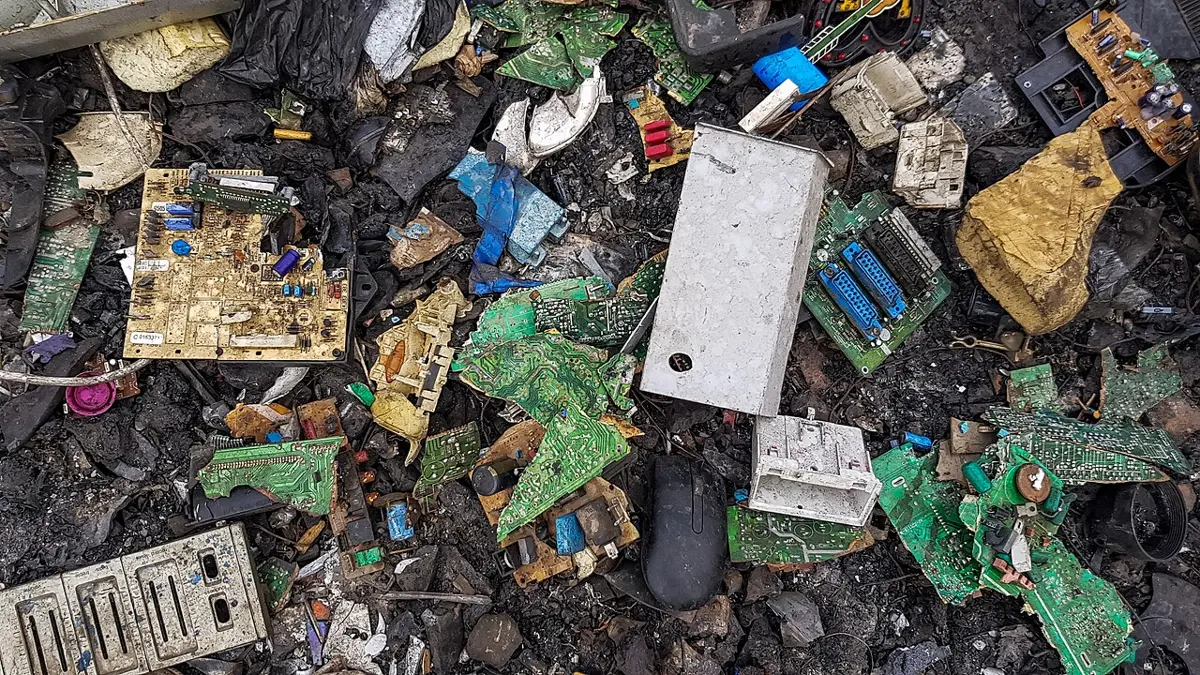
- The environment. Phones and their towers use electricity. Making a phone needs metals dug from mines, some of them in places where children work in dangerous mines. And old phones, chargers and batteries become e-waste (Unit 1), electronic waste, which harms soil, water and people when it is dumped or burned.
The World Wide Web was made at CERN so that physicists could share their papers. Today people shop, learn and spread false news on it. What are these uses?
Pick an answer to see why.
Thinking like a computer scientist at work
You have been learning ways of solving problems: breaking a job into parts in Grade 6, writing exact steps in algorithms and programs. These ways of thinking are not only for programmers. People in many jobs use them every day, often with a computer, sometimes on paper. Together they are called computational thinking: thinking about a problem so that its solution can be carried out step by step, by a person or by a computer. It has four parts, or habits:
- Decomposition: breaking a big problem into smaller parts (you met it in Grade 6).
- Patterns: spotting what repeats, or what is alike, so one solution can be used again.
- Abstraction: keeping only the details that matter for the problem and leaving out the rest. A bus route map is an abstraction: it shows the stops in order and leaves out every house and tree.
- Algorithms: writing the exact steps that solve the problem, so they can be followed the same way every time.
A flood forecaster
Every monsoon, rivers in Nepal can rise within hours. Forecasters at the Department of Hydrology and Meteorology in Kathmandu watch them day and night. Look at how their work uses all four habits.
- Decomposition. “Warn people about floods” is too big a job. Split it: measure the rivers; measure the rain upstream; work out how fast high water travels down the river; know who lives where; send the message.
- Patterns. From past floods, forecasters know how fast a river rises after heavy rain upstream, and how long the high water takes to reach the next town.
- Abstraction. A whole river, with its rocks, colors and fish, becomes a few numbers: the height of the water at each station, and two lines, a warning level and a danger level.
- Algorithm. If the water at a station passes the warning level, send a warning message to phones near the river downstream; if it passes the danger level, send another and alert the police and local officials. A computer can follow these steps every few minutes, without sleep.
Three more workers
| Worker | The problem | Computational thinking in it |
|---|---|---|
| a dairy cooperative’s manager in Chitwan | pay each farmer fairly for milk | abstraction: each delivery becomes liters and how much fat the milk has; algorithm: price = liters × the rate for that fat level, the same for everyone; patterns: whose milk drops in the dry season |
| a nurse at a health post | make sure every child gets each vaccine on time | decomposition: one list per vaccine and age; algorithm: each week, find children who reach the age for a vaccine and haven’t had it; patterns: a ward where many miss their dose |
| a programmer making a bus ticket app | sell seats without selling the same seat twice | decomposition: search, choose a seat, pay, ticket; algorithm: hold a seat while one person pays, release it if they don’t; abstraction: a bus becomes a grid of seat numbers |
A trekking guide plans a 10-day route by dividing it into one day at a time: where to walk, where to sleep, where to buy food. Which habit is this?
Pick an answer to see why.
A map of a city’s bus routes shows the stops in order but leaves out the buildings and trees. Which habit is this?
Pick an answer to see why.
Machines that take, change and make jobs
When a machine does work by itself that people used to do, it is called automation. Automation is as old as Jacquard’s loom (Grade 6), and computers have made it spread to almost every job.
Automation does three different things to work:
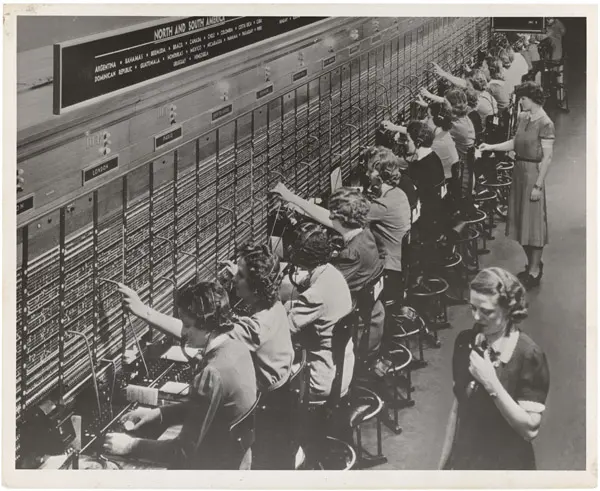
- It replaces some tasks, and sometimes whole jobs. The human computers of the 1940s did sums by hand; electronic computers took that job. Telephone operators once connected every call by plugging a cable into a board; automatic exchanges took over.
- It changes most jobs. A bank still has people at the counter, but ATMs and phone banking count out the cash and move the money, so bank staff now spend more of their time on loans, problems and advice.
- It creates new jobs that didn’t exist before: people who repair phones, write apps, run computer networks, deliver what people order on apps, or design websites.
Usually automation takes over tasks, the parts of a job that repeat in the same way every day, before whole jobs. Tasks that need judgment, care for people, or hands working in changing places, such as nursing, teaching, plumbing or farming on a hillside, are much harder to automate.
Who gains, and who pays?
New jobs don’t always go to the people who lost the old ones. A telephone operator didn’t become a network engineer overnight; she needed new skills, and many people were too old, too poor or too far from a training center to learn them. So the same automation can be good for a country and still hard on particular people. Whether it ends well depends on choices people make: whether workers can learn new skills, and whether the people who gain help the people who lose.
A bank opens three ATMs in a town and needs fewer staff to count cash, but more to help customers with loans and phone banking. What has automation done to the bank teller’s job?
Pick an answer to see why.
Who has access, and who doesn’t
Access to computing means being able to use computers and the internet when you need them. It needs five things together: a device (a phone or computer); a connection (a signal, and electricity to charge); money for the device and for data; the skills to use it; and apps and websites that work in your language and for your body, whether or not you can see, hear or move easily. Take away any one, and access is gone.
The gap between people who have access and people who don’t is called the digital divide. In Nepal, as everywhere, it depends on:
- Place. A town with fiber cable and towers on every hill, or a valley in Karnali where the signal comes and goes.
- Money. A smartphone and a monthly data pack cost far more, compared with what a family earns, for a poor family than for a rich one; a computer even more.
- Age. Many grandparents never learned, and apps are rarely designed with them in mind.
- Being a woman or a man. In many families the man has his own phone and the woman shares it, or has none.
- Ability. A blind person, or someone who can’t use their hands well, can use a phone only if it and its apps are built so they can.
- Language and schooling. Most apps and websites are in English or Nepali; many people’s first language is Maithili, Bhojpuri, Tharu, Tamang or one of the more than a hundred other languages of Nepal.
As of MICS 2024–25, Nepal’s national survey, which gap in using the internet was larger: between the poorest and richest families, or between women and men?
Pick an answer to see why.
Designing for everyone
Look at the edge of a footpath where it meets the road. In many cities, a small ramp has been cut into it. It was made for people in wheelchairs. But parents with prams use it, and so do porters with heavy loads, cyclists, and anyone pulling a suitcase. Something designed for people who need it most often turns out better for everyone.
Designing so that as many people as possible can use something, whatever their age, ability, language, money or place, is called designing for everyone (designers also call it inclusive design or universal design). For an app or website it means:
- Text that can grow and can be read: it gets bigger when the phone’s text size is set larger, and it is dark on light (or light on dark), never pale gray on white.
- Your language: Nepali as well as English, and more languages where the users speak them.
- Never color alone: “Open” in words as well as a green dot, because some people, most of them men, can’t easily tell red from green.
- Named buttons: every button and picture has a name that a screen reader (Grade 6) can read aloud, not just “button”.
- Big targets: buttons large enough to tap with a shaking finger.
- Light pages: pages that open on a weak signal and use little data.
- Another way in: a text message or a phone number for people with a basic phone, and a counter for people with none.
- Captions on videos, and plain words in short sentences.
A government app shows whether an office is open with only a green or red dot. Who does this fail most?
Pick an answer to see why.
Project
In short
Exercise
Put these eras in order, oldest first.
Pick an answer to see why.
Who paid for most of the first electronic computers in the 1940s?
Pick an answer to see why.
Which of these is an unintended effect of the mobile phone in Nepal?
Pick an answer to see why.
A forecaster turns a whole river into a few numbers: the water’s height at each station. Which habit of computational thinking is this?
Pick an answer to see why.
Which job did computers create?
Pick an answer to see why.
Which design change helps a person who is blind?
Pick an answer to see why.
Name the six eras of computing in order. For each, write roughly when it was and name one person or group who shaped it.
Answer
Compare the role of governments in the era of the electronic giants and in the era of personal computers. Why was it different?
Answer
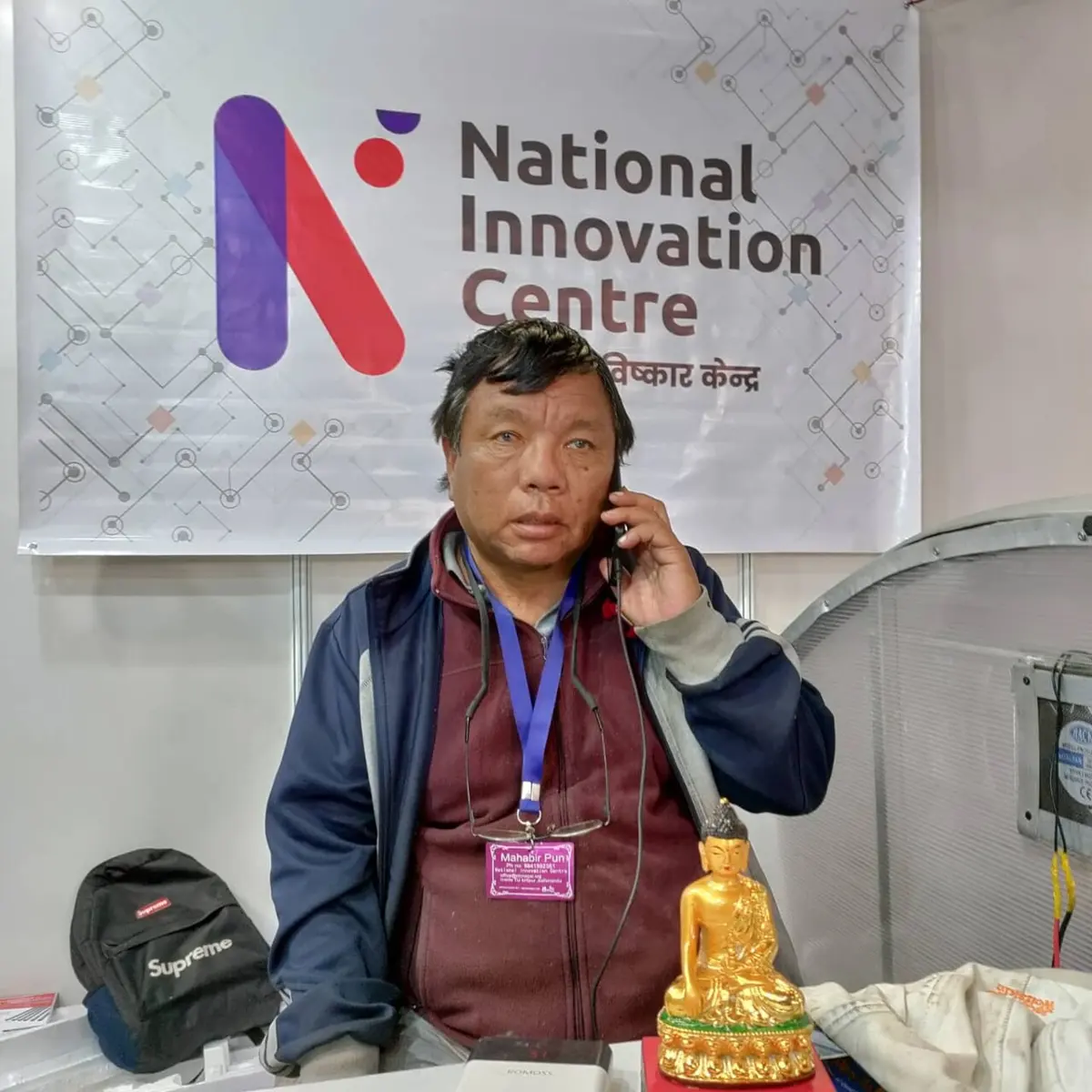
Mahabir Pun brought the internet to Nangi. Was he acting as an individual, an organization, a government or a community? Explain why no company had done it first.
Answer
What is the difference between an intended and an unintended effect of a technology? Give one intended effect, one helpful unintended effect and one harmful unintended effect of the mobile phone in Nepal, and one effect on the environment.
Answer
Name the four habits of computational thinking and explain each in one sentence. Then show how a nurse who makes sure every child in a ward is vaccinated on time uses each.
Answer
What is automation? Explain, with one example of each, how automation can replace, change and create jobs.
Answer
Why are tasks that repeat in the same way every day the first to be automated? Give two jobs in Nepal that will be hard to automate, and say why.
Answer
Bishnu says: “Almost every household in Nepal has a mobile phone, so everyone has access to the internet.” Explain what is wrong with this, using the five things access needs.
Answer
Using the survey numbers in this unit, describe how access to the internet in Nepal differs by place, by family money, by age and by being a woman or a man. Which gap is largest?
Answer
A school makes a website for parents to see their children’s results. List five things its designers should do so that every parent can use it, and say who each helps.
Answer
“Design for the people who need it most, and you help everyone.” Do you agree? Give two examples.
Answer
Quiz yourself: Safety and society, Grades 6–12 →
Practice every question in the book, and keep track of the ones you miss →