
Most school projects end on the day they are presented. The app works on the team’s phone, the teacher gives marks, and nobody opens it again. That isn’t because the students were lazy. It is because nobody asked, early enough, the questions that decide whether real people will use something: who is it for, what do they do now, would they understand it without help, and is it really better than what they already have?
This unit is the year’s making unit. You will take one app from an idea to people using it, the way good product teams do: find out who it is for by listening to them; write what they need as user stories; draw the app on paper and test the sketch with real people before writing code; build a working first version, with a server where it needs one (Unit 6); measure how well it works for its users and check it against what it had to do; and release a second version, better because of what you saw. In Grade 10 you learned how a team plans and builds together Grade 10: A Project in a Team. Here the question is different: not “can we build it?” but “will people use it, and how do we know?”
You will follow four Grade 11 students at a school in Bhaktapur, Aashma, Nischal, Pooja and Rojan, through one app from start to finish. They, their school and their numbers are made up; the problem and the methods are real.
Who is it for?
Rojan had the idea in his first weeks of Grade 11. After his SEE, his family had sold his Grade 10 books to the kawadi, the scrap dealer, by the kilo, for less than the price of one new book. The same week, his cousin’s family bought a full new set for Grade 10. “We should make an app,” he said, “an online shop for old books. Students sell, students buy.”
It sounds like a good idea. But notice what it is: a solution. It already says what will be built (a shop), who will use it (students who sell and buy), and how (online, with money). Every one of those guesses might be wrong. A team that starts building now will spend weeks on a shop that people may not want.
So the team did what Grade 8 and Grade 10 taught: they started with people, not with an idea Grade 8: Start with people. In two weeks they talked to fourteen people: eight students from Grades 8 to 10, three parents, two teachers and the school librarian. This section is about doing that well, which is harder than it sounds.
Interviews that find the truth
People are kind. If you describe your app and ask “Would you use it?”, almost everyone says yes. It costs them nothing to say, it makes you happy, and it tells you nothing. Many of those kind people would never open the app.
Three rules get past the kindness. They are from a short book written in 2013 for people starting businesses, Rob Fitzpatrick’s The Mom Test, named after the idea that even your mother, who loves you and will praise anything you make, can’t mislead you if you ask the right questions.
- Talk about their life, not your idea. Don’t describe the app at all in an interview. Ask how they do the thing now.
- Ask about real times in the past, not opinions about the future. “Tell me about the last time you got your books for a new year” gives you a true story. “Would you…?” and “How much would you pay…?” give you guesses.
- Listen more than you talk. Ask “why?” and “what happened then?”, and let silence sit: people often fill it with the most useful thing they say.
A question that tells the person which answer you want is a leading question: “Don’t you think buying new books every year is a waste?” Most people will agree, and you will have learned only that they are polite.
Here is part of the team’s interview with Sunita, a Grade 8 student, written up the way they wrote every one: what was asked, what she said, in her words where they could.
interview-07.txt
Sunita, Grade 8, 12 Bhadra. Asked by Pooja; notes by Nischal. Q: Tell me about the last time you got books for a new year."Last Baisakh. Buwa took me to the bookshop near the bus park. The list from school had eleven books. We bought nine; two were out of stock for three weeks."Q: Did you think about getting used ones?"My didi's books were the old edition. The Science teacher said we must have the new one, page numbers are different."Q: What happened to your didi's books?"Still under her bed. Nobody wanted them."Q: Would you take books from a student you don't know?"From school, yes. Not from someone's house. Mamu won't let me go."(She said Buwa paid "a lot" but didn't know how much.)Notice what the questions did. None of them described an app. Each one asked about something that really happened, and each answer led to the next question. And look at what came out that nobody on the team had guessed: the edition matters, the books are often still under a bed, and meeting a stranger is a real worry for a younger student and her parents.
Which interview question will tell the team the most about what students really do?
Pick an answer to see why.
Sorting what you heard
Fourteen interviews filled forty pages of notes. The team needed to find what they said together: the needs that came up again and again. They used an affinity diagram: each single thing someone said or did goes on its own small card or sticky note; the team puts the notes on a wall and moves them around, saying nothing about what the groups should be, until notes that belong together sit together; only then does each group get a name.
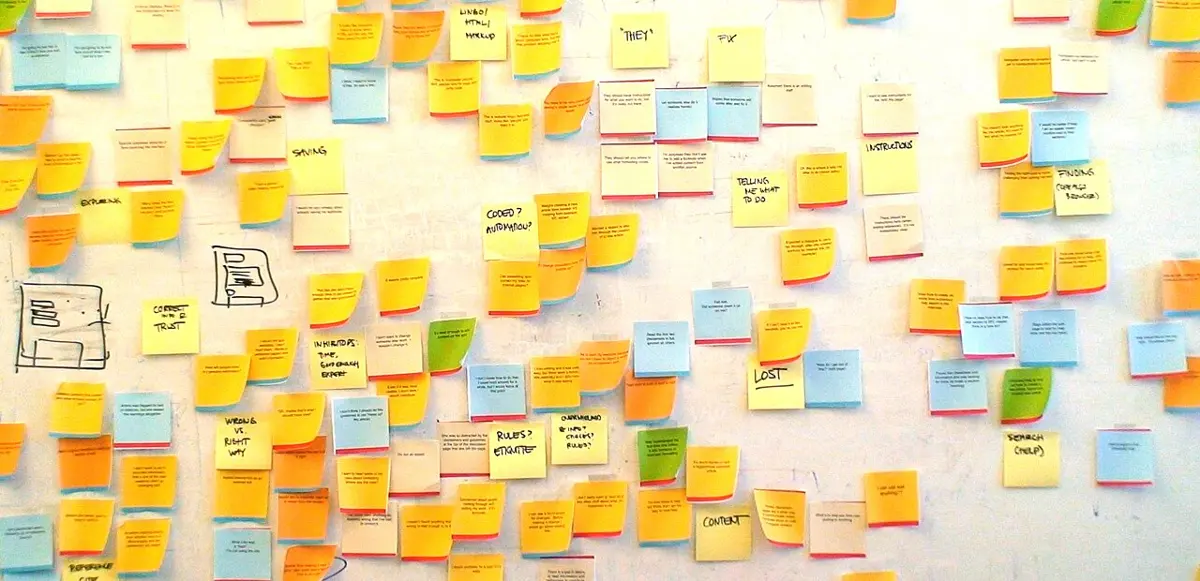
When the team’s notes were sorted, five groups stood out:
| Group (the team’s name for it) | Some of the notes in it |
|---|---|
| Old books go to waste | “Still under her bed.” “Sold to the kawadi by the kilo.” Five of the eight students had old books at home nobody used. |
| The edition matters | “The teacher said we must have the new one.” Two parents had once bought a used book of the wrong edition. |
| Strangers and money are a worry | “Not from someone’s house.” “Bargaining with seniors is embarrassing.” A parent: “Who is this person my daughter is meeting?” |
| The week before school starts is the rush | Shops run out; families buy in the first week of Baisakh. |
| The library could help | The librarian: “I have empty shelves in Chaitra. I could hold books for a week.” |
These groups were the needs. And they changed the idea completely. Nobody needed an online shop. Students and parents needed last year’s books to reach next year’s students, safely and in the right edition, at the time of year they buy books, with no money and no strangers involved. The school library was the natural place for the books to change hands. The app the team went on to build, Pass It On, lists the books handed in to the library, lets a student keep one, and tells them when to collect it.
Who are the users?
An app usually has more than one kind of user, each with different needs. The people the app is mainly for are its primary users: here, the students who will take books. But the givers, the parents who pay for books and worry about safety, and the librarian who holds and hands out the books are users too, and so are people who never touch the app but are affected by it. Everyone who is affected by the app, or who can affect whether it succeeds, is called a stakeholder. The principal who allows the library to be used, and the bookshop near the bus park, are stakeholders.
A team writes down, before designing, who the app is for:
For: students of our school going into Grades 8 to 10, who need that grade’s books (primary). Also: students giving last year’s books; their parents; the librarian, who runs swap day. Not for: selling books, or anyone outside the school.
That last line matters as much as the first. Every “not for” is a decision that keeps the app small enough to build well.
Who is a stakeholder of Pass It On but not a user of the app at all?
Pick an answer to see why.
User stories
In Grade 10 you wrote numbered requirements, each with a test Grade 10: Requirements you can test. A user story is a way of writing a requirement from the user’s side: who wants something, what they want to do, and why. It is usually written in one sentence of three parts:
As a <kind of user>, I want <to do something>, so that <the reason, what it gets them>.
For example:
As a student going into Grade 9, I want to see which Grade 9 books are on offer, so that I don’t buy new ones I could get free.
Each part does a job. Who reminds everyone that a real kind of person, met in the interviews, has this need. What says what they want to get done, not how the app will do it. Why carries the reason, and the reason helps the team choose between designs: if the point is not buying books you could get free, then showing the books early, before families go to the shop, matters as much as the list itself.
A story stays small: something a user can do, and the team can build and test, in a few days. “As a student, I want to use the whole app” isn’t a story; it is everything.
Acceptance criteria
A story says what a user wants. It doesn’t yet say exactly when it is done. So each story gets a few acceptance criteria: exact conditions it must meet, each of which can be tested. A common way to write them is Given, When, Then: the situation, the action, and what must happen.
S3. As a student, I want to keep a book for myself, so that nobody else takes it before swap day.
- Given a book nobody has kept, when I type my class and roll number and tap Keep, then the book is kept for me, and the page tells me where and when to collect it.
- Given I haven’t typed my class and roll number, when I tap Keep, then nothing is kept, and the page asks for them.
- Given someone else has just kept the book, when I tap Keep, then I am told it has gone, and nobody gets it twice.
Each criterion is a test waiting to be written. You will see these three again as the tests under the app’s page, later in this unit.
Here are Pass It On’s stories, numbered as Grade 10 numbered requirements:
| No. | User story |
|---|---|
| S1 | As a student going into a new grade, I want to see that grade’s books on offer, so that I don’t buy new ones I could get free. |
| S2 | As a parent, I want to see each book’s edition and condition, so that we don’t take one the teacher won’t use. |
| S3 | As a student, I want to keep a book for myself, so that nobody else takes it before swap day. |
| S4 | As a student giving my books, I want to hand them all in at one place, so that I don’t have to meet strangers or argue about money. |
| S5 | As the librarian, I want a list of the books kept for each class, so that I can hand them out quickly on swap day. |
| S6 | As a student who kept a book, I want to know when and where to collect it, so that I don’t miss swap day. |
And the quality requirements, from the same interviews: it must work on cheap phones over a slow connection; a student going into Grade 8 must be able to keep a book without help; and it must show nobody’s name or phone number to anyone else.
A story map: what goes in version 1?
Six stories, and more ideas arriving every day: search by title, reminders, a chat. The team can’t build them all at once, and shouldn’t try. So they drew a story map: the steps of the user’s journey from left to right along the top, in the order they happen, and under each step the stories for it, the most needed at the top.
Then they cut the map with lines across it into slices. The top slice is version 1: the smallest set of stories with which a real person can go the whole way, from handing in a book to collecting one. It is thin, but it is complete. Version 2 adds to every step; the rest waits.
Why slices across the whole journey, and not one step finished perfectly first? Because a beautiful “find a book” screen with no way to keep or collect a book can’t be used by anyone, so it can’t be tested with anyone. A thin, complete version 1 is in users’ hands weeks earlier, and what they do with it decides what goes into version 2. This is Grade 10’s “thinnest version that goes all the way through” Grade 10: Building in stages, planned from the user’s journey. A first version with just enough in it to be used and learned from is often called a minimum viable product.
What should version 1 of an app contain, according to the story map?
Pick an answer to see why.
Test it on paper before you build
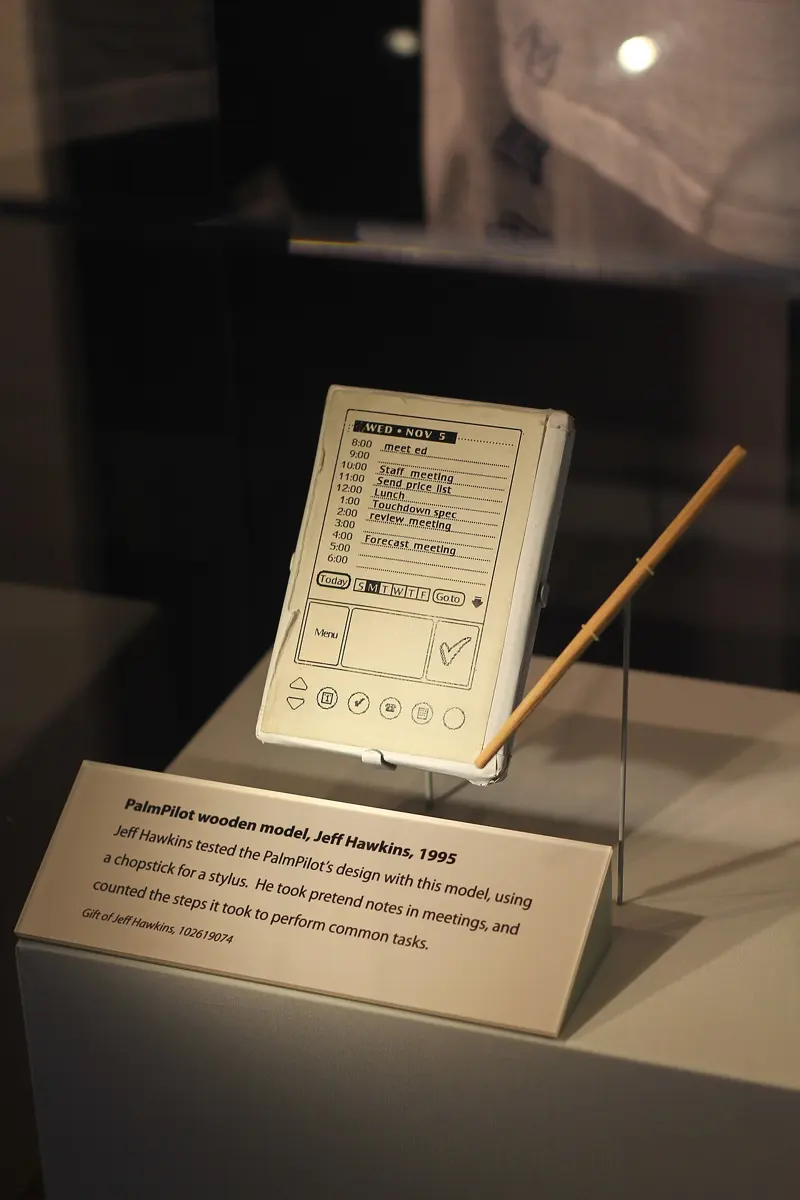
Changing a sketch takes a minute. Changing a program takes hours; changing one that people already use takes much longer, and annoys them. So designers test their ideas as prototypes: early, rough versions made to learn from, not to keep.
Prototypes differ in their fidelity: how close they are to the real thing.
- A low-fidelity prototype is a sketch: screens drawn by hand on paper or cards, the size of a phone. A team can make one in an hour and redraw a screen in the middle of a test.
- A clickable prototype is the same screens drawn on a computer or phone, linked so that tapping a button opens the next screen. Nothing behind it works; it only looks as if it does.
- A high-fidelity prototype looks and behaves almost like the finished app, but is still built to be thrown away.
Low fidelity is not a weakness. A rough sketch tells the tester “this isn’t finished, tell me what’s wrong,” and they do. A polished screen makes people polite again, and makes the team reluctant to change what took so long to make.
Running a prototype test
A prototype test is a short meeting with one tester at a time, about fifteen minutes, run the same way for everyone. In a team of four:
- the facilitator welcomes the tester, gives the tasks and keeps quiet;
- the note-taker writes down what the tester does and says, and the time;
- for a paper prototype, one member plays the computer: when the tester taps a drawn button, they put down the next screen, without a word;
- the fourth watches, or is next week’s tester’s facilitator.
The tester gets tasks, not instructions. A task is a goal from a user story, in the user’s words: “Next year you will be in Grade 9. Get a used Grade 9 Science book kept for you.” Not “Tap Browse, then tap Science.” If you tell them where to tap, you are testing whether they can follow you, not whether they can use the app.
Then ask the tester to think aloud: to say what they are looking for, what they expect to happen, and what surprises them, as they go. “I want Science… I don’t see it… maybe the menu?” Thinking aloud shows you why a tester goes wrong, not only that they did. The method was brought into computing by Clayton Lewis at IBM in 1982, from the way psychologists studied problem solving, and it is still one of the most used ways to test a design.
The hardest part is for the facilitator: don’t help. When a tester is stuck and looks at you, say “What would you do if I weren’t here?” Every time you help, you hide a problem that every real user will meet alone. And say at the start: “We are testing the app, not you. If something is hard, that is the app’s fault, and it’s exactly what we need to find.”
Now be a tester yourself. The team’s first sketch, Sketch 1, and the one they drew after five tests, Sketch 2, are below as clickable prototypes.
Here is what the team wrote down from the five tests of Sketch 1, and what they changed:
| What testers did or said | Change in Sketch 2 |
|---|---|
| 4 of 5 scrolled through “All books” looking for their grade; only one found the filter in the ☰ menu. | The first screen asks “Which grade will you be in?” |
| “Request swap? I don’t have a book to swap.” Two testers stopped here. | The button says what it does: “Keep it for me”. |
| One tester tapped “Message the giver” and saw a phone number: “Is that Rojan’s real number?” | No messages and no phone numbers: the library handles the swap. |
| A parent: “Which edition is it?” The edition was only on the book’s own page. | The edition and condition are on the list, with the edition the teacher uses. |
| “Swap day: Baisakh 2” was on the first screen only; nobody remembered it at the end. | The last screen says when and where to collect, and what to bring. |
Five tests of a paper sketch, about two hours in all, found the problems that would otherwise have reached every user. The team built nothing until Sketch 2 tested well.
A tester is stuck on a screen and asks the facilitator, “Where do I tap?” What should the facilitator say?
Pick an answer to see why.
A working first version
With a sketch that tested well, the team built version 1, the top slice of the story map. Your Grade 9 web apps ran entirely in the browser. This one can’t, and deciding why is the first design decision of any app.
Does it need a server?
Unit 6 gave the rule: the browser belongs to the user, the server belongs to you Grade 11: What runs where. For an app as a whole, ask two questions:
- Is the data shared between people? If what one person does must be seen by others (a book kept by one student must show as kept on everyone’s phone), the data must live in one place that everyone asks: a server. A bill splitter, a unit converter or a personal timetable shares nothing, and can run in the browser alone.
- Must something be decided once, fairly, for everyone? Only one student can have a book. If each phone decided for itself, two phones could both say yes. One server must decide, and every phone must accept its answer.
Pass It On says yes to both, so it has a server part. The page asks; the server checks and decides; only the server touches the database Grade 11: Building both sides.
The team also decided what not to store, before writing a line of code. The interviews said nobody should see anyone else’s name or phone number. So the server keeps, for a kept book, only the class and roll number the student typed (8B-14), which the librarian checks against the student’s ID card on swap day, and it never sends even that to anyone’s phone. Collecting only what the app really needs is called data minimization, and it is easiest at the start: data you never collected can’t leak, can’t be misused, and needs no protecting.
The server’s part
Here is the server part of version 1, as a module, bookswap.py, in the style of Unit 6’s lost-and-found board. It answers two requests: the list of a grade’s books, and keeping one. As in Unit 6, the database lives in memory on this page.
bookswap.py
"""Pass It On's server part: the books on offer, and keeping one for a student."""import jsonimport reimport sqlite3from urllib.parse import urlsplit, parse_qs db = sqlite3.connect(":memory:") # on a computer: "books.db", kept on the diskdb.execute("""CREATE TABLE IF NOT EXISTS books ( id INTEGER PRIMARY KEY, grade INTEGER NOT NULL, subject TEXT NOT NULL, edition TEXT NOT NULL, condition TEXT NOT NULL, kept_for TEXT)""")db.executemany("INSERT INTO books (grade, subject, edition, condition) VALUES (?, ?, ?, ?)", [ (9, "Science and Technology", "2081", "good"), (9, "Mathematics", "2081", "notes in pencil"), (10, "Science and Technology", "2081", "good"), (9, "Science and Technology", "2079", "cover torn"),])db.commit() def answer(status, data): """A response: the status code, and the body as JSON text.""" return status, json.dumps(data, ensure_ascii=False) def handle(method, address, body=""): """The server: one request in, one response out.""" parts = urlsplit(address) if parts.path == "/books" and method == "GET": grade = parse_qs(parts.query).get("grade", [""])[0] if not grade.isdigit(): return answer(400, {"error": "Say which grade, such as /books?grade=9"}) rows = db.execute("""SELECT id, subject, edition, condition, kept_for IS NOT NULL FROM books WHERE grade = ? ORDER BY subject, id""", (int(grade),)) return answer(200, [{"id": i, "subject": s, "edition": e, "condition": c, "kept": bool(k)} for i, s, e, c, k in rows]) keep = re.fullmatch(r"/books/(\d+)/keep", parts.path) if keep and method == "POST": try: student = json.loads(body).get("student") except (json.JSONDecodeError, AttributeError): return answer(400, {"error": "The body must be a JSON object."}) if not isinstance(student, str) or not re.fullmatch(r"\d{1,2}[A-Z]?-\d{1,3}", student): return answer(400, {"error": "Give your class and roll number, such as 8B-14."}) book = int(keep[1]) done = db.execute("UPDATE books SET kept_for = ? WHERE id = ? AND kept_for IS NULL", (student, book)) db.commit() if done.rowcount == 1: return answer(200, {"kept": book}) if db.execute("SELECT 1 FROM books WHERE id = ?", (book,)).fetchone(): return answer(409, {"error": "Someone has just kept this book."}) return answer(404, {"error": "There is no book " + str(book) + "."}) return answer(404, {"error": "Nothing at " + parts.path})- Lines 32 to 39:
GET /books?grade=9reads the grade from the address’s query string, the part after?, withurlsplit()andparse_qs(). It sends each book’s subject, edition and condition, and only whether it is kept (kept_for IS NOT NULL), never who kept it. - Lines 40 to 47:
POST /books/1/keepreads the student’s class and roll number from the JSON body, and checks its shape with a regular expression (Unit 9): one or two digits, perhaps a section letter, a dash, a roll number. - Lines 48 to 56: the decision, explained below. Status 409 Conflict means the request was sensible but clashes with the data as it is now: someone else has already kept this book.
Now be two students at once:
import jsonfrom bookswap import handle def show(grade): """The list a student's phone would show for a grade.""" status, text = handle("GET", "/books?grade=" + str(grade)) for book in json.loads(text): mark = "kept" if book["kept"] else "free" print(book["id"], book["subject"], book["edition"], "-", book["condition"], "-", mark) show(9)print(handle("POST", "/books/1/keep", '{"student": "8B-14"}'))print(handle("POST", "/books/1/keep", '{"student": "8A-3"}'))print(handle("POST", "/books/2/keep", '{"student": "Sita"}'))show(9)Output
2 Mathematics 2081 - notes in pencil - free1 Science and Technology 2081 - good - free4 Science and Technology 2079 - cover torn - free(200, '{"kept": 1}')(409, '{"error": "Someone has just kept this book."}')(400, '{"error": "Give your class and roll number, such as 8B-14."}')2 Mathematics 2081 - notes in pencil - free1 Science and Technology 2081 - good - kept4 Science and Technology 2079 - cover torn - freeThe first student gets book 1. The second, asking a moment later for the same book, is told it has gone. “Sita” isn’t a class and roll number, so nothing is kept for her, and the list afterwards shows book 1 kept without saying for whom.
One book, one student
Look closely at how the server decides. It doesn’t first look up whether the book is free and then, in a second step, mark it kept. It does both in one SQL statement: “set kept_for, but only where it is still empty.” The database carries out a single statement as one step that nothing else can come between. Then the server reads rowcount, the number of rows the statement changed: 1 means this student got the book; 0 means it had already gone.
Two steps would be the race condition of Unit 4 Grade 11: Threads again. On swap-day eve, two students tap Keep on the same book within a second. Both requests read “free”; both write their roll number; the second overwrites the first; both phones say “Kept for you”. Two students arrive at the library for one book. A server serving many users at once must make each decision in one step that can’t be split, as this one does.
The page
The page is HTML, CSS and JavaScript (Grade 9), and on a computer it asks the server with fetch(), as Unit 6’s page did. On this book’s page there is no server to ask, so in the version below, an array in script.js stands in for the server’s answer to GET /books. Everything else is the real page, and it runs on a phone.
This is version 1 as the team first built it, with the three acceptance criteria of S3 and one of S1 written as tests underneath, and the feedback of the first people who used it. Use it as a student would: choose Grade 9, type a class and roll number, and keep a book.
The team’s own tests would have caught Sunita’s empty list before any user saw it, if they had run them. They hadn’t: the first person to choose a grade, in the first user test, found a page with no books on it. They fixed the one line in front of her and carried on, red in the face. Write the acceptance criteria as tests before the first user test, and run them all.
With only a phone, you can still build and test version 1: write the page in an editor like the one above, with the data in an array as here, and test it by handing your phone to your testers. Every user test in this unit works that way. What needs a computer is the server part and putting it online; on an Android phone, Unit 6’s project shows how a terminal app can run a Python server for testing on the phone itself.
Which of these apps needs a server part?
Pick an answer to see why.
Why does Pass It On’s server keep the student’s class and roll number, but never send it to anyone’s phone?
Pick an answer to see why.
Measuring how well it works
In Grade 10 you measured a user test by success, time, mistakes and help, with a rating at the end Grade 10: Testing with users, and measuring. Now you will measure in a way that lets two versions be compared fairly, and check the app against everything it had to do. The team tested version 1 with five new students going into Grades 8 to 10, each on their own phone, with one task: keep a Grade 9 Science book (or their own grade’s) for yourself.
Three numbers for each task
- Completion rate: how many testers finished the task without help, out of how many. Version 1: 4 of 5. Kabita, who uses a screen reader, couldn’t: the boxes had no names and Keep wasn’t a button.
- Time on task: how long each tester who finished took. Version 1: 31, 38, 44 and 95 seconds.
- Errors: actions that went wrong, whether or not the tester noticed. Version 1: 3 of 5 tapped Keep before typing their class and roll number, and the page “kept” a book for nobody.
With so few testers, write the counts themselves: “4 of 5”, not “80%”. A percentage of five people sounds more exact than it is, and one more tester could move it by twenty points.
For times, use the median, the middle value when they are sorted, not the mean. One slow tester (a phone call in the middle, a long look at every book) pulls the mean a long way, but hardly moves the median.
A questionnaire: the System Usability Scale
Watching tells you what people did. A short questionnaire after the tasks tells you how it felt, in a form you can compare. The most used one is the System Usability Scale (SUS), written by John Brooke at Digital Equipment Corporation in Britain in 1986, published in 1996, and free for anyone to use. The tester answers ten statements from 1 (strongly disagree) to 5 (strongly agree), and the answers become one score from 0 to 100.
The statements take turns: the odd ones say something good about the app, the even ones something bad. That stops a tester from ticking 5 all the way down without reading, but it means the answers can’t simply be added. Each odd statement scores its answer − 1; each even statement scores 5 − its answer; so every statement gives 0 to 4 points, and 4 is always the good end. The total, out of 40, is multiplied by 2.5 to give a score out of 100.
What is a good score? It is not a percentage: 68 doesn’t mean “68% usable”. A score means something only beside other scores. Jeff Sauro, an American researcher, collected the SUS scores of about 500 studies and found an average of about 68, so a score above 68 is better than most apps people have tested, and a score below 50 is a sign of real trouble. The five testers’ SUS scores for version 1 were 35, 47.5, 52.5, 55 and 62.5: a median of 52.5.
Checking it against its specification
A test with users shows how the app works for them. The specification says what the app had to do: the stories and their acceptance criteria, and the quality requirements. Checking against it is Grade 10’s evaluation Grade 10: Evaluating against the specification, with two things added.
Usability targets, set before testing. Before the first test, the team wrote down what “good enough” would mean: 4 of 5 testers keep a book without help; median time under 60 seconds; median SUS 68 or more. Set the target first, then measure. A target written after seeing the results always seems to have been met.
Accessibility, against a standard. Grade 9’s checklist Grade 9: Apps everyone can use comes from the Web Content Accessibility Guidelines (WCAG), written by the World Wide Web Consortium, the body that writes the web’s standards. Their version 2.2, of October 2023, is the one many organizations now aim for, usually at its middle level, called AA. A few of its rules that a school app can check by hand:
| WCAG 2.2 asks | How to check it |
|---|---|
| Text has a contrast of at least 4.5 : 1 with its background (3 : 1 for large text). | A contrast checker in the browser’s developer tools, or the checks under this book’s editor. |
| Things to tap are at least 24 × 24 CSS pixels, or have space around them. | Measure in developer tools; phone makers advise bigger, about 44 to 48. |
| Every box has a name a screen reader can say, and everything works with a keyboard. | Use the app with the phone’s screen reader switched on, eyes closed; then with only the Tab and Enter keys. |
| Nothing is lost when text is made twice as big, or the screen is 320 pixels wide. | Zoom to 200%; set the developer tools to a narrow phone. |
| Messages that appear are announced, not only shown. | role="status"; listen with the screen reader. |
Then two checks that matter in Nepal as much as any standard: a cheap phone on a slow connection (the team tested on a five-year-old phone on mobile data: the page, with no pictures, was about 12 KB and opened in about two seconds), and the user’s language (two parents asked for the subject names in Nepali).
Here is the team’s evaluation of version 1, shortened:
| Checked | Evidence | Verdict |
|---|---|---|
| S1 a grade’s books | Shown, after the one-line fix in the first test. | met |
| S2 edition and condition | On every line. Two parents still asked which edition the teacher uses. | partly met |
| S3 keep a book | Kept for nobody when the box was empty (3 of 5 testers); two requests can’t both get one book (server test). | partly met |
| S6 when and where | Not on the page: 4 of 5 testers asked. | not met |
| Usability targets | 4 of 5 finished (target 4); median 41 s (target under 60 s); median SUS 52.5 (target 68). | 2 of 3 met |
| Accessibility (WCAG 2.2 AA) | No labels; Keep not a button; message not announced; gray text 2.6 : 1. Kabita couldn’t finish. | not met |
| Privacy | Nobody’s name or phone number shown or sent. | met |
| Slow phone, slow data | 12 KB; about 2 s on mobile data. | met |
Another team’s five testers took 22, 25, 25, 31 and 140 seconds. What is the median time?
Pick an answer to see why.
A tester gives every odd statement of the SUS a 5 and every even statement a 1. What is the score?
Pick an answer to see why.
The second version
The evaluation gave the team a long list: findings from the tests, requests from teachers, parents and the principal, and ideas of their own. Improving an app is not doing everything on that list. It is choosing what will make the app better for the people it is for, and saying no, with a reason, to what won’t.
Deciding what to change
For each finding, the team asked three questions:
- How badly does it hurt? Does it stop people (they can’t finish), slow them, or only annoy them? Fix what stops people first (Grade 10).
- How many people does it hurt? One tester’s wish, or most testers’ trouble?
- Does it fit the app’s values? Some requests would make a number go up and the app worse: a countdown that isn’t real, more data collected “just in case”, a feature nobody in the research needed.
Then they compared each with the work it would take: a label is a minute’s work, search by title a week’s.
What changed, and why
Version 2 was the first version shown to the whole school. The team recorded each change with the finding it came from, so that anyone (a teacher, a new team member, next year’s team) could see why the app is as it is:
| Finding (evidence) | Change in version 2 |
|---|---|
| Kabita couldn’t finish with a screen reader (test 3) | Labels on both boxes, a real button, messages announced. |
| 3 of 5 kept a book for nobody (all tests) | Keep asks for class and roll number first; the server refuses anything else. |
| 4 of 5 asked when to collect (S6 not met) | The message after Keep says where, when and what to bring. |
| Gray text too pale in the sun (a parent) | Dark text, about 12.6 : 1. |
| Two parents asked which edition the teacher uses (S2 partly met) | Each grade’s list says the edition the teacher uses; older editions are marked. |
| Keep hard to hit with a thumb (2 testers) | Buttons at least 44 pixels high, with space between. |
| Subject names wanted in Nepali (2 parents) | The subjects in Nepali and English. |
| “Only 3 left!” in red (the principal) | Not done: counts shown plainly; one book per subject per student. |
| Search by title (1 tester) | Later: on the story map’s last slice. |
A change record like this is for the team. The users need something shorter: release notes, a few lines in their words about what is new for them, at the top of the app or on the library notice board:
What’s new in Pass It On, version 2
- Choose your grade and see each subject's books, with the edition your teacher uses.- Subject names in Nepali and English.- After you keep a book, we tell you when and where to collect it: the library, Baisakh 2, with your school ID card.- Works with your phone's screen reader.- One book per subject each, so there are enough to go round.Then the team tested version 2 exactly as they had tested version 1: the same task, the same questionnaire, five new testers (people who had seen version 1 would already know their way):
| Version 1 | Version 2 | Target | |
|---|---|---|---|
| Finished without help | 4 of 5 | 5 of 5 (Kabita too) | 4 of 5 |
| Median time | 41 s | 23 s | under 60 s |
| Books kept for nobody | 3 of 5 testers | 0 | 0 |
| Median SUS | 52.5 | 80 | 68 |
The numbers are small, and the testers were different people, so the team didn’t claim more than they showed: version 2 met every target, and every problem found in version 1 was gone. That is a fair claim for five testers; “version 2 is 44% faster” would not be.
After version 1, a teacher asks for a chat inside the app, so that givers and takers can talk. No user in the research or the tests asked for it. What should the team do?
Pick an answer to see why.
When people really use it
The day version 2 was shown at assembly, the app was finished as a project and only starting as a product. An app people use needs three more things.
People must find it at the right time. The team put a poster with a QR code on the library door and each classroom’s notice board in the last week of Chaitra, when families start thinking about books, and the class teachers shared the address in their class chat groups. The librarian, who had been in the research from the start, told every student who came in.
It must keep working, and someone must look after it. The team wrote a short guide for the librarian (Grade 10’s handover), and a computer teacher agreed to look after the server for the next year.
You must keep measuring, without watching people. A team needs to know how the app is used, but not who did what. Pass It On’s server counts events: books handed in, books kept, books collected. Counts like these, with no names, show where people drop out along the way. Following the same journey step by step and counting how many get to each step is called a funnel:
| Step | Count |
|---|---|
| Books handed in to the library | 312 |
| Books kept by students | 151 |
| Books collected on swap day | 133 |
Out of 151 books kept, 18 were never collected: that is a number to ask about. Were those students away that day, or did they keep books “just in case”, or forget? The team didn’t guess: the librarian asked six of those students in the first week of school. Four had been at their village for the holiday and came back after swap day. So version 3 has a second, smaller collection day in the first week of school. The funnel showed where something went wrong; asking people showed why.
In a funnel, 400 students opened the app, 150 chose a grade, and 140 of those kept a book. Where should the team look first?
Pick an answer to see why.
Project: an app people use
This is the Grade 11 project, about ten periods of practical work over several weeks, in a team of two to four. It brings together objects (Unit 1), data structures (Unit 3), clients and servers (Unit 6), and keeping data safe (Unit 7).
In short
Exercise
What is a leading question?
Pick an answer to see why.
Which is a well-written user story?
Pick an answer to see why.
Why test a paper sketch before writing any code?
Pick an answer to see why.
Six testers took 30, 34, 36, 40, 44 and 200 seconds. What is the median time?
Pick an answer to see why.
What does a System Usability Scale score of 75 mean?
Pick an answer to see why.
Explain these terms in your own words, with an example from an app you know or could build: user story, acceptance criterion, prototype, stakeholder, data minimization.
Answer
Rewrite each interview question so that it finds out what really happens, and say what was wrong with it.
- i.Would you use an app to find a tutor?
- ii.Don’t you think tuition fees are too high?
- iii.How much would you pay for the app each month?
Answer
A school canteen wants an app so that students can order tiffin before break and skip the queue. Write three user stories for it, for at least two kinds of user, and two acceptance criteria (Given, When, Then) for one of them.
Answer
Describe how you would run a paper prototype test of a sketch with one tester: the roles, what you say at the start, the task, and what you do when the tester gets stuck. Why must the task not tell the tester where to tap?
Answer
Rojan says: “Pass It On doesn’t need a server. Each phone can keep its own list of books.” Explain, with an example, why he is wrong. Then name one app that really doesn’t need a server, and say why.
Answer
In Pass It On’s server, the decision to keep a book is one SQL statement: UPDATE books SET kept_for = ? WHERE id = ? AND kept_for IS NULL. Explain what could go wrong if it were done in two steps (first SELECT to check that the book is free, then UPDATE), and why the one statement prevents it.
Answer
A tester answered the ten SUS statements 4, 2, 5, 1, 4, 2, 4, 3, 5, 2. Work out the score, showing the points for each statement. Is it above or below the average of about 68?
Answer
Before testing their quiz app, a team sets these usability targets: 4 of 5 testers finish a quiz without help; median time under 3 minutes; median SUS at least 68. Their five testers: finished, yes for four and no for one; times for those who finished, 2:10, 2:40, 3:30 and 4:50; SUS scores 60, 65, 70, 72.5, 85. Which targets are met? Write one honest sentence summing up the result.
Answer
Pass It On’s first sketch had a “Message the giver” button that showed the giver’s phone number. Using the values of responsible design (privacy, honesty, fairness to everyone, safety), explain why the team removed it, and how the app met the need behind it in another way.
Answer
After version 1 of an app, a team has these findings. Put them in the order you would deal with them, and say what you would do with each and why: (i) users on old phones can’t press the main button, because it is under the keyboard; (ii) one tester wants a dark mode; (iii) the head teacher wants every student’s name shown beside their score, “to motivate them”; (iv) two of five testers didn’t understand the word “Submit” in Nepali-medium classes.
Answer
Pass It On’s funnel showed 151 books kept but only 133 collected. Explain what a funnel is, what it can and can’t tell a team, and how the team found out why 18 books weren’t collected. What did they change?
Answer
Version 2 of an app is tested with the same five people who tested version 1, and does much better. Give two reasons why that comparison is unfair, and say how to compare two versions fairly.
Answer
Quiz yourself: Creating, Grades 6–12 →
Practice every question in the book, and keep track of the ones you miss →