
A robot is learning to play badminton. At first it copies a human player’s swing. It misses. It changes the angle a little and misses less. After thousands of tries it returns the shuttlecock across the net, and nobody ever wrote a rule for how to hit it. Can a machine like that be said to think?
Machines today learn from their past experience and from what is around them. They answer people in ordinary language, Nepali included. Robots help surgeons with delicate operations, and virtual reality lets you walk through a world that isn’t there. Your photos and documents can be kept on the internet and opened from anywhere. Artificial intelligence (AI), robotics, virtual reality, cloud computing and the Internet of Things (IoT) are changing how we live, work and do everyday things. This unit is about all of them: what each one is, what it is used for, and how to use it fairly and safely.
5.1 Artificial intelligence and machine learning
Artificial intelligence (AI) is the part of computer science that makes machines do things that need intelligence when people do them: learning, reasoning, solving problems, planning, understanding language, recognizing what is in a picture, even moving objects. An AI system usually has some of these abilities, not all of them.
Ordinary computer programs process and store data by following exact steps written by a programmer. AI systems can also take in many kinds of input (pictures, speech, text), find patterns in large amounts of data, and use them to do a task: AI plays chess, drives cars, translates languages, finds faces in photos and answers questions.
For most of their history, computers could only follow the instructions they were given. Now they can improve from experience; this is machine learning (ML), the most important part of AI today. In machine learning, a computer learns from data and gets better with more of it, without being programmed step by step for the task. To make a computer tell dogs from cats, nobody writes rules about ears and whiskers; we give it thousands of photos marked “dog” or “cat”, and it works out for itself how to tell them apart.
So AI is the broad goal (smart machines), and ML is one way of getting there, the way most AI works today: a subset of AI. A map app that suggests a faster route from today’s traffic is AI that uses machine learning: it learned from millions of past journeys how long each road takes at each hour.
| Artificial intelligence | Machine learning |
|---|---|
| The branch of computer science that makes computers do things that need intelligence, as humans do. | The part (subset) of AI in which computers learn from data. |
| Uses reasoning, problem solving, planning, language and more; some AI works by rules written by people. | Finds patterns in data and makes predictions from them. |
| Includes robots, chatbots and smart assistants. | Includes spam filters and product suggestions. |
| Example: a robot that serves food in a hotel. | Example: the videos a video app recommends. |
Which sentence about AI and machine learning is right?
Pick an answer to see why.
Applications of AI
a. Gaming. AI plays chess, poker, Go and football games against people, and makes the computer players in video games smarter. A chess program looks ahead at many possible moves and replies and chooses the one that leads to the best position.
b. Natural language processing (NLP). AI lets computers understand and answer in human language: you can talk to a voice assistant such as Siri or Alexa, control devices by voice, and use translation apps, in Nepali too.
c. Automated grading. AI tools check and score students’ work: quizzes are marked at once, writing tools point out grammar and spelling mistakes, and some tools suggest how to improve an essay. Teachers save time, and students get quick feedback. (A good teacher still checks: AI marking makes mistakes, especially on new or unusual answers.)
d. Personalized learning. Every person learns differently, and in a class of 50 a teacher can’t give each student their own plan. AI learning apps notice which questions you get wrong and give you more practice there, at your own speed.
e. Expert systems. Programs that act like a human expert in one field, using stored knowledge and rules (“if the patient has a fever and a rash and…, then…”) to solve problems or give advice. Doctors have used them to suggest possible diseases and treatments.
f. Vision systems. Computer vision is AI that understands pictures and videos: it uses cameras and algorithms to recognize, read and analyze what is in an image. The face lock of a smartphone, reading number plates at a toll gate, and finding a missing person in CCTV footage all use it.
g. Handwriting recognition. AI that reads handwriting, on paper or written on a screen with a finger or pen, and turns it into digital text that can be edited.
h. Intelligent robots. Robots with AI use sensors to detect light, heat, sound and movement, and can learn from their mistakes and adjust to new places. They work in factories, hospitals and space.
Applications of machine learning
- a.Email spam detection: ML recognizes unwanted or dangerous emails and moves them to the spam folder.
- b.Speech recognition: ML turns speech into text, so a voice assistant can understand you and a phone can type what you say.
- c.Image recognition: ML identifies people and objects in photos: face unlock, tagging photos, and checking medical images such as X-rays.
- d.Self-driving cars: ML recognizes roads, signs, people and vehicles from the car’s cameras and sensors, and helps decide when to turn or stop.
- e.Chatbots and virtual assistants: businesses use ML chatbots to answer customers; they improve from past conversations.
- f.Fraud detection: banks use ML to notice unusual activity in an account (a payment at 3 a.m. from another country) and stop online theft.
- g.Social media feeds: ML chooses what you see on social media apps from what you watched and liked before, to keep you scrolling.
- h.Dark web monitoring: the dark web is a hidden part of the internet, reached only with special software; ML helps police and security companies find illegal activity there, such as stolen passwords on sale.
- i.Cybersecurity: ML spots and stops attacks such as hacking and phishing by noticing what is unusual.
A bank’s computer blocks a card payment because it is very different from the owner’s usual spending. Which application of machine learning is this?
Pick an answer to see why.
5.2 Learning techniques
A computer that learns studies data, finds patterns in it, and uses them to make decisions about new data. There are two main ways it can learn: supervised and unsupervised.
Supervised learning
In supervised learning, the computer is trained on labeled data: examples that come with the right answer (the label). It is shown hundreds of photos marked “tiger” and hundreds marked “lion”; it learns what makes a tiger a tiger. Then, given a new photo with no label, it says “tiger” or “lion”. It is like learning with a teacher who tells you the right answer for each practice question.
Unsupervised learning
In unsupervised learning, the computer is given data without labels and finds patterns or groups by itself. Given photos of tigers and lions with no names, it might sort them into two groups by how they look (stripes in one, manes in the other), but it can’t say which group is called “tiger”: a person must look at the groups and name them. It is like exploring the materials without a teacher.
| Supervised learning | Unsupervised learning |
|---|---|
| Learns from labeled data. | Learns from unlabeled data. |
| Knows the correct output for every training example. | Finds patterns or groups in the data by itself. |
| Like learning with a teacher who gives the right answers. | Like learning without a teacher, by exploring. |
| Answers a question we chose (spam or not? tiger or lion?). | Finds groups we may not have thought of; a person must say what they mean. |
| Example: classifying email as spam or not spam. | Example: grouping customers by what they buy. |
A shop’s computer looks at what thousands of customers buy and sorts them into groups nobody named: students, families, tea shops. What kind of learning is this?
Pick an answer to see why.
5.3 AI in robotics: simulating simple robot tasks
Robotics is the study of designing, building and operating robots; with AI, robots can do more on their own. A robot is a machine that senses its surroundings with sensors (cameras, microphones, touch, light and distance sensors), decides what to do, and acts with actuators (motors, wheels, arms). Robots are especially useful for jobs that are too dangerous, difficult or dull for people: defusing bombs, exploring the deep ocean, fighting fires, exploring space, and working where there is radiation or poisonous chemicals.
Today robots work in factories (welding and painting cars), in hospitals, on farms, and in homes, such as robot vacuum cleaners. They make work faster, safer and more precise, and as they get smarter they change how we live and work.
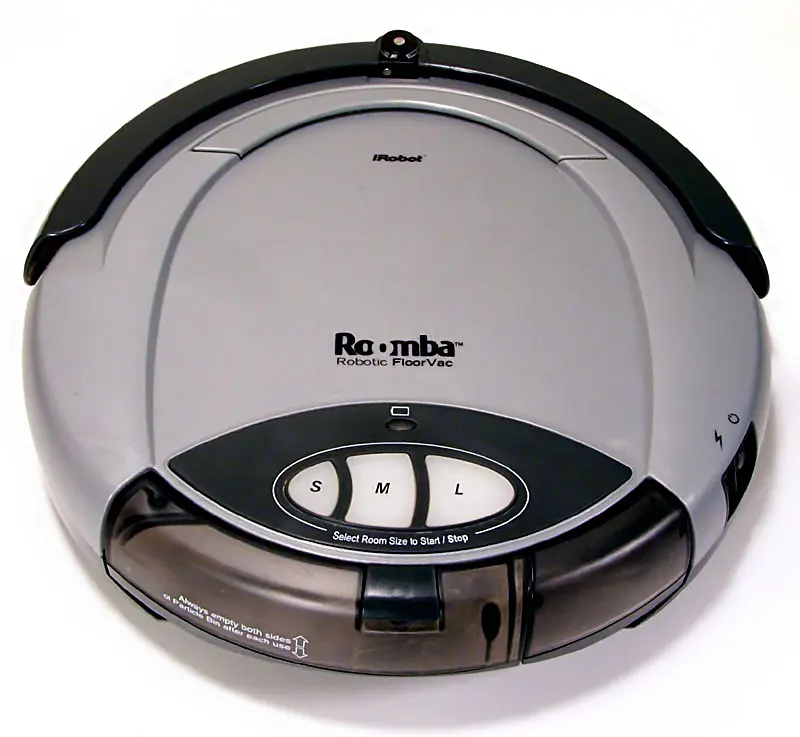
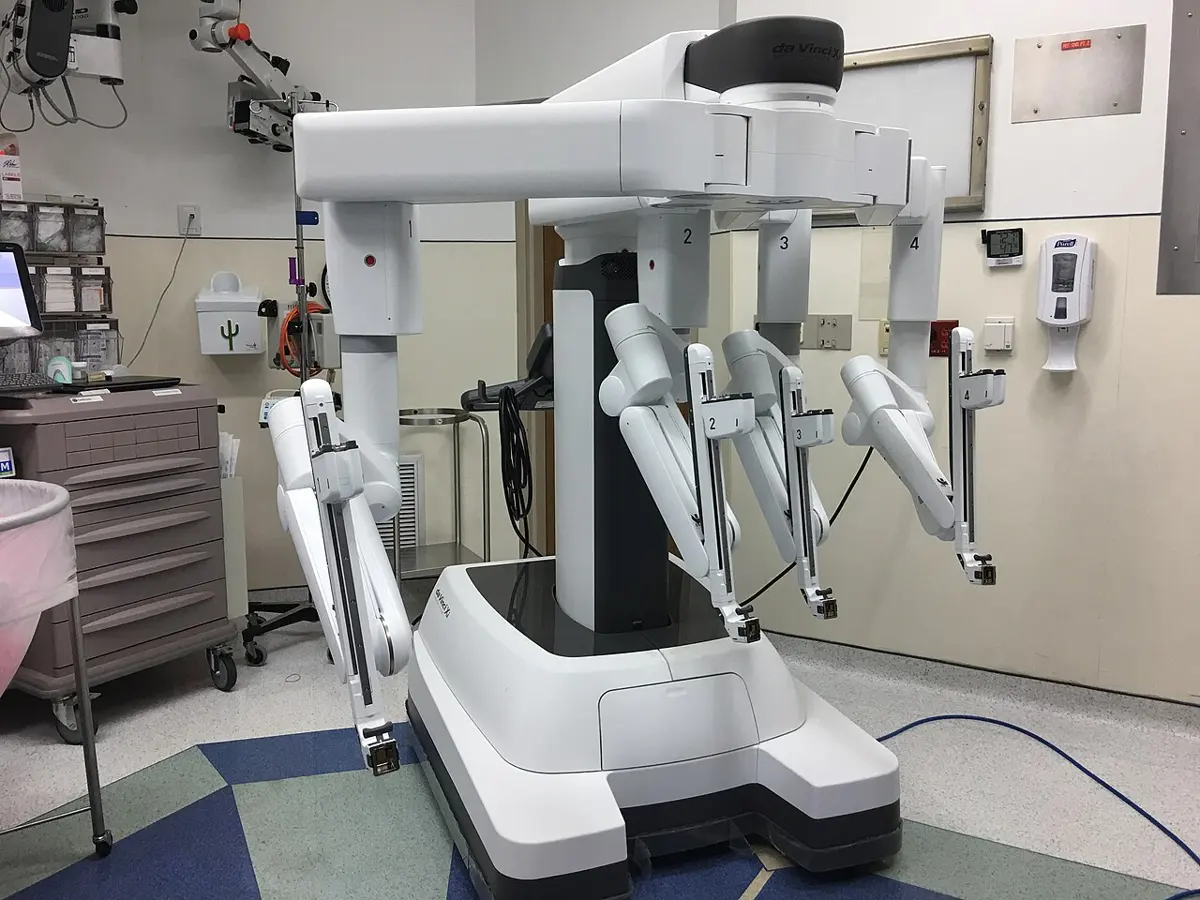
Every robot repeats the same loop many times a second: sense (what do my sensors read?), decide (what do my rules or my learned model say to do?), act (move the motors). A line-following robot is the simplest example: two light sensors underneath tell it whether each side sees a dark line on the floor.
A robot’s sensors tell it a wall is close ahead, and it turns left. Which part of the robot’s loop is “turn left”?
Pick an answer to see why.
5.4 Generative AI
Earlier computers could only give back information already stored in them. Generative AI creates new content: text, pictures, music, video or computer code. It learns from huge amounts of examples, then produces something that wasn’t in them; ask twice and the answer can be different each time.
A chatbot that writes text is a large language model (LLM). Inside, it does one thing again and again: given the words so far, it works out how likely each possible next word (or piece of a word, a token) is, picks one, adds it, and repeats.
That is why a chatbot can be confidently wrong: it writes what is likely to come next, and nothing inside it checks that it is true. Always check facts, numbers and quotations it gives you.
Three popular generative AI tools:
Copilot is Microsoft’s generative AI assistant. It helps write text and code, and works inside Microsoft’s apps such as Word, Excel and Outlook. GitHub Copilot, made by GitHub (owned by Microsoft), works inside code editors and suggests code as a programmer types, which helps beginners as well as experts. Both use AI models from OpenAI, and now from other companies too.
ChatGPT is an AI chatbot made by OpenAI. At first it handled only text, answering prompts (the questions or instructions you type). Newer versions also read files and pictures, understand speech, and make pictures.
Gemini is Google’s AI chatbot (made by Google DeepMind). Besides chatting, it works inside Google’s tools, such as Gmail and Google Docs.
Why can a chatbot write a wrong fact so confidently?
Pick an answer to see why.
5.5 Applications of integrated AI tools
Many everyday apps now have AI built in: word processors, email and office suites. It helps to organize content and makes work quicker; the most common features are grammar correction, voice typing and smart compose (suggesting the rest of a sentence as you type).
AI in Google Docs:
- i.smart compose and auto-correction;
- ii.grammar and spelling suggestions;
- iii.voice typing (speak, and it types; Nepali too);
- iv.language translation of a whole document;
- v.automatic summaries.
AI in email:
- i.smart compose and quick replies (short answers suggested for you to tap);
- ii.scheduled sending, with suggested times;
- iii.spam filtering;
- iv.grammar and writing suggestions;
- v.email summaries (a long thread in a few lines).
AI in Microsoft 365 (Office 365):
- i.writing tools in Word: drafting, rewriting, summarizing;
- ii.data analysis in Excel: finding patterns and making charts from a question in plain words;
- iii.presentations in PowerPoint: designs and slides drafted from a document;
- iv.meetings in Teams: notes, summaries and lists of tasks from a meeting.
5.6 Ethics in AI: bias, privacy and security
Ethics is the set of moral principles about what is right and wrong, fair and unfair: how people should behave. AI needs ethics too, so that AI systems are fair, safe and responsible: they do their work without causing harm, respect people’s privacy, treat everyone fairly, and are open about how they decide (transparency).
Bias in AI. Bias means unfair decisions, treating people differently because of their gender, caste, ethnicity, religion, region or background. An AI system should be fair to everyone. But an AI learns from past data, and if that data is unfair or incomplete, the AI will be unfair too. If a hiring AI is trained mostly on the CVs of men a company hired in the past, it may learn to mark down women’s applications; this really happened, at a large company, which stopped using the system. A face recognition system trained mostly on light-skinned faces makes more mistakes with darker ones. AI can repeat and spread human bias unless it is carefully checked and corrected. The fixes: train it on diverse, representative data (people of every group it will be used on), test its results separately for each group, and let people check and overrule its decisions.
Privacy in AI. Privacy means keeping personal information safe from people who shouldn’t have it. AI systems collect, store and use a great deal of personal data: your face, your voice, your location, what you search and buy. If it is leaked or misused, it can lead to identity theft, spying, or unfair treatment. So collect only the data that is needed, ask people’s permission, keep it encrypted, delete it when it is no longer needed, and never type passwords or other people’s private details into a chatbot.
Security in AI. AI security means protecting AI systems from attacks such as hacking or data poisoning (changing its training data). Since an AI learns from its data, changed data makes it decide wrongly: a hacked self-driving car might not stop at a red light. AI systems are protected with strong security: encryption, access control, checking the training data, and watching for attacks.
A company’s AI keeps choosing men for engineering jobs. What is most likely to reduce this bias?
Pick an answer to see why.
5.7 Internet of Things (IoT) and its applications
The Internet of Things (IoT) is the network of everyday physical objects, such as vehicles, TVs, meters, cameras and farm sensors, that collect data through sensors and exchange it over the internet without a person in between. IoT makes life easier by doing tasks automatically, saving energy, and helping in emergencies: a smart smoke detector that senses smoke can alert the fire brigade and the owner’s phone at once.
An IoT system has four parts: sensors that measure (temperature, moisture, smoke, movement), a small device with a processor and a radio, a network (Wi-Fi, mobile data) to the internet and the cloud, where the data is stored and looked at, and often a phone app for people.
Applications of IoT:
- i.Smart education: attendance by ID card, classrooms whose lights and fans switch off when empty.
- ii.Smart home: lights, fans, locks and cameras controlled from a phone; a smart meter that shows electricity use.
- iii.Smart city: streetlights that dim when nobody is there, bins that report when they are full, sensors that measure air pollution.
- iv.Smart transportation: traffic lights that change with the traffic, buses tracked on a map, parking spaces shown on an app.
- v.Smart healthcare: watches that measure heart rate, sensors that alert a family when an old person falls.
- vi.Smart agriculture: soil sensors that water crops only when needed, sensors in a cold store.
- vii.Communication: devices that report and warn by themselves, such as a flood sensor on a river that sends warning messages downstream.
Which is an IoT system?
Pick an answer to see why.
5.8 Virtual and extended reality
Virtual reality (VR) is a computer-made world that feels real. With a VR headset (a screen in front of each eye, and sensors that follow your head), you look around a virtual world, play games, or join a virtual classroom; when you turn your head, the view turns too.
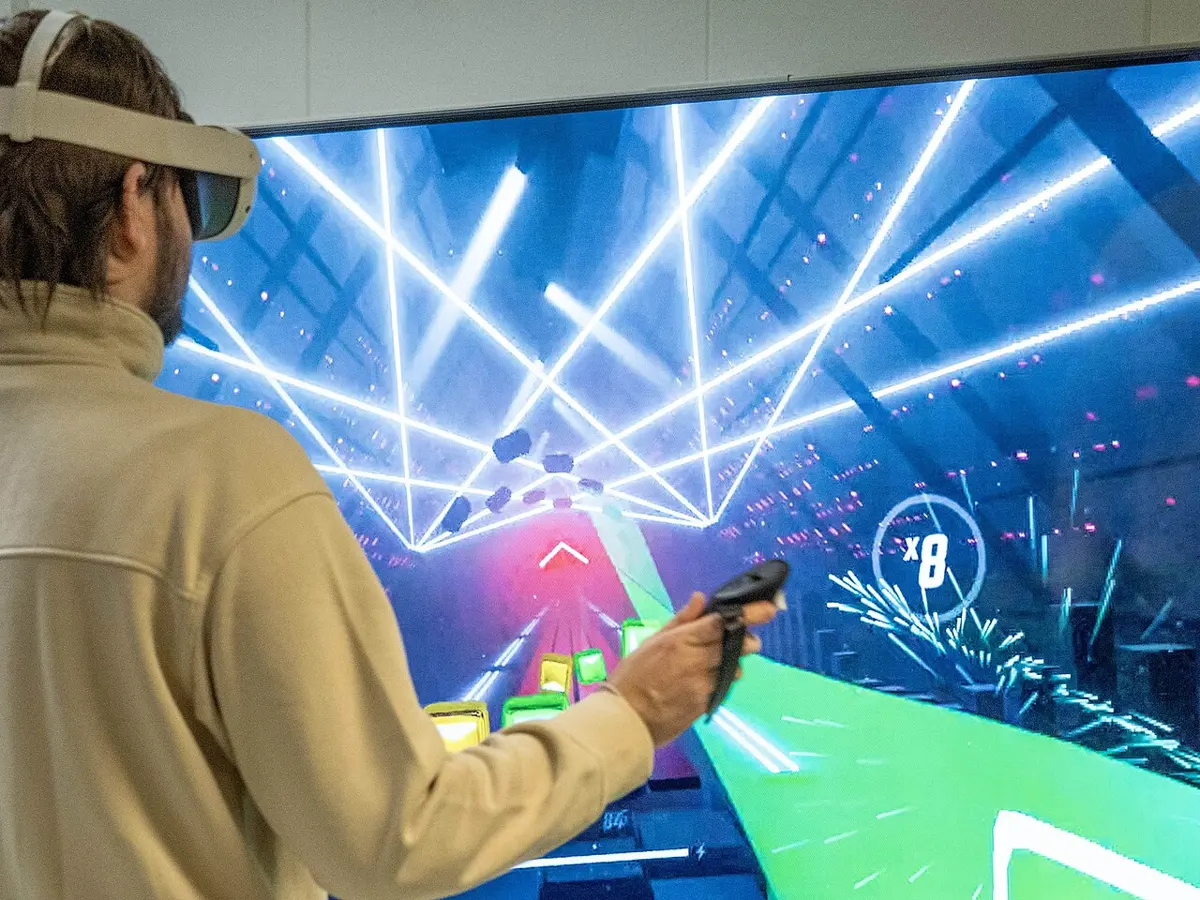
Extended reality (XR) is the general name for all the technologies that mix the real and digital worlds:
- VR: a fully virtual world, which replaces what you see;
- AR (augmented reality): digital pictures and information shown on top of the real world, through a phone’s camera or special glasses. A phone filter that puts sunglasses on your face, or an app that labels the mountains you point it at, is AR;
- MR (mixed reality): virtual objects that fit into the real room and can be touched and moved, as if they were there.
These technologies make learning, gaming and exploring more interactive.
Applications of VR and XR:
- a.Education: walk inside a human heart, or round the Solar System.
- b.Training: pilots in flight simulators, surgeons practicing operations, workers learning to use dangerous machines.
- c.Health and medicine: planning operations, treating fear of heights, helping patients relearn movements.
- d.Business: trying furniture in your own room before buying, virtual meetings.
- e.Entertainment: games and 360° films.
- f.Military and defense: training soldiers safely.
- g.Tourism and hospitality: a virtual walk round a hotel, or round a temple before you visit.
- h.Aeronautics: designing and testing aircraft before they are built.
An app shows the names of the peaks of the Annapurna range on top of your phone’s camera picture. What is this?
Pick an answer to see why.
5.9 Cloud computing and its applications
Cloud computing means using computing services, such as storage, servers, software and databases, over the internet, instead of keeping them on your own computer. The computers that do the work are in the provider’s data centers; you use them from anywhere, on any device.
Companies such as Amazon Web Services (AWS), Microsoft Azure, Google Cloud and IBM Cloud provide cloud services. Before, people and organizations had to buy, run and repair their own hardware and software; with the cloud, they rent what they need, and the provider looks after the machines.
Cloud apps you may know include Google Drive, Dropbox, OneDrive and iCloud: they keep your documents, photos and videos online, so you can open them anytime, anywhere, without a pen drive or hard disk.
Benefits of cloud computing:
- i.it makes teamwork easier: several people can work on the same file at once;
- ii.it reduces hardware costs;
- iii.data is kept safe (copies in more than one place) and available;
- iv.it gives access to advanced tools and services, even to a small school or business.
Features of cloud computing:
- i.on-demand service: take more or less, when you need it;
- ii.access anytime, anywhere, with the internet;
- iii.scalable resources: they can grow (or shrink) as needed;
- iv.shared resources (resource pooling): many customers share the provider’s computers;
- v.strong security, managed by experts;
- vi.easy to maintain: the provider updates and repairs;
- vii.low cost: pay for what you use;
- viii.reliable performance.
But it needs an internet connection; your data is in someone else’s hands, often in another country; and a monthly bill goes on as long as you use it.
Services of cloud computing
a. SaaS (Software as a Service). You use complete software over the internet, in a browser or an app, without installing it on your device; the provider runs everything. Gmail, Google Docs, Microsoft 365 and Google Drive are SaaS.
b. PaaS (Platform as a Service). A platform is everything needed to build, test and run software: the operating system, programming languages, databases and tools. With PaaS, programmers upload their own program and the provider runs it, so they don’t manage any servers. Google App Engine and Microsoft Azure App Service are PaaS.
c. IaaS (Infrastructure as a Service). The provider rents out basic hardware over the internet: virtual servers, storage and networks. You install and manage the operating system and software yourself. IaaS saves the cost and trouble of buying and running physical servers. Amazon EC2 (virtual servers), Amazon S3 (raw storage) and Azure Virtual Machines are IaaS.
A school wants to run its own results program on a rented virtual server, installing the operating system itself. Which service is that?
Pick an answer to see why.
5.10 E-commerce, e-governance and e-education
Computers and the internet have changed how people do everyday things. Today people run businesses, shop, and get government services from home, with no need to wait in long queues at offices.
E-commerce
E-commerce (electronic commerce) means buying and selling goods or services over the internet. It is growing fast all over the world, and in Nepal.
Merits of e-commerce:
- i.You can shop from home.
- ii.It saves time.
- iii.Goods and services are available 24 hours a day, 7 days a week.
- iv.You can buy products from other countries.
- v.Goods are delivered to your door.
Limitations of e-commerce:
- i.The product delivered may be different from what was shown.
- ii.There is a risk of online scams and fraud.
- iii.There is less face-to-face contact and social interaction.
- iv.It makes us more dependent on technology.
- v.Delivery is sometimes late.
E-governance
As people use digital tools in daily life, governments have adopted them too, to serve people better. E-governance is the use of digital devices, the internet and communication technology to provide government services and information to citizens. Through government websites and apps, people can now apply for passports, licenses, citizenship certificates and more, and check results, pay taxes and bills. It is a move from paper files to digital systems, to make government more efficient, transparent and easy for citizens to use.
E-governance has four kinds, by who is dealing with whom:
- G2C (government to citizen): services for people, such as applying for a passport online or checking SEE results;
- G2B (government to business): registering a company, filing a business’s tax online;
- G2G (government to government): offices and levels of government sharing data, such as a ministry and the municipalities;
- G2E (government to employee): services for government staff, such as salary and leave online.
Merits of e-governance:
- i.Transparency: citizens can follow their application and the process openly.
- ii.Accountability: officials become more responsible for their work.
- iii.Faster service: less time and paperwork.
- iv.Equal access: services reach people in every region.
- v.Less corruption: fewer face-to-face dealings means fewer chances for bribery.
Limitations of e-governance:
- i.Digital divide: not everyone has a device, internet or electricity.
- ii.Technical failures: a server down or an error can stop a service.
- iii.Lack of digital literacy: many people don’t yet have the skills to use online services.
E-education
In the past, learning happened mostly in school, with books as the main source of knowledge; students had to be in the classroom, and those who were absent missed the lesson. Now learning is no longer limited to the classroom, the teacher or the textbook: online platforms offer lessons, tutorials and even whole degree courses, and some universities teach and examine entirely online.
E-education is the use of digital technology and the internet for teaching and learning: lessons, videos, assignments and exams on a computer, tablet or phone, from anywhere and at any time.
Merits of e-education:
- i.Learners can study at their own pace.
- ii.There is a wide variety of learning materials.
- iii.Learning can happen anytime and anywhere.
- iv.It is often cheaper than traditional education.
- v.It is convenient and flexible.
Limitations of e-education:
- i.There is little face-to-face contact between teachers and students.
- ii.Technical problems (power cuts, slow internet) can spoil the learning.
- iii.The quality of content and teaching varies a lot.
A citizen renews her driving license through the transport department’s website. What kind of e-governance is this?
Pick an answer to see why.
Exercise
1. Choose the correct answer
i. Which of the following is not related to AI?
Pick an answer to see why.
ii. Which of the following is an example of AI?
Pick an answer to see why.
iii. Which of the following is not an application of AI?
Pick an answer to see why.
iv. In which type of learning is the training data given with the correct answers?
Pick an answer to see why.
v. Which type of learning has no labels or hints in its data?
Pick an answer to see why.
vi. Choose the AI chatbot made by Google.
Pick an answer to see why.
vii. If you are a programmer, which AI assistant is made especially for you?
Pick an answer to see why.
viii. Which of the following is a service of cloud computing?
Pick an answer to see why.
ix. What is buying and selling goods over the internet called?
Pick an answer to see why.
x. Which of the following is an e-education tool?
Pick an answer to see why.
xi. Which of the following is an example of e-governance?
Pick an answer to see why.
2. Write short answers to these questions
Write any two popular e-commerce sites in Nepal.
Answer
Define e-governance.
Answer
Mention any two applications of AI.
Answer
Which AI chatbots are useful for generating both text and pictures? Mention any two.
Answer
List any two applications of VR.
Answer
Write two advantages of e-education.
Answer
Write two examples of e-governance in Nepal.
Answer
Write two limitations of e-commerce.
Answer
Write two applications of cloud computing.
Answer
List any four popular generative AI tools.
Answer
3. Write long answers to these questions
Define artificial intelligence (AI). Describe at least five of its practical applications in daily life.
Answer
What is machine learning (ML)? Explain how machine learning is related to artificial intelligence, with suitable examples.
Answer
Describe any four major applications of machine learning in real-world scenarios such as education, healthcare or transportation.
Answer
Differentiate between supervised and unsupervised learning. Use examples to show how each works.
Answer
Explain the role of robotics in modern industries. Discuss how robots have changed sectors such as healthcare, manufacturing or education.
Answer
What is generative AI? Discuss its importance and how it is changing the way we create digital content such as images, videos and text.
Answer
Discuss the role of the Internet of Things (IoT) in the development of smart cities. Include examples of how IoT improves life in cities.
Answer
Analyze the merits and demerits of e-commerce, with examples.
Answer
How does e-governance improve service delivery to citizens? Discuss with examples from sectors like health, education or transport.
Answer
Evaluate the advantages of e-education. How has it changed the traditional learning environment for students and teachers?
Answer
Define cloud computing. List and explain any four major services provided by cloud computing platforms.
Answer
Practice every question in the book, and keep track of the ones you miss →
A companion to your textbook, not a replacement for it: study from the book your school uses, and where the two differ, follow your teacher. Found a mistake? Please tell us.