
Type “Su” into the search box of your phone’s contacts, and Sunita’s number appears before you have lifted your finger. The phone may hold a thousand names, and it didn’t read all thousand to find her. When the SEE results come out, a website finds one student’s grades among hundreds of thousands, in a moment. A dictionary has tens of thousands of words, and you can find any one of them in under a minute, by hand.
All of these are searching: finding one thing among many. And much of their speed comes from one idea: the things were put in order first, which is called sorting. In this unit you will learn the two great ways to search and two ways to sort, write them in Python, and count how much work each one does. Some ways are hundreds or millions of times faster than others. You will also learn two ways to write an algorithm down before you program it, pseudocode and flowcharts, and how to choose tests that show whether an algorithm really works.
Writing an algorithm down
In Grade 6 you wrote algorithms as numbered steps in plain words: how to make chiya, how to walk to Nyatapola. Since then you have written programs, in blocks and in Python. Between the two there is a gap. Plain words can be vague, but a program is full of details (brackets, colons, int()) that have nothing to do with the idea. When programmers plan an algorithm, or explain one to someone who uses a different programming language, they use one of two in-between ways: pseudocode or a flowchart.
Pseudocode
Pseudocode is an algorithm written in short, exact lines, like a program, but in plain words that any person can read. (Pseudo means “pretend”, as in Grade 7’s pseudo-random numbers: it is pretend code.) No computer runs it, so small details don’t matter, but the steps, the choices and the loops must be exact.
Here is Pema’s savings from Unit 2 (Rs 150 a week, for a football that costs Rs 1,000) as pseudocode and as Python:
Pseudocode
SET saved TO 0SET weeks TO 0WHILE saved < 1000 SET saved TO saved + 150 SET weeks TO weeks + 1END WHILEOUTPUT "Weeks:", weekssaved = 0weeks = 0while saved < 1000: saved = saved + 150 weeks = weeks + 1print("Weeks:", weeks)Output
Weeks: 7There is no single official pseudocode: every exam board and every book has its own. In this book we write it like this:
| Pseudocode | Means | Python |
|---|---|---|
SET x TO 0 |
put a value in a variable | x = 0 |
INPUT x (or READ x) |
ask the user, keep the answer in x | x = input(…) |
OUTPUT x (or DISPLAY x) |
show something | print(x) |
IF … THEN, ELSE, END IF |
a choice | if …:, else: |
WHILE …, END WHILE |
repeat while a condition is true | while …: |
FOR i FROM 0 TO 9, END FOR |
repeat for each number, 0 to 9 including 9 | for i in range(10): |
The keywords are in capitals, so they stand out, and the lines inside a choice or a loop are indented, as in Python. The END lines show where each one stops. Any pseudocode is fine, in an exam too, as long as every step is exact and someone else could follow it without asking you what you meant.
In Grades 9 and 10, and in the SEE, you will also write an algorithm as numbered steps, from Start to Stop, with words such as Read and Display. Pema’s savings that way:
Algorithm
Step 1: StartStep 2: Set saved = 0 and weeks = 0Step 3: Is saved < 1000? Yes: saved = saved + 150, weeks = weeks + 1, go to Step 3 No: go to Step 4Step 4: Display weeksStep 5: StopIt is the same algorithm. Pseudocode just shows the loop more clearly, with WHILE and its END.
Flowcharts
A flowchart draws an algorithm as boxes joined by arrows. Each kind of step has its own shape, so you can see at a glance where the algorithm asks a question and where it goes round in a loop. The figure in Unit 2 that showed the bus fare as three paths was nearly a flowchart already.
The rules are few:
- A flowchart has one Start, and at least one Stop (some books write End).
- Follow the arrows: every box except Stop has an arrow out.
- A decision diamond holds a question whose answer is yes or no (true or false), and has exactly two arrows out, each labeled with its answer.
- A connector, a small circle with a letter or number in it, joins two parts of a flowchart without a long arrow: an arrow into circle A carries on from the other circle A, on the same page or the next.
- A loop is an arrow that goes back up to an earlier step, usually to a decision that asks whether to go round again.
- A procedure box stands for a whole job that has its own flowchart somewhere else, like “make chiya” in a flowchart of your morning. It keeps a big flowchart small. In Python, procedures (Unit 2) are called functions:
print()andinput()are ready-made ones, and in Unit 4 you will write your own.
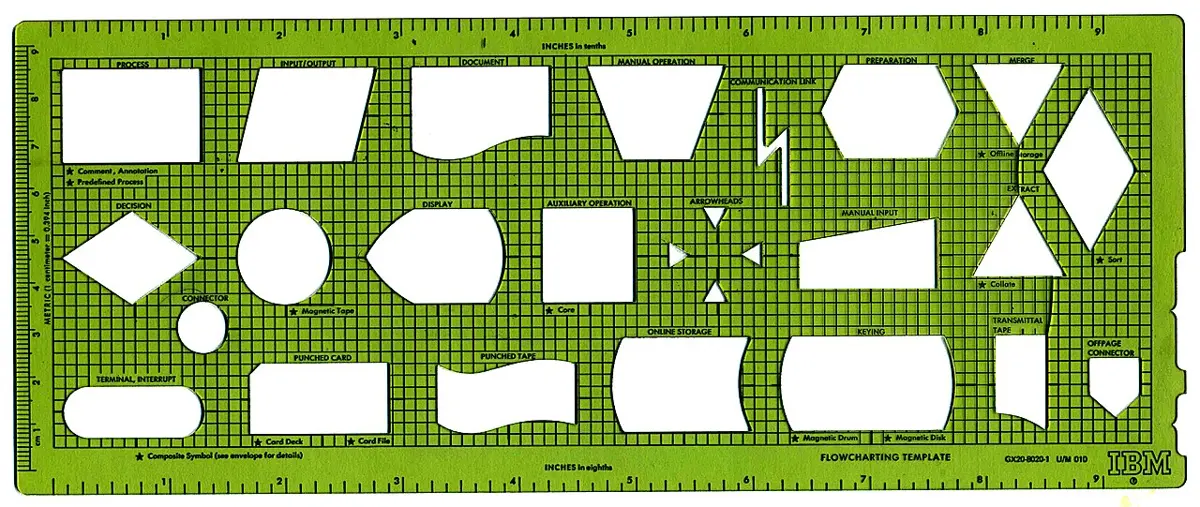
In a flowchart, which shape holds marks ≥ 35?
Pick an answer to see why.
How does a flowchart show a loop?
Pick an answer to see why.
Lists: many values in one variable
To search or sort, a program needs many values at once: the 40 names of a class, the marks of every student. Forty variables, name1, name2… name40, would be hopeless. Python keeps them all in one variable, a list: values in square brackets, separated by commas, in order.
marks = [52, 38, 71, 45, 60]print(marks)print(marks[0])print(marks[4])print(len(marks))Output
[52, 38, 71, 45, 60]52605Each value in a list is an item, and each item has a position, also called its index: a number that says where it is. Just as range() counts from 0, so do positions: the first item is at position 0, so marks[0] is 52, and the last of five is at position 4. len() gives a list’s length, how many items it has. So a list’s positions always run from 0 to len(list) - 1.
| Position | 0 | 1 | 2 | 3 | 4 |
|---|---|---|---|---|---|
marks |
52 | 38 | 71 | 45 | 60 |
An item can be changed, like a variable, and a for loop over range(len(marks)) visits every position in turn:
marks = [52, 38, 71, 45, 60]marks[1] = 40for i in range(len(marks)): print("Position", i, "holds", marks[i])Output
Position 0 holds 52Position 1 holds 40Position 2 holds 71Position 3 holds 45Position 4 holds 60A list can hold strings too: names = ["Sita", "Ram", "Gita"]. Asking for a position that doesn’t exist, such as names[3] in a list of three, stops the program with an IndexError. That is all you need to know about lists for this unit; in Grade 9 you will do much more with them.
names = ["Asha", "Bimal", "Chandra", "Dolma"]. What is names[2]?
Pick an answer to see why.
A list holds 40 names. What is the position of the last one?
Pick an answer to see why.
Linear search
Your teacher has a pile of 40 homework copies, in no order, and asks you to find Pemba’s. There is only one way: pick up the first copy and read the name; if it isn’t Pemba’s, pick up the next, and so on, until you find it or run out of copies. Going through the items one at a time, from the start, is called linear search (also sequential search). Each time you compare an item with the one you want is one comparison, and counting comparisons tells you how much work a search did.
The algorithm
Pseudocode
INPUT targetSET i TO 0SET found TO FalseWHILE i < length of list AND NOT found IF list[i] = target THEN SET found TO True ELSE SET i TO i + 1 END IFEND WHILEIF found THEN OUTPUT target, "is at position", iELSE OUTPUT target, "is not in the list"END IFtarget is what you are looking for. i is the position being looked at; it starts at 0. found is a flag (Unit 2): a true/false variable that remembers whether something has happened yet, like found in Grade 7’s guessing game. Here it remembers whether the search has succeeded. The loop goes round while there are still items to look at and nothing has been found; so it stops in one of two ways, and the IF at the end says which.
The same algorithm in Python, line for line:
names = ["Sita", "Bikash", "Gita", "Hari", "Maya", "Nabin"]target = input("Whose name? ")i = 0found = Falsewhile i < len(names) and not found: if names[i] == target: found = True else: i = i + 1if found: print(target, "is at position", i)else: print(target, "is not in the list.")Output
Whose name? HariHari is at position 3How much work?
How many comparisons does linear search need, for a list of n items?
- At best, 1: the target is the first item.
- At worst, n: the target is the last item, or isn’t in the list at all.
- On average, if the target is in the list and could be anywhere, about half: (n + 1) ÷ 2.
For 6 names that is no work at all. But think of a list of Nepal’s 753 local levels (as of 2026: 6 metropolitan cities, 11 sub-metropolitan cities, 276 municipalities and 460 rural municipalities), in no order. Finding one takes up to 753 comparisons, and 377 on average. A list of every person in Nepal would be about 29 million comparisons at worst. A computer is fast, but a website that searches millions of records for thousands of visitors at once needs something better.
A list has 500 names, in no order. What is the most comparisons a linear search for one name can need?
Pick an answer to see why.
Why must linear search look at every item before it can say “not in the list”?
Pick an answer to see why.
Binary search
Now look for a word in a dictionary, such as the Nepali Brihat Shabdakosh, well over a thousand pages long. Nobody starts at page 1. You open it near the middle, see that your word comes before the words on that page, and from then on look only in the first half. Then you open the middle of that half, and so on. A few openings, and you are on the right page. You can do this only because the words are in alphabetical order.
The same trick won you Grade 7’s guessing game: always guess the middle of the numbers that are left, and each “bigger” or “smaller” throws away half of them. In Grade 7 we said this was called binary search, and that you would meet it again. Here it is. Binary search finds an item in a sorted list by looking at the middle item of the part that is left, and throwing away the half the item can’t be in. (Binary means “in two”: each look cuts the list in two.)
By hand
Here are 15 numbers, sorted from smallest to biggest. Find 63.
| Position | 0 | 1 | 2 | 3 | 4 | 5 | 6 | 7 | 8 | 9 | 10 | 11 | 12 | 13 | 14 |
|---|---|---|---|---|---|---|---|---|---|---|---|---|---|---|---|
| Number | 3 | 8 | 12 | 17 | 21 | 26 | 30 | 35 | 41 | 47 | 52 | 58 | 63 | 70 | 77 |
Two variables mark the part of the list the number could still be in: low, its first position, and high, its last. At the start that is the whole list, 0 to 14. Each look is at the middle, halfway between them: (low + high) // 2, using Unit 1’s // so that the answer is a whole position.
| Look | low | high | middle | Number there | Compared with 63 | So |
|---|---|---|---|---|---|---|
| 1 | 0 | 14 | 7 | 35 | smaller | 63 is to its right: low = 8 |
| 2 | 8 | 14 | 11 | 58 | smaller | low = 12 |
| 3 | 12 | 14 | 13 | 70 | bigger | 63 is to its left: high = 12 |
| 4 | 12 | 12 | 12 | 63 | equal | found, at position 12 |
Four comparisons. A linear search would have needed 13.
If the number isn’t there, the part that is left gets smaller and smaller until there is nothing in it: low goes past high. Then the search can stop, sure that the number is not in the list.
The algorithm
Pseudocode
INPUT targetSET low TO 0SET high TO length of list − 1SET found TO FalseWHILE low ≤ high AND NOT found SET middle TO (low + high) // 2 IF list[middle] = target THEN SET found TO True ELSE IF list[middle] < target THEN SET low TO middle + 1 ELSE SET high TO middle − 1 END IFEND WHILEIF found THEN OUTPUT target, "is at position", middleELSE OUTPUT target, "is not in the list"END IFAnd in Python. The number at the middle is kept in a variable, guess, as in the guessing game:
numbers = [3, 8, 12, 17, 21, 26, 30, 35, 41, 47, 52, 58, 63, 70, 77]target = int(input("Find which number? "))low = 0high = len(numbers) - 1found = Falsewhile low <= high and not found: middle = (low + high) // 2 guess = numbers[middle] if guess == target: found = True elif guess < target: low = middle + 1 else: high = middle - 1if found: print(target, "is at position", middle)else: print(target, "is not in the list.")Output
Find which number? 6363 is at position 12How much work?
Each comparison throws away the middle item and half of the rest, so the part that is left shrinks like this:
15 → 7 → 3 → 1 → 0
So a list of 15 needs at most 4 comparisons. Turn it round: with 1 look you can search 1 item, with 2 looks 3 items, with 3 looks 7, with 4 looks 15: each extra look more than doubles the list you can search. With 10 looks, 1,023 items. With 20 looks, over a million.
| Items in the sorted list | Linear search, at most | Binary search, at most |
|---|---|---|
| 15 | 15 | 4 |
| 100 | 100 | 7 |
| 753 (Nepal’s local levels) | 753 | 10 |
| 1,000 | 1,000 | 10 |
| 1,000,000 | 1,000,000 | 20 |
| 29,164,578 (Nepal’s people in the 2021 census) | 29,164,578 | 25 |
| everyone in the world, over 8 billion (as of 2026) | over 8 billion | 33 |
Doubling the list adds just one comparison to a binary search, but doubles a linear search’s worst case. That is why your phone, a dictionary and an exam results website can find one thing among millions in a moment.
Binary search looks at the middle item and finds it is bigger than the target. What does it do next?
Pick an answer to see why.
A sorted list has 2,000 names. About how many comparisons does a binary search need, at most?
Pick an answer to see why.
Sorting
So binary search needs a sorted list. How does a computer sort one? In Grade 6 a spreadsheet did it when you pressed a button. Now you will see what happens inside. A computer can’t look at a whole list and see where everything goes, as you can glance at five numbers. It can only compare two items at a time, and move them. Every sorting algorithm is a plan for which two to compare next, and what to do with them.
Bubble sort
Bubble sort goes along the list from left to right, comparing each item with the next one, its neighbor. If the two are in the wrong order (the left one bigger), it swaps them. One trip along the whole list is called a pass. After a pass, the biggest item has been carried all the way to the right end, like a bubble rising through water, which gives the sort its name. Then it makes another pass, and another, until a pass makes no swaps at all: then every neighbor is in order, and so is the list.
Swapping two values
A swap needs care in Python. Try to swap a and b like this:
a = 5b = 9a = bb = aprint(a, b)Output
9 9The first line of the swap, a = b, puts 9 into a, and the 5 that was there is gone forever; then b = a copies 9 back. It is like swapping the tea in one cup with the milk in another: you need a third, empty cup. In a program the third cup is a spare variable, often called temp (for “temporary”):
a = 5b = 9temp = aa = bb = tempprint(a, b)Output
9 5(Python also has a shortcut, a, b = b, a, which you will meet in Grade 9. It does the same thing, with a hidden third cup.)
Bubble sort in Python
Bubble sort needs a loop inside a loop: the inner for loop is one pass, comparing each position i with i + 1; the outer while loop makes passes until one makes no swap. swapped is a flag, set to False at the start of each pass and to True by any swap.
marks = [52, 38, 71, 45]swapped = Truepasses = 0while swapped: swapped = False for i in range(len(marks) - 1): if marks[i] > marks[i + 1]: temp = marks[i] marks[i] = marks[i + 1] marks[i + 1] = temp swapped = True passes = passes + 1 print(f"After pass {passes}: {marks}")Output
After pass 1: [38, 52, 45, 71]After pass 2: [38, 45, 52, 71]After pass 3: [38, 45, 52, 71]The inner loop goes up to len(marks) - 1, not len(marks): it compares position i with i + 1, and the last position has no neighbor after it. swapped starts as True on line 2 only so that the while loop goes round the first time.
Insertion sort
Pick up playing cards one at a time, and you sort them in your hand without thinking: each new card goes in among the ones you already hold, in its right place. That is insertion sort. The left part of the list is kept sorted. It starts with just the first item, which on its own is in order. Then each item in turn, from the second, is moved left past every bigger item, until the item to its left is smaller (or it reaches the front). Then the sorted part is one longer.
Comparing the two sorts
Two algorithms can do the same job, sort the same list, and give the same answer, with very different amounts of work. Count the comparisons:
When computer scientists compare algorithms, they ask questions like these: how many steps does each take for this list? For the worst list? And how does that grow when the list gets longer? For 6 items, 30 comparisons or 15 hardly matters. For a million items it matters a great deal. Bubble sort and insertion sort are both too slow for long lists: in Grade 9 you will count how their work grows as a list doubles, and meet sorts that are far faster.
In a bubble sort, what is a pass?
Pick an answer to see why.
When does bubble sort stop?
Pick an answer to see why.
A list is already in order. Which is true?
Pick an answer to see why.
Testing an algorithm
How do you know an algorithm works? Not by reading it and feeling sure. In Grade 6 you tested algorithms: you chose inputs whose right answers you already knew, ran the algorithm (or traced it by hand), and compared. A test passes when the algorithm’s answer is the right one. Professional programmers do the same, with tests chosen carefully, because one bug can hide in a program that passes a hundred careless tests.
Choosing tests
Good tests come in three kinds:
- Ordinary: everyday inputs, the job the algorithm is for. A search for a name in the middle of the list; a sort of a mixed-up list.
- Edge: inputs at the edges of what is allowed, where bugs like to hide. The first item and the last; a name that isn’t there; a list of one item, or none; a list already sorted, or backwards; two items the same.
- Wrong: inputs that shouldn’t be given, to see that the program deals with them sensibly instead of crashing or giving nonsense. A roll number of 0 or 41 in a class of 40; “forty” typed instead of 40.
Before a test, write down what should happen; then run it and write what did happen. A test table keeps it clear:
| Test | Kind | Input | Expected | Actual | Pass? |
|---|---|---|---|---|---|
| 1 | ordinary | 35 | at position 7 | ||
| 2 | ordinary | 63 | at position 12 | ||
| 3 | edge: the first item | 3 | at position 0 | ||
| 4 | edge: the last item | 77 | at position 14 | ||
| 5 | edge: not there, smaller than all | 1 | not in the list | ||
| 6 | edge: not there, bigger than all | 80 | not in the list | ||
| 7 | edge: not there, in between | 40 | not in the list | ||
| 8 | wrong | thirty | a sensible message |
A bug that only edge tests find
Here is the binary search from this unit with one character changed: < where it had <= in line 6. Run it for the tests in the table: 35, then 3, then 77.
numbers = [3, 8, 12, 17, 21, 26, 30, 35, 41, 47, 52, 58, 63, 70, 77]target = int(input("Find which number? "))low = 0high = len(numbers) - 1found = Falsewhile low < high and not found: middle = (low + high) // 2 guess = numbers[middle] if guess == target: found = True elif guess < target: low = middle + 1 else: high = middle - 1if found: print(target, "is at position", middle)else: print(target, "is not in the list.")Output
Find which number? 3535 is at position 7A program finds a student’s name from a roll number from 1 to 40. Which is an edge test?
Pick an answer to see why.
A sorting program passes a test with a mixed list of 6 numbers. What can you say?
Pick an answer to see why.
Plan, test, then type
Put the unit together. For an algorithm of your own:
- Say what it does, with an example: the input, and the output it should give.
- Write it in pseudocode, or draw its flowchart. Check that every decision has its two ways out, and that every loop can end.
- Choose tests before you run anything: ordinary, edge and wrong, each with its expected result, in a test table.
- Trace it by hand for one or two tests, with a trace table. Count the comparisons if speed matters.
- Turn it into Python, a few lines at a time, then run every test and fill in the table. When a test fails, find the first step that went wrong, fix one thing, and run all the tests again.
In short
Exercise
Which flowchart symbol is used for INPUT name?
Pick an answer to see why.
roll = [3, 7, 11, 15, 19]. What is roll[len(roll) - 1]?
Pick an answer to see why.
Which list can binary search not be used on, as it is?
Pick an answer to see why.
A sorted list of 63 numbers is searched with binary search. What is the most comparisons it can need?
Pick an answer to see why.
After the first pass of a bubble sort (smallest to biggest), which item is sure to be in its final place?
Pick an answer to see why.
Which of these makes a list nearly in order quickest to sort?
Pick an answer to see why.
Draw the flowchart symbols for: i. start or stop ii. a process iii. input or output iv. a decision v. a procedure vi. a connector. Say what each is used for.
Answer
Write pseudocode for an algorithm that asks for 10 marks, one at a time, and outputs how many of them are 35 or more. Then draw its flowchart.
Answer
The list is 4, 9, 13, 18, 25, 31, 36, 42, 50. Show the steps of a linear search and of a binary search for 36, with low, high and middle for the binary search. How many comparisons does each make?
Answer
Using the same list, show the binary search for 20, which isn’t in it. How does the algorithm know when to stop?
Answer
Explain why binary search needs a sorted list. Give an example of a list and a target for which it gives the wrong answer when the list isn’t sorted.
Answer
Sort 29, 14, 35, 8 from smallest to biggest with bubble sort. Show the list after each pass, and count the comparisons and swaps.
Answer
Sort the same list, 29, 14, 35, 8, with insertion sort. Show the list after each item is placed, count the comparisons and swaps, and compare with your answer to f.
Answer
Write the output of this program, and say what it does.
values = [6, 2, 9, 4]count = 0for i in range(len(values) - 1): if values[i] > values[i + 1]: count = count + 1print(count)Answer
A student’s linear search is meant to print where a name is, but for a list of 5 names it stops with IndexError: list index out of range. Find the mistake and correct it.
names = ["Asha", "Binod", "Chhiring", "Dipa", "Esha"]target = "Kopila"i = 0found = Falsewhile i <= len(names) and not found: if names[i] == target: found = True else: i = i + 1print(found)Answer
Choose eight tests for a program that sorts a list of numbers: at least two ordinary, four edge and one wrong. Give each one’s expected result.
Answer
Your school’s library has 4,000 books on a list sorted by title. Explain to a younger student, without using code, why finding a title with binary search needs at most 12 looks, and how many a linear search could need.
Answer
Bubble sort and insertion sort both sorted a list of 6 numbers and made 7 swaps. Bubble sort made 20 comparisons and insertion sort 11. Explain what a comparison and a swap are, why the number of swaps is the same, and which sort did less work.
Answer
Quiz yourself: Algorithms and programming, Grades 6–12 →
Practice every question in the book, and keep track of the ones you miss →