
In 1994, sending an email from Kathmandu was something only a few offices could do, slowly, over a costly link to another country. Thirty years later, a student in Jumla can join a video call with a cousin in Qatar from a phone that fits in a pocket. Nobody in 1994 could have told you exactly how that would happen, who would gain the most, or who would still be waiting.
Nobody can tell you the next thirty years either. But you can learn to do what this unit teaches: look underneath a new technology to see what is really different about it; ask who gains and who is left out; trace how a technology grew, and why; see how today’s choices last for decades; propose a better rule; and find where you might fit in, including working from Nepal for people anywhere in the world. This is the last unit of the course every student takes, so it also asks you to make a plan of your own.
What makes a technology “emerging”?
You met the word in Unit 8 Grade 10: An idea with an emerging technology: an emerging technology is one that is new or changing fast, whose uses are still being found and whose effects aren’t yet well known. An established technology is one that is settled: most people know what it does, it is cheap and reliable, and its effects have been studied for years. Mobile phones, fiber-optic cables and spreadsheets are established. They were all emerging once.
New technologies are usually described by what they promise: faster, smarter, cheaper. A better question is: what is different underneath? A real difference in how a technology works changes what it can and can’t do, and often changes computing itself. Let’s look at two.
Satellites close to the ground
Since the 1960s, many satellites that carry telephone calls and TV have been put in a geostationary orbit, 35,786 km above the equator. Up there, a satellite goes round the Earth exactly once a day, so it seems to hang still in the sky. A dish pointed at it once never has to move. Three or four such satellites can cover most of the world, so they were a good way to reach places with no cables, such as many valleys in Nepal.
A newer design does the opposite. Low Earth orbit satellites fly only a few hundred kilometers up, roughly 350 to 600 km. Each one crosses the sky in a few minutes, so a single satellite is no use: a service needs thousands of them, passing your signal from one to the next, and a dish that follows them without moving, by steering its beam electronically.
The fundamental difference is distance, and distance means delay. Radio waves travel at the speed of light, about 300,000 km every second. That sounds instant, but 35,786 km up and 35,786 km down, twice (your message out, and the answer back), takes about half a second. Try it.
Half a second doesn’t matter for an email. It matters a lot for a video call, where people start talking over each other, or for a game. So the closer satellites change what satellite internet can be used for: almost everything a cable is used for, in places a cable will never reach. That is why this difference matters, not just “faster”.
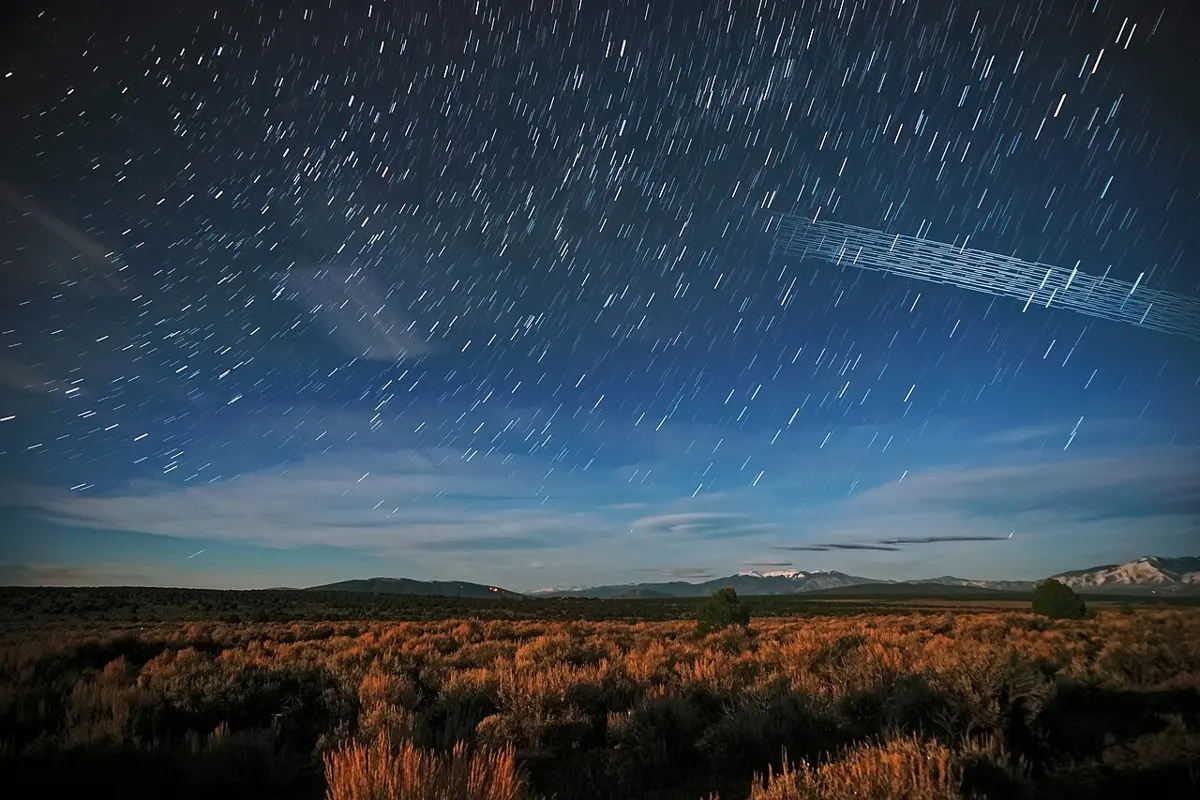
It also brings new problems that the far satellites didn’t have: thousands of satellites crowd the sky, old ones must be brought down before they collide and break into pieces, and their bright trails cross astronomers’ photographs. And, as you will see, it raises new questions for the law.
Why does a signal through a geostationary satellite always take at least about half a second there and back, however good the equipment?
Pick an answer to see why.
Quantum computers
Every computer you have used, from a phone to the biggest server, works with bits: each one is 0 or 1 at any moment (Grade 9, How a Computer Really Works). A quantum computer works with qubits (quantum bits), which follow the rules of quantum physics, the physics of very small things like single atoms and electrons. A qubit can be in a mixture of 0 and 1 at the same time until it is measured, and qubits can be linked so that what happens to one is tied to the others.
What does that change? Not everything. For most jobs (a spreadsheet, a video, a game) a quantum computer would be no better than an ordinary one, and much worse. But for a few special problems, a clever program can arrange the qubits so that the wrong answers cancel each other out and the right answer becomes likely. One of those problems is finding the two prime numbers that were multiplied to make a huge number. In 1994, the mathematician Peter Shor showed that a big enough quantum computer could do that quickly.
That matters to you, because the public-key encryption that protects a padlocked website relies on that being impossibly slow (Grade 9, Public-key encryption). So a technology that can’t yet do any useful everyday job is already changing computing: since 2024 there have been new standards for post-quantum encryption, which no known quantum method can break, and the world’s websites, banks and phones are slowly moving to it.
Qubits are also very fragile. Heat, a stray vibration or a bit of radio noise spoils them, so many designs are kept colder than outer space, about a hundredth of a degree above absolute zero, inside big refrigerators. That is another fundamental difference: a quantum computer isn’t something you will have in your pocket. If it becomes useful, most people will reach one through the cloud (Unit 5).

Which is the best question to ask first about a new technology?
Pick an answer to see why.
Who gains and who is left out
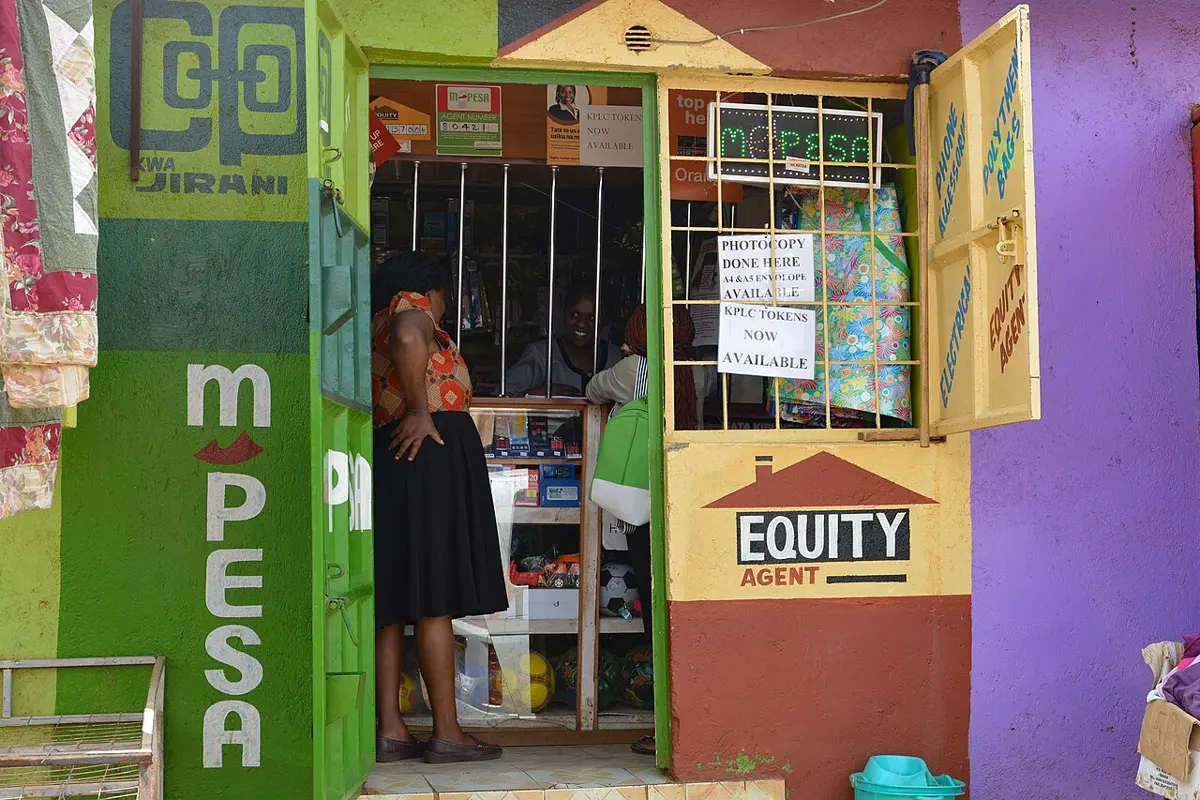
In Grade 7 you saw that access needs several things at once: a device, a connection, money, skills, and apps that work in your language and for your body; take away one, and access is gone Grade 7: Who has access, and who doesn’t. A new technology always arrives unevenly. It reaches people who already have the most (money, a good school, a town with towers and cables) first, and they gain the most from it. So unless someone plans otherwise, a new technology can make the gap between people wider, not narrower.
There are two kinds of gap to look for:
- Inequity in access: who can use it at all.
- Inequity in outcomes: among the people who use it, who gets the benefit, and who carries the harm. Two students can use the same app, one in her own language with a good connection and one struggling with English on a shared phone at night; they don’t get the same result.
The good news is that many of these gaps are made by design choices, and design choices can be changed. Try it with a made-up but realistic case.
Two lessons from it. First, every requirement leaves somebody out, and the requirements that seem normal to the people building a technology (a good phone, fast data, English) are often the ones that shut out the most people. Second, some gaps no app can close. A student with no smartphone and no signal needs a device and a tower, and that takes a school, a ward, or a government, not a programmer.
The environment pays too
Who gains and who is left out is also about the planet, and about the people who live where the costs land. You saw the energy and e-waste of computing in Unit 5 Grade 10: Who is affected, and why. Emerging technologies add new costs:
- Satellites: each one burns up when it falls back, every few years, leaving tiny particles of metal oxides high in the air; scientists are still measuring what thousands of them will do. Crowded orbits risk collisions, and bright trails spoil the night sky for astronomers.
- AI: training and running large models needs data centers that use a great deal of electricity, and water to cool them (Unit 7).
- New gadgets of every kind become e-waste faster when they are replaced quickly.
So for low-orbit satellite internet in Nepal, a fair table of who gains and who could lose might look like this:
| Who | Could gain | Could lose |
|---|---|---|
| Families in remote villages | internet good enough for video calls and online classes, where no cable will come | money: the dish and the monthly fee cost far more than a data pack |
| Trekkers, climbers, rescue teams | a connection on the mountains | little |
| Nepal’s internet companies and their workers | could resell the service | customers and jobs, to a company abroad |
| The government | a way to reach every ward | tax, if people pay abroad; the power to require what Nepali companies must do |
| Astronomers, and everyone who looks at the night sky | nothing | a darker sky |
A new app is free, but works only in English and needs a fast connection. What kind of gap is this most likely to cause?
Pick an answer to see why.
The history of one technology: the internet in Nepal
To understand a technology, it helps to trace how it grew: when each step came, what made it possible, and what held it back. In Nepal, the internet’s story is shaped by two things at every step: society (laws, money, families working abroad, what people needed) and the environment (mountains, earthquakes, rivers, electricity).
Look at the steps in Figure 9.4, and the causes under them:
- Satellites first, because of the mountains. In 1993 the Royal Nepal Academy of Science and Technology (RONAST), with a private company, Mercantile, exchanged email with a network in India over an international phone line, for its scientists only; the calls were so costly that it soon stopped. In 1994 Mercantile started the first email service that anyone could pay for, and a service for health workers began at the Teaching Hospital. Soon after, Mercantile was selling internet connections through small satellite dishes (VSATs). Satellites came first because laying cables through hills and gorges was slow and costly, while a dish needed only a clear view of the sky.
- A law opened the door. The Telecommunications Act of 1997 let private companies offer telecom services under license, and created a regulator, the Nepal Telecommunications Authority (1998). Competition brought prices down.
- Phones before computers. In 1999 Nepal Telecom started the first mobile network. Most Nepalis would meet the internet on a phone, years later, not on a computer: phones were cheaper, ran on batteries, and needed towers rather than lines to every house.
- Families far away. By the late 2000s, more than 200,000 Nepalis a year were getting permits to work abroad, and over half a million in 2013/14. Calls and later video calls home were one of the strongest reasons families bought smartphones and data.
- Power cuts. Until 2016–2018, much of Nepal had long daily power cuts (load-shedding), worst in the dry months, when the rivers that drive most of Nepal’s power stations run low. Towers, offices and homes needed batteries, inverters and generators, which added cost, and many villages had no grid power at all; in Nangi, Mahabir Pun ran the school’s first computers on small water-powered generators (Grade 7).
- The 2015 earthquake. On 25 April 2015 the earthquake damaged buildings and networks, but phones and the internet also carried messages that people were safe, and thousands of volunteers mapped the damage online (you will meet them below). A planned fiber cable to China along the Araniko Highway was delayed when the earthquake blocked that road.
- A second route. Until 2018, all of Nepal’s fiber links to the rest of the world came through India. On 12 January 2018 a fiber link through China opened instead at Rasuwagadhi–Kerung. A second route means the internet stays up if one fails, and less dependence on one neighbor.
- 4G and the pandemic. Nepal Telecom started 4G on 1 January 2017, in the Kathmandu and Pokhara valleys. When the COVID-19 lockdown began in March 2020, schools, offices and shops moved online all at once, and many families tried online classes and paying by phone for the first time, while children without a device or a signal fell behind.
How to trace a technology’s history
You will trace one yourself in the project. Historians of technology use a few steps:
- Fix the dates from more than one source. Sources often disagree on “firsts”: some say Nepal’s first email was in 1993, others 1994, because they count different things (a link for a few scientists, or a service anyone could pay for). Say so when they do, and say what each counts.
- Prefer sources from the time: a newspaper report from the day, a law’s own text, a company’s announcement. Later summaries copy each other’s mistakes, like the “five computers” quote.
- Ask what made each step possible, and what held it back: money, laws, people’s needs, the land, the weather, disasters, other technologies.
- Ask who gained, and who was left out, at each step.
- Ask what the technology did to society and the environment, intended or not (Grade 7, Planned, and unplanned).
Which of these is an environmental factor in the history of the internet in Nepal?
Pick an answer to see why.
Choices that last
Every technology is the result of choices: how to design it, whether to use it, where to deploy it (put it into service), and how to regulate it (what rules to make). Some choices seem small when they are made, and still matter decades later.
A design choice: how many digits for a year?
In the early decades of computing, memory was very costly, and many programmers stored a year as two digits: “75” for 1975. It saved space, and nobody expected those programs to still be running in 2000. But they were, in banks, airlines, power stations and governments. In the year 2000, “00” would come after “99”, and a program would think it was 1900: interest worked out for minus 99 years, a bill that seemed a century late. This was the Year 2000 problem, or Y2K.
Fixing it took years of work by programmers all over the world, checking millions of lines of old code; well-known estimates put the cost at 300 to 600 billion US dollars, and some much higher. When 1 January 2000 came, very little went wrong, and some people decided it had never been a real problem. It was real; the work was the reason nothing happened.
The same kind of choice is waiting for 2038. Many computers count time as the number of seconds since 1 January 1970, and many stored that count in a signed 32-bit number, one whose biggest value is 2,147,483,647. In Grade 7 you saw what happens when a number doesn’t fit: it overflows Grade 7: Overflow.
Most modern systems now use 64 bits for time, which will last far longer than the Earth. But small computers in machines, cars, routers and old databases that still use 32 bits must be found and fixed before 2038. Nepal has its own example of a choice that lasted: Nepali typed in Preeti and other old fonts, which stored Devanagari as the codes of English letters, still turns into gibberish in today’s programs, decades of documents later (Grade 7, Old Nepali files).
A choice about data: keep it, or delete it?
Storage is cheap, so the easy choice is to keep everything, forever. But data kept is data that can leak, be stolen, or be used for something nobody agreed to (Grade 8, Data, Privacy and You). And the risk grows with time: a list of students’ phone numbers kept for twenty years has twenty years in which to leak.
Quantum computers add a strange twist. Someone could copy encrypted messages today, which they can’t read, and keep them, hoping to read them in twenty years with a quantum computer. This is called harvest now, decrypt later. Most messages won’t matter by then. But medical records, a country’s secrets, or a person’s private life might. That is why the move to post-quantum encryption is starting now, long before such a computer exists.
A choice about using: cash or digital?
Paying by phone (Grade 9, Paying with your phone, safely) is a choice each person and shop makes, and a choice a whole country makes by what it encourages. Look at the short-term and the long-term effects:
| Benefits | Risks | Long-term effects | |
|---|---|---|---|
| Paying digitally | quick; no change needed; a record of every payment; money can come from abroad in seconds | scams; fees; useless when the network or the power is down; every payment is recorded by companies | a payment history can help a person or a shop get a loan; but a record of everything a person buys is kept for years; shops that take only digital payments shut out people without a phone |
| Paying in cash | works with no phone, no network and no power; private | can be lost or stolen; no record if there is a dispute | a person paid only in cash has no record to show a bank; a country where few use cash must keep its networks running through earthquakes and floods |
Neither choice is simply right. A good long-term answer usually keeps both possible: digital payments for those who want them, and cash for those who need it, and for the day the network fails.
A choice about rules: when to regulate?
Rules have long-term effects too. A rule made too early, before anyone understands a technology, can block good uses nobody had thought of. A rule made too late can come after the harm is done, when a few big companies are hard to change. Two ideas help lawmakers with this:
- A review clause says when a rule must be looked at again (“in three years”), and a sunset clause says the rule ends on a date unless it is renewed. Both stop a rule written for today’s technology from lasting forever without anyone checking whether it still works.
- A regulatory sandbox lets new products be tried with real customers, under close watch and with limits, before the full rules are decided. Regulators learn from what happens, and companies can test an idea without being blocked or set completely free.
Why did programmers in early computing store years as two digits?
Pick an answer to see why.
Proposing a change to a law
In Grade 9 you judged laws with five questions: the problem, who gains and who pays, whether it is clear, whether it can be enforced, and whether it is proportionate Grade 9: Why is this rule here?. Now you will go one step further: propose a change.
Laws and policies on technology in Nepal change in several ways. An Act is passed or amended by the Federal Parliament. Rules, directives and guidelines are made under an Act by the government, a ministry or a regulator such as Nepal Rastra Bank or the Nepal Telecommunications Authority; these are quicker to change. A policy sets out what the government plans. Drafts are sometimes published for comments from the public, and anyone can write to their member of parliament, a ministry, or a newspaper. A good proposal from a citizen, an organization or a group of students can start a change.
A good proposal on technology tries to do two things at once: encourage new ideas that do good, and keep the risks low. Here are its parts:
- The problem, with evidence. What harm happens now, or what good thing is blocked? Give numbers and sources where you can.
- The law it changes. Name it, and the part. A proposal to change “the law” in general changes nothing.
- The change itself, in words exact enough to be written into the law.
- Who gains, who pays. Including the people who would rather it didn’t change.
- Risks and safeguards. What could go wrong, and how the change limits it.
- How it encourages good innovation. Is it technology-neutral, written about what something does and not about one company or product, so that it still works for the next technology? Is it proportionate, with lighter rules for small players?
- How we will know it worked. What will be measured, and when the rule will be reviewed.
Careers in computing
Almost every job now uses computers. But some jobs are about computing itself: building, running, protecting or studying the systems everyone else uses. Here are some of them:
| Job | What they do | You will like it if you like… |
|---|---|---|
| Software developer | write, test and fix programs and apps | solving puzzles, building things that work |
| Data analyst | clean data, find patterns, make honest charts for decisions (Units 3 and 4) | numbers, questions, explaining |
| Network engineer | design and run the networks of internet companies, banks, offices | how things connect, fixing what’s broken |
| Security analyst | find weaknesses before attackers do; respond to attacks (Grade 9) | puzzles, thinking like an opponent |
| UI/UX designer | design screens and how people use them, and test them with users (Unit 8) | people, drawing, noticing what confuses others |
| IT support and system administrator | keep a school’s, hospital’s or company’s computers and accounts running (Unit 6) | helping people, fixing things |
| GIS and mapping specialist | make and analyze maps from satellite and GPS data (Unit 5) | geography, maps |
| Machine learning engineer | build and test AI models (Unit 7) | maths, data, careful testing |
| Computing teacher | teach the next people | explaining, people |
And beyond these, people who know computing do better in other jobs too: a doctor who reads data well, a farmer who uses a sensor, a journalist who checks a photo’s source, a shopkeeper who runs a small online shop.
Teams of different people
Real problems are rarely solved by one person, and the best teams are made of different people: different skills, places, languages and experience. A team where everyone thinks alike shares the same blind spots. You saw in Unit 8 that “you are not your user”; a team with more kinds of people has more of its users inside it.
Why did the 2015 mapping need both volunteers abroad and mappers in Nepal?
Pick an answer to see why.
Working online from Nepal
Some of the jobs above can be done for people anywhere in the world, from a desk in Nepal, if there is a computer, a good connection and electricity. This can mean earning well without leaving your family. It also has traps.
Ways of working online
- Freelancing: you work for yourself and take on separate jobs (a website, a logo, a translation, an analysis) for different clients, often found through a freelancing platform, a website that brings clients and freelancers together, holds the payment and takes a share.
- Remote employment: a company abroad employs you, full time or part time, and you work from home. Sometimes the company pays through a firm in Nepal that employs you on its behalf.
Either way, clients pay for skills they can see. So build them first, here in school and after: write programs, make designs, analyze data, and keep the best as a portfolio, a collection of your work that shows what you can do (your Unit 8 project is a start). Write well in English, answer messages on time, and do what you promised by the date you promised. Your reputation is your most valuable possession online: every review stays.
When you are ready to look further, this site’s pages Work from Nepal for the World describe jobs that employers abroad pay for and that can be done from Nepal, each with what to learn and what to test first.
A contract in writing
Before you start any paid work, agree in writing:
- what you will deliver, exactly, and how many changes are included;
- the price, in which currency, and whether it is per hour or for the whole job;
- when and how you will be paid, and for a big job, part up front or held by the platform (a milestone) before you start;
- who owns the work when it is finished (Grade 9, Copyright when you write code);
- how either side can end the agreement.
Send an invoice (a bill) for every payment, and keep it with the bank’s record of the money arriving.
Getting paid, legally, through a bank
Money from a client abroad should arrive through the banking system: a bank transfer into your own bank account in Nepal, or a payment service your bank accepts. Your bank changes it into rupees and records it as foreign income. That record is valuable: it is income you can show to get a loan, to get the tax clearance a visa may need, or to prove your work later. It also lets you pay the tax that is due, and Nepal’s rules for freelancers have been made easier over the years.
Never use hundi, the informal way of moving money across borders through a middle-man: it is illegal in Nepal. And never let anyone else use your bank account, your wallet or your freelancing account, for any payment: people who “rent” their accounts become the money mules that criminals use to move stolen money, and the police trace the account to its owner.
Job scams
The more people look for online work, the more scammers target them. Nepal Police’s Cyber Bureau has reported that job and loan scams are among the most common frauds it sees. They follow patterns: easy money for simple tasks, a fee to pay first, a hurry, a chat on an app instead of a real interview, and a request to receive money and send it on.
Your plan
The last question of this unit is about you. What do you want to do, and how could computing help you get there? Your answer may change many times. A plan is still useful: it shows you what to learn next, and it changes as you learn more about yourself.
A plan can be short:
- What I enjoy and am good at. Think back over the course: was it the programs, the data, the designs, helping people fix things, the stories of how technology changed lives?
- Where I might want to work, in two or three ideas, not one: a job, a field, a kind of problem.
- The computing skills I have, with evidence: a program, a project, a chart, a web page.
- The skills I need next, and where I will learn them: Grades 11–12, a diploma, a course, a book, a club, a project of my own.
- The next three steps, each with a date.
After Grade 10 you choose what to study next. If you take computing further, in Grades 11–12 or in a diploma, you will go deeper: objects and recursion, how programs really run, building apps people use, neural networks, the limits of computing. If you take another path, everything in this course goes with you: you can learn any new tool (Unit 6), judge what AI tells you (Unit 7), work in a team (Unit 8), and stay safe and honest online.
Project: a proposal, and a plan
This unit’s project has two parts. Part A is done in a group of three or four and presented to the class; Part B on your own.
In short
Exercise
What makes a technology emerging?
Pick an answer to see why.
A low Earth orbit satellite is 550 km up. What is the least time a message can take to go up to it, down to a ground station, and the answer to come back the same way?
Pick an answer to see why.
Which job is a quantum computer expected to be much better at than an ordinary computer?
Pick an answer to see why.
A survey says “every 100 people in a district have 110 internet subscriptions”. What can you conclude?
Pick an answer to see why.
A signed 32-bit counter of seconds since 1970 overflows in January 2038. What does the computer then think the date is?
Pick an answer to see why.
Which proposal is technology-neutral?
Pick an answer to see why.
A message on Telegram offers Rs 4,000 a day for rating hotels online, after a Rs 2,000 registration fee. What should you do?
Pick an answer to see why.
Explain the difference between an emerging and an established technology, with two examples of each.
Answer
Describe the fundamental technological difference between geostationary and low Earth orbit satellite internet, and explain how that difference changes what satellite internet can be used for. Give one new problem the difference brings.
Answer
What is the difference between inequity in access and inequity in outcomes? Give an example of each for an online learning app.
Answer
A company plans an AI tutor app for Nepal’s students. Suggest four design changes that would let more students use it, and say who each would include. Which students would still be left out, and what would they need?
Answer
Trace the history of the internet in Nepal in five steps, naming for each step one factor from society or the environment that shaped it.
Answer
What was the Year 2000 problem? Why did it happen, and why do some people wrongly think it was never a real problem?
Answer
Give the benefits, risks and long-term effects of a town’s shops accepting only digital payments.
Answer
What is a regulatory sandbox, and how does it help with an emerging technology? What is a sunset clause?
Answer
Write a short proposal to change a law or rule on technology in Nepal, with all seven parts.
Hint
Answer
Using the 2015 earthquake mapping, explain how a team of different people used computational thinking to solve a problem.
Answer
List five things a contract for a freelance job should say. Why should a freelancer in Nepal be paid through a bank, and never lend their account to anyone?
Answer
A friend gets this message: “Data entry job from home! Earn $30 an hour. No experience needed. Pay Rs 3,000 for your training kit to start today. Only 5 places left!” List the warning signs, and what your friend should do.
Answer
Quiz yourself: Safety and society, Grades 6–12 →
Practice every question in the book, and keep track of the ones you miss →