
Walk into any school office in Nepal and you will find registers: an admission register, an attendance register for each class, a book of exam marks, the library’s list of who borrowed what. The same student is written in every one of them, by different people, sometimes with her name spelled differently. When the head teacher asks “Which Grade 10 students from Banepa scored under 40 in Mathematics?”, someone has to turn the pages of three books and copy names onto a fourth.
A computer can answer that question in less time than it takes to blink, and not only for one school. When the results of a national exam come out, hundreds of thousands of students type in their numbers on the same day, and each one gets their own result back in a moment. Behind that is a database.
In this unit you will see how a database keeps data in tables, how keys make every record findable and link one table to another, and how to ask a database questions in SQL, the language almost every database understands, on a real database that runs in this page. You will also design tables of your own, write a data dictionary that says exactly what each field may hold, judge the different ways of keeping wrong data out, and find out how a database finds one record among millions in an instant.
What a database is
You met tables in Grade 6, in Tables: records and fields: each row is one record (one student, one book), and each column is one field (name, class, town). In Grade 7 you kept tables in spreadsheets, sorted them, filtered them and summarized them. In Grade 9 and in Unit 1 your Python programs read tables from CSV files.
A database is an organized collection of data, kept so that it can be searched, changed and shared. A database is looked after by a program called a database management system (DBMS). You never open the database’s files yourself. You ask the DBMS, and it finds the data, changes it, checks it, and keeps it safe, even when many people use it at once.
Most databases in the world are relational databases: they keep their data in tables, and the tables are linked to each other by the values in them (you will see how in this unit). This kind of database is what this unit teaches.
Why not just a spreadsheet?
A spreadsheet is a table too, and for a class survey or a small shop’s budget it is the right tool. A database is built for jobs a spreadsheet does badly:
| A database… | which matters because… |
|---|---|
| lets many people and programs use the same data at once, safely | the office, every class teacher and the school’s website all use the same records |
| checks every change against rules you set | a mark of 130 or a class that doesn’t exist is refused before it is saved |
| links tables, so each fact is written once | a student’s name is stored in one place, not in every register |
| finds one record among millions in an instant | a results website can answer a whole country on one day |
| keeps every change safe, even if the power goes in the middle of one | a change is either saved completely or not at all |
| lets each person see and change only what they should | a student can see her own marks, not everyone’s |
What is a DBMS?
Pick an answer to see why.
A school keeps every student’s marks in one spreadsheet that six teachers edit on their own copies and email to the office. Which problem is a database built to solve here?
Pick an answer to see why.
Designing a table
Before any data goes in, someone must design the tables: decide which fields each one has and what kind of data each field holds. A good design makes the data easy to search and hard to get wrong. A bad one causes trouble for years.
One fact per field
Each field holds one fact, the smallest piece anyone will want to search or sort by. If an address is stored as “Ward 4, Suryabinayak, Bhaktapur” in a single field, finding everyone from Bhaktapur means searching inside text, and someone will have typed “Bkt”. Stored as three fields, ward, municipality and district, it is one simple question.
Store facts, not things worked out from them. Store a student’s date of birth, never her age: the age changes every year, and a stored age is wrong a year later, while the date of birth never changes and the age can always be worked out from it. In the same way, store each subject’s mark and let the database add up the total when it is asked.
Data types
Each field has a data type: the kind of value it may hold. The type decides what can be done with the value (numbers can be added, dates compared, text searched) and lets the DBMS refuse a value of the wrong kind.
| Kind of data | Common type names | Examples |
|---|---|---|
| whole numbers | INTEGER, INT | a student’s ID, a mark, a year |
| numbers with a decimal point | REAL, DECIMAL, FLOAT | a GPA of 3.45, a price of 125.50 |
| text | TEXT, VARCHAR(n), CHAR(n) | a name, a town, a class like 10A |
| dates and times | DATE, DATETIME | 2011-05-13 |
| yes or no | BOOLEAN | has paid the fee: yes |
Different database systems name their types a little differently: VARCHAR(60) means text of up to 60 characters in MySQL, and SQLite, the database on this page, has just INTEGER, REAL, TEXT and BLOB (any bytes, such as a photo) and keeps dates as text written year-month-day, 2011-05-13, which sorts in date order.
Choose the type by what you will do with the value, not by what it looks like. A phone number is made of digits, but it is not a number: you never add two phone numbers, and a landline number in Kathmandu starts with 01, a zero a number type would throw away. So a phone number is TEXT. So is a ward number written as “Ward 4”? No: store the 4 as an INTEGER, if you will ever sort or compare wards, and write “Ward” only when you show it.
Which is the best way to store when a student was born?
Pick an answer to see why.
What data type should a field for a customer’s mobile number have?
Pick an answer to see why.
Keys: telling records apart
Our school database has two students called Sita Shrestha: one in Grade 9A, one in 10B. One scored 18 in Science, the other 67. If the office finds students by their names, one day the wrong Sita’s marks will be printed on the other’s report card.
So every table needs a field, or a set of fields, whose value is different in every record: a primary key. A primary key must be:
- unique: no two records have the same value;
- never empty: every record has one;
- stable: it doesn’t change, because other records point to it (as you will see).
A name fails the first test, and a phone number fails the third. The best key is usually a number the system gives out itself: a student ID written on the admission form. Our school gives IDs from 101 up, so the two Sitas are student 108 and student 139, and can never be mixed up again.
You have used keys all your life. A symbol number on an exam admit card is different for every student who sits that exam. A citizenship certificate number, a bank account number, a SIM card’s mobile number, a book’s ISBN: each was made so that one record, and only one, can be found by it.
A key of two fields
Sometimes no single field is unique, but two together are. In the school’s marks table each row is one student’s mark in one subject. Student 139 has six rows, one for each subject, and Science has a row for each student who has marks. But the pair (student 139, Science) appears only once. A key made of two or more fields is a composite key, and it also makes a rule: a student can’t have two Science marks.
Why is a student’s name a poor primary key?
Pick an answer to see why.
Linking tables
Here is a students table a beginner might design, with the class teacher written in every row:
| student_id | name | class | class_teacher |
|---|---|---|---|
| 122 | Anisha Tamang | 10A | Ramesh Acharya |
| 123 | Binod Karki | 10A | Ramesh Acharya |
| 124 | Deepa Gurung | 10A | Ramesh Acharya |
| 125 | Ishwor Basnet | 10A | Ramesh Achraya |
Look at the last row: the teacher’s name is spelled wrong, so a search for Ramesh Acharya’s students misses Ishwor. And if a new teacher takes over 10A, the name must be changed in every row; miss one, and the data says two things at once. Data written more than once is called redundant, and redundant copies drift apart.
The cure is to write each fact once, in its own table, and point to it. The class teacher belongs to the class, so it goes in a classes table, one row per class. Each student’s row keeps only the class’s key, 10A. A field that holds another table’s primary key is a foreign key: it points to one row of the other table.
Figure 3.1 shows the whole school database you will use in this unit, with five tables.
Now the class teacher is written once, in classes. Changing the teacher is one change in one row, and every student of 10A sees the new teacher at once.
Kinds of relationship
How many records on each side can be linked is the relationship’s kind:
- One-to-many: one class has many students, but each student is in one class. The foreign key goes on the “many” side:
class_idis in students, not a list of students in classes. This is the most common kind. - One-to-one: one record matches exactly one on the other side, such as a student and her library card. These could often be one table; they are split when one part is private or rarely used.
- Many-to-many: a student studies many subjects, and a subject is studied by many students. No single foreign key can hold this. It needs a third table in between, a linking table, whose rows each join one student to one subject. In our database that table is marks: each row joins a student and a subject, and carries the mark.
A foreign key must point to something
If a student’s row says class 10C and the school has no 10C, the record points nowhere. A DBMS can be told to refuse such a record: a foreign key rule says that every value in students.class_id must already be a class_id in classes. It also refuses to delete a class while students still point to it. Keeping every foreign key pointing at a real record is called referential integrity.
In the school database, why is the class teacher stored in classes and not in students?
Pick an answer to see why.
A library lets each member borrow many books over time, and each book is borrowed by many members over time. What kind of relationship is this, and what does it need?
Pick an answer to see why.
Asking questions with SQL
SQL (Structured Query Language, said “ess-cue-ell” or “sequel”) is the language for asking a relational database questions and for changing its data. A question in SQL is called a query. Its shape is close to English:
SELECT name, townFROM studentsWHERE class_id = '9A';Read it as: select the name and town from the students table, where the class is 9A. The words in capitals are SQL’s keywords. SQL doesn’t mind whether you write them in capitals or small letters, but capitals make queries easier to read. A query ends with a semicolon.
The answer is itself a table: the rows that match, with only the columns you asked for. Notice what you didn’t say: you didn’t say how to search, which row to start from or when to stop. You said what you want, and the DBMS works out how. That is Codd’s idea at work.
Picking rows with WHERE
The WHERE line is a condition, like an if in Python, and only the rows for which it is true are in the answer. Conditions compare a field with a value:
| In SQL | means | Example |
|---|---|---|
= |
equal to (one = sign, not two as in Python) | town = 'Thimi' |
<> or != |
not equal to | town <> 'Thimi' |
<, >, <=, >= |
less, more, at most, at least | mark >= 80 |
BETWEEN … AND … |
in a range, both ends included | mark BETWEEN 40 AND 59 |
IN (…) |
one of a list | town IN ('Thimi', 'Banepa') |
LIKE |
matches a pattern: % is any characters (or none), _ exactly one |
name LIKE 'S%' (names starting with S) |
IS NULL |
the field is empty | town IS NULL |
AND, OR, NOT |
join conditions, as in Grade 7’s logic | class_id = '10A' AND town = 'Bhaktapur' |
Text and dates go in single quote marks, 'Thimi', '2011-01-01'; numbers don’t, 80. Without the quotes, Thimi would be read as the name of a column.
Sorting with ORDER BY
A table has no order of its own. To get rows in an order, say so with ORDER BY, ASC for smallest first (the usual), DESC for largest first. LIMIT keeps only the first few rows of the answer.
SELECT student_id, markFROM marksWHERE subject_id = 'SCI'ORDER BY mark DESCLIMIT 5;This gives the five best Science marks: students 122 and 132 with 98, then 130 with 94, 120 with 78 and 131 with 77. Several lines join in a set order: SELECT, FROM, WHERE, ORDER BY, LIMIT.
Which query lists the names of Grade 10A students from Bhaktapur?
Pick an answer to see why.
What does WHERE name LIKE '%Gurung' find?
Pick an answer to see why.
Counting and summarizing
Many questions aren’t about single records but about totals: how many students, the average mark, the best score. SQL has five aggregate functions that turn many rows into one value:
| Function | gives | Example | Answer |
|---|---|---|---|
COUNT(*) |
the number of rows | SELECT COUNT(*) FROM students; |
41 |
SUM(field) |
the total | SELECT SUM(mark) FROM marks WHERE student_id = 139; |
462 |
AVG(field) |
the average | SELECT AVG(mark) FROM marks WHERE subject_id = 'SCI'; |
64.9 (rounded) |
MIN(field), MAX(field) |
the smallest, the largest | SELECT MAX(mark) FROM marks WHERE subject_id = 'MATH'; |
97 |
COUNT(field) counts only the rows where that field isn’t NULL; COUNT(*) counts every row.
GROUP BY: a total for each group
In Grade 7 you summarized a survey by group: how many students walk, how many come by bus. SQL does this with GROUP BY: it puts the rows into groups with the same value, and the aggregate function works out one answer per group.
SELECT town, COUNT(*)FROM studentsGROUP BY townORDER BY COUNT(*) DESC;| town | COUNT(*) |
|---|---|
| Bhaktapur | 10 |
| Banepa | 10 |
| Thimi | 6 |
| Kathmandu | 6 |
| Lalitpur | 5 |
| Nagarkot | 4 |
Six towns, six rows, one count each, the largest first.
To choose groups by their totals, use HAVING, which works like WHERE but after the grouping. WHERE picks rows before they are grouped; HAVING picks groups after. This finds students whose average over all their subjects is 80 or more:
SELECT student_id, AVG(mark)FROM marksGROUP BY student_idHAVING AVG(mark) >= 80;Three students: 122, 130 and 132.
What does this query give?SELECT subject_id, MIN(mark) FROM marks GROUP BY subject_id;
Pick an answer to see why.
Joining tables
The marks table says student 132 scored 98 in Computing. But who is student 132? The name is in another table. Splitting the data kept each fact once; now a query must put the pieces back together. That is a join.
SELECT students.name, marks.markFROM marksJOIN students ON marks.student_id = students.student_idWHERE marks.subject_id = 'COMP'ORDER BY marks.mark DESC;The JOIN line says: take each row of marks, find the row of students whose student_id is the same, and put the two together into one longer row. The ON part is the link, the foreign key matched to the primary key it points to. Because both tables have a column called student_id, each column is written with its table’s name and a dot: marks.student_id, students.name.
| marks.student_id | marks.subject_id | marks.mark | → | students.student_id | students.name |
|---|---|---|---|---|---|
| 132 | COMP | 98 | joins | 132 | Dipesh Prajapati |
| 130 | COMP | 95 | joins | 130 | Sabina Ghimire |
| 122 | COMP | 93 | joins | 122 | Anisha Tamang |
Then WHERE, ORDER BY and SELECT work on the joined rows as on any table. So the answer starts Dipesh Prajapati 98, Sabina Ghimire 95, Anisha Tamang 93.
Joins can go on: this finds each class’s teacher by name, through the foreign key in classes:
SELECT classes.class_id, teachers.nameFROM classesJOIN teachers ON classes.teacher_id = teachers.teacher_id;It gives 9A Pratibha Shakya, 9B Nisha Silwal, 10A Ramesh Acharya and 10B Sushila Manandhar. And joins work with GROUP BY: here is each student’s total, with names, best first.
SELECT students.name, SUM(marks.mark) AS totalFROM studentsJOIN marks ON marks.student_id = students.student_idGROUP BY students.student_idORDER BY total DESCLIMIT 3;Dipesh Prajapati 586, Anisha Tamang 582, Sabina Ghimire 501. AS total gives the new column a name, which ORDER BY can then use. Notice that the query groups by student_id, not by name: grouping by name would add the two Sita Shresthas’ marks together.
In JOIN students ON marks.student_id = students.student_id, what does the ON part do?
Pick an answer to see why.
Changing the data
Queries that ask questions start with SELECT. Three other statements change the data:
INSERT INTO students (student_id, name, class_id, born, town)VALUES (142, 'Rabin Shakya', '9A', '2012-04-18', 'Bhaktapur'); UPDATE studentsSET town = 'Thimi'WHERE student_id = 142; DELETE FROM studentsWHERE student_id = 142;INSERT adds a row, with a value for each field named. UPDATE changes fields in the rows that match its WHERE. DELETE removes the rows that match its WHERE. And a new table is made with CREATE TABLE, which names each field, its type and its rules:
CREATE TABLE books ( book_id INTEGER PRIMARY KEY, title TEXT NOT NULL, author TEXT, year INTEGER CHECK (year BETWEEN 1450 AND 2100));Which statement corrects Bibek Thapa’s (student 102) Science mark to 72?
Pick an answer to see why.
Keeping the data right
A database is only as useful as the data in it. A mark of 130, a date of birth in the wrong calendar, a student in a class that doesn’t exist: each wrong value spoils every answer that uses it. Keeping data right is done in two ways:
- Validation checks that a value is possible: the right type, inside the allowed range, in the right format. A computer does it automatically, every time.
- Verification checks that a value is what was meant: that the 67 typed in is really the mark on the answer sheet. Validation can’t catch a mark of 76 typed as 67, because 67 is a perfectly possible mark.
Kinds of validation check
| Check | asks | Example |
|---|---|---|
| type check | Is it the right kind of value? | a mark is a whole number, not “ninety” |
| range check | Is it between the limits? | a mark is from 0 to 100; a year from 1950 to 2100 |
| presence check | Is it there at all? | every student has a name |
| format check | Is it in the right pattern? | a date is written 2011-05-13; a mobile number has 10 digits |
| list (lookup) check | Is it one of the allowed values? | a class is one of 9A, 9B, 10A, 10B |
| uniqueness check | Is it different from all the others? | no two students share an ID |
| cross-field check | Do two fields agree? | a book is returned on or after the day it was borrowed |
In a database, these checks are written into the table as constraints, rules the DBMS enforces on every INSERT and UPDATE, whoever or whatever sends it: the data type, NOT NULL (presence), CHECK (…) (range, format and cross-field), UNIQUE and PRIMARY KEY (uniqueness), and REFERENCES (a foreign key: a lookup in another table).
Where to check: four places, each with its own job
The same check can be made in several places, and each place catches different mistakes:
| Where | How | Good at | Misses |
|---|---|---|---|
| in the form where the data is typed | a menu of classes instead of a box to type in; a date picker; a field that accepts only digits | stopping a mistake before it is made, and telling the person at once, while they can still fix it | data that doesn’t come through the form (a file loaded in, another program); anyone who gets round the form |
| in the program that saves the data | Python’s if not 0 <= mark <= 100: before saving |
rules too complicated for the database, and clear messages for the user | other programs that write to the same database |
| in the database, as constraints | types, NOT NULL, CHECK, UNIQUE, foreign keys | the last line of defense: no data gets in without passing, whatever sent it | anything possible but wrong (67 for 76); any rule nobody wrote down |
| after the data is in | queries that look for strange values: SELECT * FROM marks WHERE mark < 10;, counts that should match |
data already saved before a rule existed, or loaded from somewhere else; things that are possible but unlikely | nothing is stopped: the bad data is already there, and someone must fix it |
So a careful system checks in more than one place: in the form, so people fix mistakes as they type, and in the database, so nothing gets past whatever happens. And because validation can’t tell a wrong value from a right one, important data also gets verification: typing the marks twice, by two people, and comparing (double entry); reading them back against the answer sheets; or a check digit, an extra digit worked out from the others, which the computer can check (ISBNs and the long numbers on bank cards have one).
Does your database check types?
You might expect every database to refuse “ninety” in a number field. Not all do. SQLite, the database on this page, normally stores whatever it is given: put a word in an INTEGER column, and it keeps the word. A table created with the word STRICT at the end checks types strictly and refuses such values. Most other database systems always check types, though some can be set up to quietly change a wrong value into another one (such as 0) instead of refusing it. So knowing exactly what your own DBMS checks, and what it lets through, is part of designing a database.
A data dictionary
How does a new programmer, or the office clerk, or you in a year’s time, know that born is written year-month-day in AD, that a mark is out of 100, or that class_id must be a class that exists? Not from the data. It must be written down, in a data dictionary: a document that describes every field of every table, so that everyone who uses the data understands it the same way.
For each field, a data dictionary gives at least:
- its name and a description: what it means, in plain words;
- its data type (and size, if there is one);
- its allowed values: a range, a format, or a list, and whether it may be empty;
- whether it is a key, and what a foreign key points to;
- an example value.
It also describes the relationships: how the tables are linked, and the rules between fields. Here is the school database’s data dictionary for two of its tables.
students: one row per student in the school
| Field | Type | Allowed values | Key | Description | Example |
|---|---|---|---|---|---|
| student_id | INTEGER | from 101 up; unique; never empty, never changed | primary key | the ID given when the student is admitted | 139 |
| name | TEXT | not empty; up to 100 characters; any script | the student’s full name, as on the admission form | Sita Shrestha | |
| class_id | TEXT | must be a class_id in classes; not empty | foreign key → classes | the class the student is in this year | 10B |
| born | DATE (TEXT in SQLite) | written YYYY-MM-DD, in AD; between 2005-01-01 and 2016-12-31; may be empty if not known | date of birth, from the birth certificate | 2011-05-13 | |
| town | TEXT | may be empty | the town or village the student lives in | Bhaktapur |
marks: one row per student per subject, for this term’s exam
| Field | Type | Allowed values | Key | Description | Example |
|---|---|---|---|---|---|
| student_id | INTEGER | must be a student_id in students | primary key (with subject_id); foreign key → students | whose mark it is | 139 |
| subject_id | TEXT | must be a subject_id in subjects | primary key (with student_id); foreign key → subjects | which subject | SCI |
| mark | INTEGER | whole number, 0 to 100; not empty | the mark out of 100 | 67 |
Relationships and rules. One class has many students (students.class_id → classes). One student has at most one mark in each subject (the composite key), so the marks table links students and subjects, many-to-many. A student without marks yet is allowed (a new admission). Dates are in AD and shown in BS on report cards.
A data dictionary is written before the tables are built: it is the design, and the CREATE TABLE statements and the form’s checks are made from it. Then it is kept up to date, because a field nobody understands is soon filled with guesses. Compare it with the database’s own constraints: the dictionary says born must be between 2005 and 2016, but our database checks only the format. That gap is worth knowing, and worth closing with a CHECK.
What does a data dictionary not contain?
Pick an answer to see why.
Finding one record among millions
Back to the question on this unit’s card. Imagine the results of a national exam: 200,000 students, in a table. You type a name. How does the database find the right rows?
The simplest way is to look at every row, from the first to the last, and keep those that match. This is a full table scan: the linear search of Grade 9. It works, but its work grows with the table: twice the rows, twice the time.
A book has a better way. To find “photosynthesis” in a science book, you don’t read every page: you turn to the index at the back, where the words are in alphabetical order, each with its page number. Libraries did the same with their card catalogs: a drawer of cards in alphabetical order, each card saying where a book stood on the shelves.
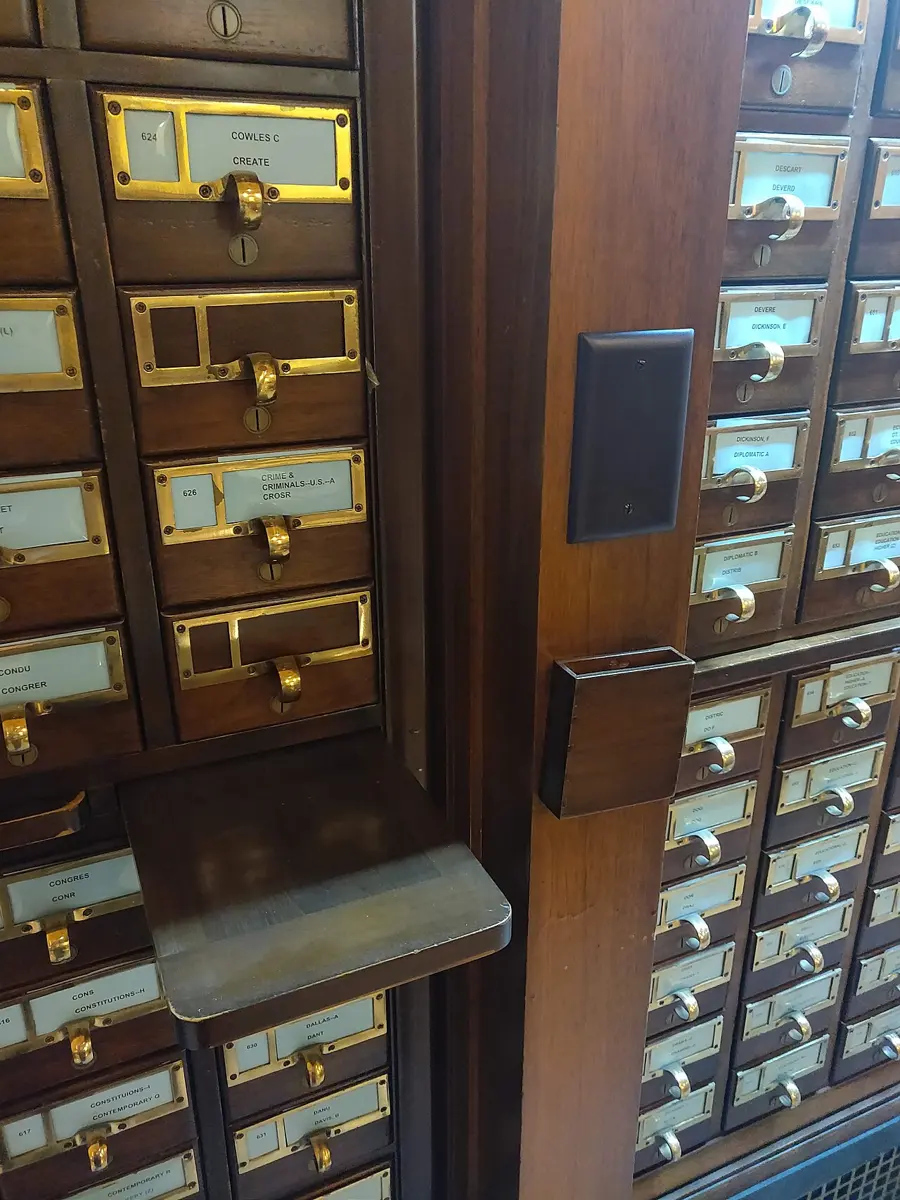
A database index is the same idea. It is a second, hidden structure that keeps one field’s values in order, each with where its row is:
| name (in order) | where its rows are (their symbol numbers) |
|---|---|
| Aarati Adhikari | 2000001, 2000161, 2001721, … |
| Aarati Bajracharya | 2000321, 2001881, 2002041, … |
| … | … |
| Dawa Sherpa | 2000954, 2002514, 2002674, … |
Because the index is in order, the database can find a name the way you find a word in a dictionary, halving the search each time, as in Grade 9’s binary search: 200,000 names need only about 18 halvings (2¹⁸ is 262,144). Real databases keep an index as a B-tree, a tree (Unit 2’s trees) whose every node holds hundreds of values in order, so a table of millions of rows is only three or four levels deep: a search reads a handful of nodes and goes straight to the row. The catalog’s drawers work the same way: the labels on the drawers are the top level, and the cards inside are the next.
See it for yourself in the next playground. It holds a different database: 200,000 results of a made-up national exam, built in your browser (that takes a moment). Its query finds every student called Dawa Sherpa, and the playground shows the time taken.
- Run the query and note the time.
- Put
EXPLAIN QUERY PLANin front of the query and run it: the database says how it would search. SCAN means it would read every row. - Make an index on the name: replace the query with
CREATE INDEX idx_name ON exam_results (name);and run it. - Run the first query again, and its EXPLAIN QUERY PLAN. What changed?
- Find one student by symbol number:
SELECT * FROM exam_results WHERE symbol_no = 2123456;. Is it fast without an index of yours? Why?
A few milliseconds for 200,000 rows sounds fast already. But a scan’s time grows with the table, and an index search hardly grows at all. A real exam board’s database holds every student of many years; a bank’s holds every payment ever made. At a thousand times the rows, a scan takes a thousand times as long, seconds for every single search, while the index needs only one or two more levels of its tree. And a busy website answers thousands of searches a second.
Indexes aren’t free, though. Each one takes space, and every INSERT, UPDATE and DELETE must change the index too, so a table with many indexes is slower to change. Database designers make indexes on the fields that are searched most (a phone number in a wallet app, a symbol number for results), and not on every field.
Why does an index make finding a name faster?
Pick an answer to see why.
A shop’s database has an index on every one of its 30 fields. What is the cost?
Pick an answer to see why.
A database from Python
Programs talk to databases in SQL too. A school’s website, a wallet app or a results page is a program that sends SQL to a database and shows you the rows that come back. Python comes with SQLite, in the sqlite3 module (a library, as in Unit 1), so a Python program can make and use a database with no installing at all:
import sqlite3 db = sqlite3.connect(":memory:") # a database kept in memory, just for this programdb.execute("CREATE TABLE marks (student TEXT, subject TEXT, mark INTEGER)") rows = [("Anisha", "SCI", 98), ("Binod", "SCI", 64), ("Deepa", "SCI", 71)]db.executemany("INSERT INTO marks VALUES (?, ?, ?)", rows) wanted = 70for name, mark in db.execute("SELECT student, mark FROM marks WHERE mark >= ? ORDER BY mark DESC", (wanted,)): print(name, mark) average = db.execute("SELECT AVG(mark) FROM marks").fetchone()[0]print("Average:", round(average, 1))Output
Anisha 98Deepa 71Average: 77.7Each ? is a placeholder: the values travel to the database separately from the SQL, in the tuple after it, so they can only ever be data. This is the safe way you met in Grade 9’s SQL injection: never build SQL by joining in what a user typed. fetchone() gives the first row of the answer as a tuple, and [0] its first value.
A real program would connect("school.db") instead of ":memory:": then the database is a file that stays on the disk after the program ends, and the next run finds its tables still there.
Why does the program write WHERE mark >= ? and pass (wanted,) separately, instead of joining the number into the SQL text?
Pick an answer to see why.
Project: a database for the school library
In short
Exercise
In a table of books, what is one record?
Pick an answer to see why.
Which field is the best primary key for a table of a bank’s customers?
Pick an answer to see why.
A foreign key is…
Pick an answer to see why.
Which query gives the average mark in each subject?
Pick an answer to see why.
A form lets the clerk type a mark of 67 when the answer sheet says 76. Which would catch it?
Pick an answer to see why.
Which is the safest thing to do before running DELETE FROM loans WHERE returned < '2020-01-01';?
Pick an answer to see why.
Explain these words, with an example of each from a school: database, DBMS, record, field, primary key, foreign key.
Answer
A health post keeps this table of patient visits. Find three problems with its design, and design better tables.
| visit | patient | age | address | phone | doctor | doctor’s phone |
|---|---|---|---|---|---|---|
| 1 | Hari Thapa | 45 | Ward 3, Banepa | 98xxxxxxxx | Dr. Rai | 98yyyyyyyy |
| 2 | Hari Thapa | 45 | Wd 3 Banepa | 98xxxxxxxx | Dr. Rai | 98yyyyyyyy |
| 3 | Mina KC | 30 | Ward 1, Dhulikhel | 98zzzzzzzz | Dr. Rai | 98yyyyyyyy |
Answer
Using the school database (Figure 3.1), write SQL queries for:
- i.the names of all students in 9B, in alphabetical order;
- ii.the number of students from each town;
- iii.the highest mark in Nepali;
- iv.the names and Science marks of students who scored under 40 in Science;
- v.each class’s average mark over all subjects.
Answer
What is the difference between WHERE and HAVING? Give a query that uses both.
Answer
Write a data dictionary for a table of mobile recharges sold by a shop: recharge ID, mobile number, amount in rupees, date and time, and network (one of the operators in Nepal). Include the allowed values and keys, and one rule that a database constraint can’t check.
Answer
Evaluate four places a school could check that every mark is a whole number from 0 to 100: the form the teachers type into, the program that saves the marks, a CHECK constraint in the database, and a query run after the marks are in. Which would you use, and why?
Answer
A results website searches 500,000 students by symbol number. Explain why it answers quickly, and what would happen if it searched by name with no index on the name.
Answer
Explain why the school database groups by students.student_id, not by students.name, when it adds up each student’s marks.
Answer
Quiz yourself: Data and analysis, Grades 6–12 →
Practice every question in the book, and keep track of the ones you miss →